The Home Server Show 105

Dave and the guys over at the Home Server Show have released show number 105.

home_server_show_small

Here is what Dave says about this weeks show:

Backing up your Backups with Alex Kuretz, interpreting the data from Black Box with Sam Wood, it’s the HomeServerShow, Developer Deep Dive Edition.  Episode 105 is a long one and we get in depth with with two developers that have been around since the beginning of Windows Home Server.  We talk about their latest releases and the “Free vs. Fee” model of Add-Ins for WHS.  Outtakes are also back courtesy of our guests and Skype!  Don’t miss this one.

BDBB & Remote Notification

Disk Management

Black Box

Temp Directories Issue

Get in depth with the topics of this weeks podcast in our forums.

Special thanks to Alex and Sam for participating in this marathon of a podcast.

As usual you can listen to the show from here.

The Acer Aspire RevoView More Pictures

3

Yesterday we posted our unboxing of the Acer Aspire RevoView Media Player. Well, Diehard asked for some size comparison pictures and here they are.


Here it is sitting next to my iPhone 4.


IMG_2859


IMG_2860


Expect our exclusive hands on review shortly.

Apple Release iOS 4.1 Software Update

3

Apple have today released the iOS 4.1 software update for the iPhone.

Capture (5)

Here is what the 382.1 MB software update contains:

iOS 4.1 Software Update

This update contains improvements, including the following:

• Game Center

– Send and receive friend requests

– Invite friends to multi-player games over the Internet

– Play multi-player games by auto-matching with other

players

– View Leaderboards and Achievements

– Discover new games from friends

• High dynamic range (HDR) photos on iPhone 4

• Support for TV programme rentals on iTunes

• Ability to upload HD videos to YouTube and MobileMe

over Wi-Fi on iPhone 4

• Additional support for AVRCP-supported accessories,

including next & previous track control

• FaceTime calling directly from Favourites

• Bug fixes, including:

– iPhone 4 proximity sensor performance

– iPhone 3G performance

– Nike+iPod fixes

– Bluetooth improvements

Products compatible with this software update:

• iPhone 4

• iPhone 3GS

• iPhone 3G

• iPod touch 2nd generation, or later

Game Center requires iPhone 4, iPhone 3GS, iPod touch 2nd generation or later.

Sony Introduce an All In One Web Sharing Device Called the Bloggie Touch

0

Again, at IFA 2010 last week, Sony announced a new all in one web sharing device called the Bloggie Touch. This isn’t the first Sony Bloggie device but it looks like the first one worth having.

MHS-TS20_29MHS-TS20_2MHS-TS20_19

MHS-TS20_33Bloggie_touch_5

One beautiful 3.0″ (diag.) touch screen, one giant record button. The all-new Bloggie™ Touch camera features a capacitive-touch screen for touching and sliding effortlessly through all of your photos and HD videos.

Previously Sony have had a few different devices available under the Bloggie banner, and each one of those devices, whilst not being that bad, just didn’t seem to have enough to make me want to go and buy one.

However, the new Bloggie Touch makes me rethink that. Certainly having a device like that in my pocket going around the IFA 2010 show would have made things easier and meant I could have carried less kit!

The Bloggie Touch will be available soon for under $200.

Here is the full press release:

Have fun shooting Full HD video and 360 Videos with new-generation Bloggie™ Touch by Sony ‘All-in-one’ web sharing solution with camera, software and Personal Space online service

01 September 2010

• Beautifully styled snap camera shoots Full HD 1920×1080 video and 360 Videos plus 12.8 megapixel stills
• Large, easy to use 7.6cm (3”) touch-screen and new interface
• Built-in USB and Bloggie™ software for easy uploads
• Quick, secure, private sharing of videos and photos with new Personal Space by Sony*

* Personal Space service has already launched in the UK, with France and Germany scheduled to follow in October 2010.

It’s brilliantly easy to grab great-looking Full HD video clips and still photos with new Bloggie™ Touch by Sony. A radical evolution from first-generation Bloggie™ models, the all-new HD snap camera boasts gorgeous new looks with its slim, rounded body and finely brushed aluminium finish. It’s also the perfect ‘all-in-one’ solution for shooting and sharing life’s special moments, wherever you are.

Available in a choice of vibrant pink, silver and black finishes, the Bloggie Touch is a stylish partner

for day-trips, weekend breaks or fun-filled nights out.
The camera’s cool, clean lines are dominated by a big, bright 7.6cm (3”) LCD touchscreen that gives a brilliant view of your photos and video clips. A sleek new user interface simplifies intuitive ‘touch and flick’ enjoyment of your clips and pictures.

Operation is equally straightforward. Just point and shoot to catch the moment: you can even grab still images while video recording continues uninterrupted.

The sensitive Exmor™ CMOS Sensor captures sparkling Full HD videos and crisply-detailed still photos. Picture quality is enhanced further by the bright, high quality lens with F2.8 maximum aperture for clear, low noise images – even when you’re shooting indoors or on overcast days.
Bloggie™ Touch features a versatile autofocus lens with wide angle function. There’s also a new auto macro mode to focus sharply on objects as close as 10cm away. It’s ideal for snapping the menu of that unforgettable restaurant meal or a beautiful flower discovered on holiday.

Bloggie™ Touch also records amazing 360-degree panoramic videos and photos to capture everything that’s happening around you – just clip on the supplied lens adaptor. 360 Videos are now twice the resolution of previous-generation Bloggie™, and low-light video quality is also improved thanks to the Exmor™ CMOS sensor. In addition to fun 360 Video, Bloggie Touch features “free-style shooting” which allows you to capture movie both in landscape and portrait.

Despite its slim, compact size, Bloggie Touch allows nearly 4 hours HD movie shooting time (1280 x 720/30p mode) on its 8GB internal memory. (Continuous maximum shooting time: approx. 29 mins).
After shooting, it’s never been easier to share your favourite photos and clips on the web. Bloggie™ Touch connects instantly to any PC via its flip-out USB arm that also charges the camera’s battery. There are no fiddly cables or software CDs to worry about: hook up Bloggie™ Touch and built-in sharing software launches automatically.

Just drag and drop to upload your favourite moments without fuss to social networks and popular sites like YouTube, Facebook and Flickr. While you’re on the move, it’s easy to tag content with a new ‘Share-it-Later’ function for simple uploads when you’re next online.

Built-in Bloggie software also allows easy uploads to Personal Space, the brand-new online service by Sony for sharing content safely and securely. Once you’ve uploaded your pictures and clips from Bloggie™, just email invited members of your own Sharing Group with a link to your Personal Space.

It’s easier and quicker than sending big file attachments via email. Viewing options are widened further by an HDMI port that connects Bloggie™ Touch to any HD television.

The new Bloggie™ Touch MHS-TS20K mobile HD snap camera by Sony is available from the beginning of November 2010.

Key specifications:

Model name MHS-TS20K

Image sensor  7.22mm (1/2.5 type) Exmor CMOS

Gross pixels  13.0M (approx.)

Still image recording  12.8M (approx.)

Lens  Sony lens

Digital zoom  4x

Auto Macro  Yes?10cm?

Image Stabilisation  SteadyShot

Recording media  8GB Internal Memory*

Video format  MPEG4 AVC/H.264 (MP4)

Video resolution :

1920 x 1080 / 30p (16:9)
1280 x 720 / 60p (16:9)
1280 x 720 / 30p (16:9)

LCD Panel  7.6cm (3.0type)/288k dots

Face Detection  Yes?AF/AE?

Interfaces :

HDMI
USB (built-in plug)

USB charge  Yes

Built-in Software :

Bloggie Software

Weight  125g (including Battery)

Dimensions  15.2 x 107.0 x 52.0 mm (approx.)

*Actual memory capacity is approx. 7.7GB.

You can also learn from the Sony Bloggie website.

Unboxing the Acer Aspire RevoView Media Player

5

The Acer Aspire RevoView Media Player made an appearance at last weeks IFA 2010 show, and here we have our unboxing of it.

Only yesterday we talked about seeing the RevoView at IFA 2010.

Well today, one arrived at UWHS towers and so it’s time to take it out of the box and have a quick look.

IMG_2845IMG_2846

IMG_2847IMG_2848

IMG_2849IMG_2850

IMG_2851IMG_2852

IMG_2853IMG_2854

IMG_2855IMG_2856

IMG_2857IMG_2858

So there you have it – the great unboxing!

Stay tuned for our full hands on exclusive review of the Acer Aspire RevoView soon.

Sony Announce Qriocity at IFA 2010

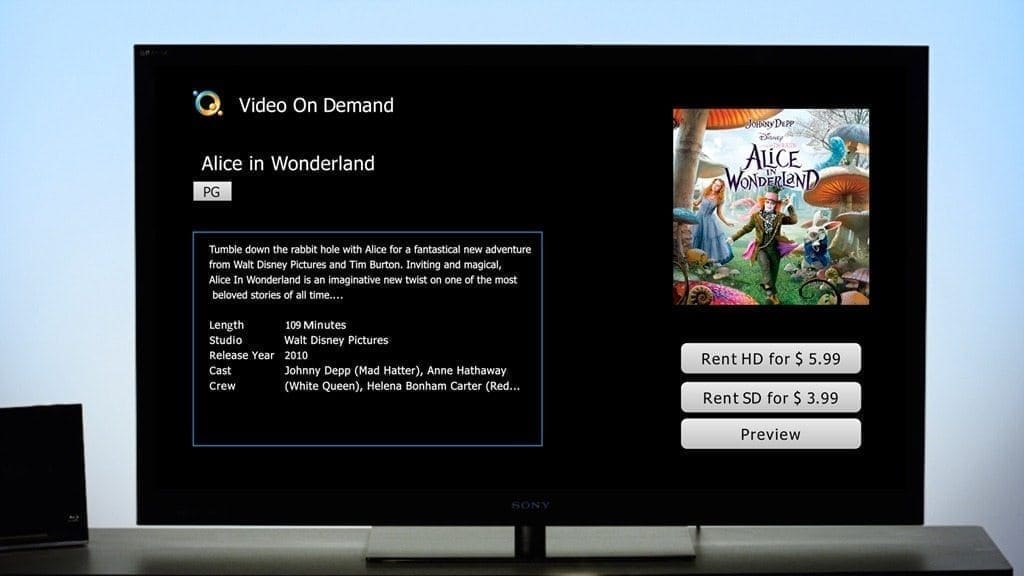
One of the many announcement at IFA 2010 last week came from Sony who announced their Qriocity service.

????

Module1_RENTinterface

Module1_VOD_Interface_TV_PENDING APPROVAL

Here is the press release:

Sony announces “Video On Demand powered by Qriocity™” extending into Europe

01 September 2010

Also announces plans for “Music Unlimited powered by Qriocity™” cloud-based music service

In November 2009, Sony Corporation (Sony) said that it was developing a network service platform called Sony Online Services (SOLS), which is now called Qriocity™.  Qriocity is a network service platform that connects many of Sony’s network-enabled devices and allows consumers to enjoy high quality entertainment across multiple devices.  Via Qriocity, Sony will deliver a variety of digital entertainment content and services that are “powered by Qriocity”, including video, music, game applications, and e-books over time, and through these services, and in combination with its networked devices, Sony aims to bring new and exciting entertainment experiences to customers.

Today at the IFA 2010 show in Berlin, Sony announced that “Video On Demand powered by Qriocity™”, a premium streaming video service, will be available this fall in five European countries including France, Germany, Italy, Spain and the U.K.  With “Video On Demand powered by Qriocity,” customers can choose from hundreds of box office hits from 20th Century Fox Home Entertainment, Lionsgate, Metro-Goldwyn-Mayer Studios Inc. (MGM), NBC Universal International Television Distribution, Paramount Pictures, Sony Pictures Home Entertainment, The Walt Disney Company, and Warner Bros. Digital Distribution, as well as popular content from top local studios. Many movies are available in High Definition (HD) as well as Standard Definition (SD), and all can be rented at the touch of a button on Sony’s 2010 models of network-enabled BRAVIA® TVs and Blu-ray Disc™ players, and Blu-ray Home Theater systems.  “Video On Demand powered by Qriocity” has been available in the U.S. since April 2010.

Sony also announced plans to introduce “Music Unlimited powered by Qriocity™”, a new, cloud-based, digital music service.  Available by year’s end, “Music Unlimited powered by Qriocity” will give music lovers access to millions of songs stored and synchronized through the cloud.  “Music Unlimited powered by Qriocity” will initially be available across Sony’s 2010 models of network-enabled BRAVIA TVs, Blu-ray Disc players, Blu-ray Home Theater systems , as well as PlayStation®3 computer entertainment systems and VAIOs and other personal computers, and will become increasingly available on a range of Sony’s portable devices.

“Music Unlimited powered by Qriocity” brings together the features cited as most important by music enthusiasts. With access to a huge library of songs through the cloud, users can discover new music through channels personalized to their tastes on multiple devices and without the requirement to manage digital music files. The convenience resulting from this new consumer music experience will further enhance the value of music, thus creating new opportunities for the industry.  Details of the service plan will be announced in the future.

“We are excited to offer our customers high quality, cloud-based entertainment experiences across many of Sony’s network-enabled devices,” said Kazuo Hirai, President of Networked Products & Services Group, Sony Corporation. “Services ‘powered by Qriocity’ will revolutionize the way that users play, listen, watch, share, communicate, learn, discover and create their digital entertainment content.”

Video on demand services are becoming very popular, and with the impending launch of the new Apple TV, and the Boxee Box, amongst many other devices, these services and additional benefits will be even more popular as time goes on.

The biggest hurdle I can see with these types of services is speed and bandwidth. For example, here in the UK, after 4pm my Internet connection slows down to an almost unusable state and I certainly couldn’t use it for streaming a movie on.

Time will tell……

Acer Aspire RevoView 100 Media Player at IFA 2010

1

Last week at IFA 2010 I had the chance to see the new Acer Aspire RevoView 100 media player.

IMG_0828

It is a very small device and it will be selling for just under 150 Euros, with makes it quite a good price, although more expensive than the new Apple TV, but it certainly doesn’t look as restrictive as the Apple TV.

Expect the full UWHS hands on review very soon.

And here is the full press release to keep you going:

Acer Aspire RevoView: the best TV companion

2010-09-03 – Berlin

More and more users want to be able to share their ever growing digital libraries with family and friends on their big screen TVs. Sadly, photos, movies videos or music lay scattered on different devices – computers, USB drives, portable music players, smartphones, digital cameras or camcorders – and sending them from one device to enjoy on another one is not always simple.

The new Aspire RevoView is an HD DLNA certified media player that can playback media content from all DLNA certified devices that helps you share and enjoy your digital media. Featuring network capability and Full HD 1080p playback, it makes watching digital content on a high-definition TV easy and intuitive. There is no need of complex devices settings, burning DVDs or connecting a computer to the TV: Aspire RevoView connects directly to your TV via an HDMI port, plus it seamlessly integrates with your surround speaker system for an immersive entertainment experience.

Four easy steps are all you need to enjoy digital content on your TV with the Acer Aspire RevoView:
1. Save your created or downloaded content to an USB storage device or memory card
2. Plug USB device into the Aspire RevoView or insert memory card in the slot
3. Connect the Aspire RevoView to your TV
4. You are ready to enjoy your HD content on TV!

It can get even easier than that. The Aspire RevoView can be equipped with an internal  swappable 3.5” HDD for seamless media exchange. The HDD tray can be shared with the 2010 Aspire M Series desktop PCs, allowing you to easily share and enjoy your downloaded or created content. The RevoView really bridges the gap between the computer and entertainment world.

An Ethernet port provides direct access to the Internet allowing you to watch online videos via YouTube or enjoy your or your friends Flickr or Picasa photo slide-shows in the comfort of your living room.

There’s no end to the fun thanks to the extensive digital media support: the Aspire RevoView makes it easy for everyone to store, play and share their media with no concern for compatibility.

A user friendly interface brings together all available media, permitting to effortlessly navigate through music, video and photo collections. Content can be displayed by folder, list or thumbnails and it can be sorted either alphabetically or by date. Plus, you can playback content from USB connected mass storage and memory cards as well as optical disks.

For seamless operation, the Aspire RevoView comes with an handy 26 keys remote control permitting to easily work media playback functions from afar and to swiftly navigate through the user friendly media center. What’s more, main functions, such as videos, photos and music are quickly accessible through dedicated hotkeys.

Aspire RevoView can also be used as an USB external hard drive where you can store your growing digital libraries and can be used as a back-up drive.
A fully featured media player, Aspire RevoView combines high storage capacity, a compact design and seamless playback functionalities.

HomeServerSync New Pricing Announced

Tranquil PC have announced a new pricing structure for HomeServerSync, including both shorter and longer contracts.

LOGO500

New Pricing Structure for HomeServerSync – now available.

· No long term commitments

· Ideal for occasional use

· Ideal for one off use (i.e. holiday / business travel)

· Lower prices for long term subscribers

If you are in the EU, the new prices are as follows (note that the 36 months should be £6.92 per month):

HSS new prices

And if you are outside of Europe, where VAT doesn’t apply to you, then you can get it slightly cheaper. But don’t think you can take this option if you are in the EU as Tranquil will just charge you the VAT later!

HSS new prices 2

If you are not sure what HomeServerSync is, you should check out our review – part one and part two.

And don’t forget our great Using Windows Home Server / HomeServerSync giveaway that is running at the moment, where you could win a 2 year subscription.

BBC Launches Updated iPlayer

0

The BBC have finally launched the updated iPlayer that has been in beta test for several month now.

BBCiPlayer

The BBC iPlayer is great to catch up on shows that you might have misses and other interesting content. There is now integration with Facebook and Twitter as well.

There are even a series of videos to help you to learn more about the iPlayer and it’s new functionality.

Here is the “Discover the new BBC iPlayer” video for your viewing pleasure:

BBC iPlayer

You can check out the BBC iPlayer website for more information and to start using and viewing.

TunerFree MCE Version 4.04 Available Now for Windows Media Center

It was only a few weeks ago that version 4.02 was released, now 4.04 is out and ready to be installed.

TunerFree

Here is how Millisoft describe TunerFree MCE:

TunerFreeMCE is a Windows Media Center add-in for watching streaming internet TV programs on your PC and Media Center Extender. For UK users, it has support for live TV and catch up programs from the UK’s main TV providers (BBC, ITV, Channel 4 and Five), as well as all of the BBC Radio stations. It also has support for the recently launched MSN Video Player in the UK. For US users, it has support for the full Hulu catalogue of TV programs, all through an easy to use Media Center interface.

Here is the latest change log since 4.02:

Change Log

4.0.4 Fixed a bug in 4.0.3 with the background app crashing.

4.0.3 Updated search to look at program descriptions and episode names.
Fixed bug with plugin click positions.
Corrected BBC playing for low resolution displays.

So what are you waiting for – go update now!

Verbatim MediaShare Server

0

Last week at IFA 2010, I had a look at the MediaShare Server from Verbatim.

IMG_0824IMG_0825

MediaShare447490-150 MediaShare 1TB

Here is how Verbatim describe the MediaShare:

Simply share, store and stream with the Verbatim MediaShare server. The MediaShare offers up to 2 TB of storage and allows you to share photos, save and protect files, stream media and even access your content — from anywhere!

Use your MediaShare to create photo albums and send them to friends and family or upload your photos directly to Facebook. Back-up home laptops and automatically save important files directly to your MediaShare so they are in one centralized location. Stream music and photos through Sony Playstation 3, Microsoft Xbox 360 or other DLNA compliant devices.
Managing your files via remote access couldn’t be easier. Simply connect to myverbatim.com from any internet connection.

Share Photos & more

Verbatim’s MediaShare Server makes sharing photos and videos of summer vacations and family events easy. Organise and group photos into digital albums. From there, create and automatically email an album link that allows friends and family to view or download photos and videos directly from MediaShare. Albums can be uploaded directly from MediaShare™ to Facebook® or Flickr®**

Save & Protect Files

Verbatim’s MediaShare offers easy data transfer from USB storage devices such as a USB flash or an external hard drive. There’s no need to power up a computer, just connect a storage device to the MediaShare and push the Easy-Transfer button. This simple step instantly transfers data to a designated storage folder on the MediaShare. Organise and manage files using the intuitive interface.
MediaShare also offers the following protective features:
• It is Windows Backup compatible for PC’s and Time Machine compatible for Mac users
• It allows end-users to schedule routine back-ups to a USB drive

Access Anywhere

Verbatim’s MediaShare gives consumers access to their pictures, music, videos or any files, anytime they’re needed, whether at home or visiting friends and family. Consumers simply go to myverbatim.com from any internet connection and access their MediaShare.
From there, they can:
• Remotely upload, download and manage files
• View photos, play music and watch videos via the internet—anywhere
• View and play files on their mobile phone**

Stream Multimedia

The MediaShare offers media, iTunes and print server functions all in one centralized place. Photos, music and videos can be stored in one easy location and then listened to or viewed from other devices.
MediaShare can:
• Stream music to any PC or Mac running Apple iTunes
• Stream music and photos through Sony Playstation® 3, Microsoft Xbox 360, Digital Media Adapters or other DLNA compliant devices
• Function as a print server so anyone on a home network can access a USB printer connected to the server
• Offer users remote access for media on-the-go

Product Number: 47490
Capacity: 1TB
Dimensions: 178 x 178 x 50mm (LxWxH)
Product Weight: 1727 grams

It is certainly a small device, and looks quite cool. In fact, it looks very Apple like!

Apart from all of the above, which is now becoming the norm on these sorts of devices, Verbatim also offer a MediaShare Premium Access.

Here is what they say about it:

More features are available with an annual premium package subscription. Consumers can access additional device support and direct sharing capabilities such as mobile phone use, an iPhone app, RSS feeds, Cooliris for 3D wall photo views and direct upload of photos to Flickr. Purchase of a MediaShare Server includes a free 30-day trial of our premium package subscription.

Hmmmm, premium access to do the same as a lot of other devices do out of the box for no extra charge? I’m not sure this is a great selling point!

There is a version that also supports 2TB as well.

You can learn more about it from the Verbatim website.

BYOB Podcast Episode 11 Out Now

The guys over at BYOB, including our very own Tim Daleo, have released the BYOB podcast episode 11.


BYOB300


Here are the details on this weeks show:


This week we will be discussing some builds from Michael and Tim.  In addition, we have some hardware news on some new video cards and a 10 inch slate from Viewsonic.  We also cover some hardware picks and talk about the OCZ PCI Express SSD drive as well as a new 10 gig PCI Express adapter.  We hope you enjoy this episode and remember to post your comments and questions in the forums.

News

New Radeon HD 5770s have single-slot coolers, gobs of Display Port
http://techreport.com/discussions.x/19494


GeForce GT 430 coming in ‘a few weeks’?
http://techreport.com/discussions.x/19502


10-inch ViewSonic slate to dual-boot Android, Windows
http://techreport.com/discussions.x/19503

Feature

Mike discusses his BIOS Reset project and talks about his recent build
http://homeservershow.com/project-bios-reset.html

Tim talks about his HTPC mini build
https://moviesgamesandtech.com/2010/08/16/building-an-under-cabinet-htpc-on-a-friday-night/

Hardware Pick

OCZ PCIe SSD Drive 120 GB

http://www.newegg.com/Product/Product.aspx?Item=N82E16820227578&cm_re=ocz_revodrive-_-20-227-578-_-Product

10 Gig PCI Express Adapter:
http://www.wegotserved.com/2010/08/16/thecus-introduces-10gb-ethernet-pcie-adapter

As usual you can listen to the show here.

Using Windows Home Server and HomeServerSync Giveaway Number Two

We have teamed up with our friends at Tranquil PC to give away some two year subscriptions to their HomeServerSync add-in for Windows Home Server. This is the second of a number of giveaways.

LOGO500

The first giveaway was a huge success and so it is time for number two.

Over the course of the next few weeks, we will be giving away a total of 10 two year subscriptions to HomeServerSync, each worth a whopping £278 each, which means we are giving away £2780 just for you, our UWHS readers.

If you are not sure what HomeServerSync is, you should check out our review – part one and part two.

HomeServerSync has ten top features, and here are the next two:

3.  Offsite Bulk Download

So you have 10s, 100s or even 1000’s GB of data safely backed up, and some disaster strikes your Home Server (perhaps theft).  You can use the web service, or a new Home Server to get your files – but if you want all of the files and can’t wait for them all to come down the internet pipe, then you can request a Bulk Download.  Selected folders or your whole backup (still encrypted) is put onto a USB HDD and is sent back to you.

4.  Synchronise your Home Server and PCs

This innovative service provides a much needed facility to make your PCs truly mobile.  Simply install the HomeServerSync desktop application onto your PC and after a few security steps, including entry of your Pre-Shared Key (PSK), you are ready to go.

The system works very simply – just select which folders on your PC should sync to which folders on your Home Server.  Whether you are locally or remotely connected makes no difference, except for transfer speeds.

Home Server folder security is managed by the Home Server console as it is already.
So you can control which users can read or write to specific folders, or none at all.

The HomeServerSync manager provides numerous controls to protect your files
– Sync direction (to Server only, from Server only or both directions)
– Versioning control
– File Deletion control
– Real time or scheduled sync

Of course more than one user can update a Server Shared Folder. If used properly the HomeServerSync system means that multiple users can sync desktop PC folders with each other – with the data being stored on the Home Server too.  This is ideal for remote family members or mobile workers.

Ok, you are probably asking yourselves, what do I have to do to win one of these fantastic prizes?

For giveaway number two, we are giving away another TWO licences (one per person), and all you have to do is send us an email giving us a suggestion for the site, whether it is an article, a change to the look of the site, the logo, anything – the choice again is yours.

So send your email to giveaways @ usingwhs.com (remembering to remove the spaces).

Giveaway number two will end on Sunday 12th September 2010 when we will reveal the next two winners, who will be drawn at random by my cats (those of you who know me will get that little in-joke!) and posted on the site sometime on Sunday. The competition is open to anyone, anywhere, and you can enter as many times as you like, as long as your entry is different each time!

Good luck and keep watching UWHS for more giveaways and surprises.

And a very big thank you to Tranquil PC for the licences!

And for those who entered giveaway number one but didn’t win, I will be randomly entering you in the next few giveaways so you may just win!

Toshiba Announce CEVO-Engine for Superior TV Experiences at IFA 2010

0

This week at IFA 2010 Toshiba announced their new CEVO-Engine for superior TV experiences and the first TV – the 55ZL1.

55ZL1_ side55ZL1_bezel55ZL1_front55ZL1_lft55ZL1_Lifestyle55ZL1_right55ZL1_stand

Facts & Figures

· First Model with new CEVO-Engine
· Full HD 16:9 LCD panel with Direct LED backlight, 1920 x 1080 pixels
· MEGA LED panel with 512 cluster local dimming
· Active Vision M400 HD (400Hz)
· 3D FULL HD
· embedded high performance 2D to 3D conversion, Intelligent 3D, 3D Resolution+
· HbbTV support
· Toshiba Places portal integrated
· Screen size: 55ZL1: 140cm (55”)
· Designed in collaboration with JACOB JENSEN DESIGN

As you can see, it is designed to work out of the box with their recently announced Toshiba Places and Toshiba Marketplace.

Here is the full press release:

TV evolution by chip technology: Toshiba unveils its new CEVO-Engine for a superior TV experience

55 ZL1 TV will be powered by Toshiba’s CEVO-Engine to drive various unrivalled technologies and applications in 2D and 3D

Berlin, Germany, 2nd September 2010 – Toshiba today introduced its new CEVO-Engine1 to the European home entertainment market.
An intelligent combination of its skills in semiconductor and software development allowed Toshiba to develop this new multi-processor
platform TV engine to power its premium TVs. The CEVO-Engine enables the devices to offer an outstanding picture quality, powerful
3D solutions and a rich web experience. Toshiba’s new flagship TV, the 55ZL1, is the first device that benefits from the enormous
calculation power of the CEVO-Engine and enables it to offer many unrivalled applications. In addition to its CEVO Engine, the 55ZL1
carries much more innovations: Its bright MEGA LED Panel with an as yet unseen 512-cluster local dimming solution, working alongside the
CEVO engine guarantees outstanding picture quality. As a premium TV needs a premium design, Toshiba collaborated with JACOB
JENSEN DESIGN to create an eye-catching masterpiece in technology, usability and design heralding a new era in home entertainment.
Bundled expertise in semi conductor and software technology “True innovations in the TV industry today are primarily based on a
close functional interaction of high calculation power and intelligent, user-centric applications,” says Toshihiro Ikeda, President, Toshiba
Television Central Europe Sp. zo. o. “That’s why Toshiba has bundled its outstanding knowledge in semiconductor design and software
development to develop a brand new multi-processor platform together with tailored applications to meet the demands of home
entertainment enthusiasts.”

1 CEVO-Engine is a Toshiba code name

The new CEVO-Engine is at the heart of Toshiba’s strategy to establish a strong presence in the European high-end home
entertainment market with user-centric applications. According to Toshiba’s market research, the European TV market requires for
more sophisticated TVs. 91% of users say highest possible picture quality is the top criteria in the purchase decision. 69% demand for
easy access to the Web and 61% for most powerful 3D solutions including high quality 2D to 3D conversion. Powered by the CEVO
Engine combined with additional innovations, the new 55ZL1 will be able to exactly meet these needs.

Superior 3D technologies powered by CEVO-Engine CEVO-Engine offers superior picture quality and also an impressive
brightness in 3D mode. As active shutter glasses, that are needed to watch 3D content, distinctly reduce the brightness of displayed
pictures Intelligent 3D automatically sets the adequate brightness as soon as it detects a 3D signal. Also other picture parameters such as
colour contrast are changed by shutter glasses. Intelligent 3D compensates for these deteriorations as well. Since digital TV
broadcasting may use a lower bandwidth and transmit pictures with lower resolution in side-by-side mode, than e.g. a Blu-ray 3D disc, the
perceived sharpness of 3D programmes may be reduced. 3D Resolution+, a technology that analyses each image and uses
complex algorithms to calculate the missing image content, compensates for these effects. The result is a significantly sharper,
more detailed near FULL-HD 3D TV experience. In addition, Toshiba’s high performance 2D to 3D conversion technology captures
and analyzes image composition and movement in 2D content and converts it to 3D with precise rendering and natural, high definition
images. To cope with the complex algorithm the CEVO-Engine features a powerful processing unit that exclusively caters for the
complex algorithms for the 2D to 3D conversion.

Hybrid services with HbbTV

The Toshiba new engine supports Hybrid broadcast broadband TV (HbbTV). It is a European standard that allows devices to display
broadcasts and related web based content on the TV screen at the same time. It also offers access to online services directly on the TV.

Ready to enjoy value-added services with Toshiba Places

User can access many more value-added services due to the integration of ‘Toshiba Places’ portal. Also, the cloud-based offering
will extend Toshiba’s Multi Screen Strategy from connecting devices locally to connecting devices via the web to enable users to easily and
intuitively share, store, access and buy multimedia content or apps.

Innovations for an outstanding picture quality

The motion picture enhancement function Active Vision M400HD also makes its debut in the 55ZL1. It is a hybrid frame interpolation
technique that adds 150 interpolated frames to the received pictures in the signal by using the calculation power of CEVO-Engine and
combines this with backlight scanning to achieve a 400 Hz frame sequence. The result is noticeably sharper moving pictures.
The 55ZL1 features an bright, luminous Mega LED panel. An innovative local dimming technology that individually triggers 512 LED
areas to adjust the backlight according to the displayed content – the maximum yet achieved in the industry – assures extremely high
contrast and precise black and grey scale.

Designed in collaboration with JACOB JENSEN DESIGN

To meet the challenge to pack high-end technology into a sensational design, Toshiba decided to cooperate with the awarded Danish
designers of JACOB JENSEN DESIGN. They joined forces to create a modern and timeless design with high-quality materials..

Price and availability

The 140cm/55” 55ZL1 will be available early 2011 throughout Europe targeting a recommended market retail price lower than 5.000 Euros.

Having seen this TV in action I can honestly say it looks and performs amazingly, but then at the price you would expect that!

For more information, visit the Toshiba website.