Motorola Announce Gingerbread Powered XT531 Smartphone

Today Motorola announced a new smartphone powered by Android 2.3 (Gingerbread) called the XT531.

DominoQ_Plus_Front_1, 3/1/11, 10:52 AM,  8C, 4500x2700 (964+2687), 100%, bent 6 adjuste,  1/20 s, R69.9, G54.0, B81.7

Key Features and Specifications:

  • Runs on Android 2.3 (Gingerbread)
  • Dual-band HSDPA/Quad-band EDGE
  • 3.5” HVGA display with capacitive multi-touch
  • 5MP camera with auto-focus and built in flash
  • Front-facing VGA camera for video call, chat and sharing
  • Moto Switch UI allows users to shift to different modes
  • 800MHz chipset
  • 512MB onboard memory
  • MicroSD card slot expandable up to 32GB
  • Access to Google Apps (Mapping, Voice Turn-by-Turn Directions, 360 Mapping, Google Talk™, Browsing)
  • FM Radio with RDS support
  • Wi-Fi b/g/n
  • E-compass, proximity sensor, ambient light sensor, accelerometer
  • GPS.aGPS
  • LED notifications
  • 3.5mm Audio Jack
  • 1540mAh battery, up to 8 hours of talk time and 28 days in standby in 3G mode

Domino_Plus_Back_2, 3/1/11, 2:19 PM,  8C, 4500x2700 (996+2679), 100%, bent 6 adjuste,  1/15 s, R78.9, G63.0, B90.7
Motorola_XT531_Titanium_Dyn_L

Here is what Motorola said:

With a bright 3.5-inch touch screen display and dual cameras, Motorola XT531 is simply better

Aug. 04, 2011

LIBERTYVILLE, Ill. – Aug. 4, 2011 – Now there is no need to sacrifice design or function with the Motorola XT531™, the new, slim and budget-friendly Android™ smartphone from Motorola Mobility. The Motorola XT531 gives users a more engaging experience with its 3.5-inch, extra-bright touch-screen display, dual cameras for vivid video capture, and all the social networking you want. The Motorola XT531 will be available starting this month in China. The device will be available in Hong Kong, Taiwan and select countries in Europe and Latin America starting this fall.

Running on the latest version of Android, or 2.3 Gingerbread, the latest version of Google’s operating system, Motorola XT531 is the perfect balance of sleek design, affordability and intuitive functionality. Capture and share your memories in crystal clear clarity with its 5-megapixel auto-focus camera with built in flash. With the *Qik Video Connect you can easily create videos and share with friends in real-time. You can also use the Qik app with the front-facing camera for video chatting. Typing text and email messages is faster and easier with the touch-screen keyboard. Plus, with access to leading social media applications users can stay in constant contact with friends and family.
The fashionable Motorola XT531 also offers unique personalization options through the Moto Switch user interface that enables users to switch between friend and work-centric modes depending on what they’re doing.
“Smartphones have become integral, personal parts of users’ lives – that’s why Motorola believes they should be fun, fashionable and feature-packed,” said Fei Liu, senior vice president, mass market consumer products, Motorola Mobility. “Motorola XT531 is an affordable device that gives young, fast-moving users everything they want from a top-quality smartphone.”
Motorola XT531 also has best-in-class battery life, allowing users to talk for eight hours or have 28 days of standby in 3G mode. The battery can handle regular multitasking between apps, games and Web browsing, as well as heavy messaging. Users also have access to more than 250,000 apps from the Android Market™ and in some countries will have access to SHOP4APPS.
The Motorola XT531 will be marketed as Motorola FIRE™ XT in Europe and as Motorola SPICE™ XT in Latin America. The Motorola XT531 will be available as single-SIM and dual-SIM models in select parts of Asia. The dual-SIM model will be available starting this fall.

Availability

Motorola XT531 is available starting in August in China. The device will be available in Hong Kong, Taiwan and select countries in Europe and Latin America starting this Fall.

For more information on Motorola XT531 please visit Motorola XT531 fact sheet.

PerfectDisk 12 SP2 Coming Next Week

Raxco have just announced via Twitter that SP2 (service pack 2) for their PerfectDisk 12 product will be released next week.

PerfectDisk-12-for-WHS-install-2_thu[1]

PerfectDisk 12 has only been out a month, so that’s pretty quick to get a service pack out.

More news next week when its released.

Here is what they tweeted:

PerfectDisk 12 Service Pack (SP) 2 planned for next week; in test now.

I spoke with Raxco and they told me that SP2 is pretty much just bug fixes. So watch this space to see just what it covers.

Read our review of PerfectDisk 12 Home Server edition for WHS 2011 Read our review of PerfectDisk 12 Home Server edition for WHS V1

UWHS Giveaway – Still Time to Win PerfectUpdater from Raxco

7

Over the weekend we reviewed PerfectUpdater from Raxco. On Monday we started another one of our UWHS giveaways, and there is still time to enter and win 1 of 5 copies of PerfectUpdater.

29-07-2011-17-24-482_thumb3

What is PerfectUpdater?

Enhance your PC’s performance with a simple scan, download and installation of the latest drivers for your system. PerfectUpdater detects and installs the appropriate drivers for unknown devices, minimizing hardware conflicts and improving system stability.

PerfectUpdater helps you avoid errors such as the BSOD (blue screen of death) by installing the latest device drivers. Are you a gamer? Optimize the functionality of your graphics card with PerfectUpdater for the best gaming experience.

● Scans system for out-of-date drivers
● Provides out-of-date driver summary
● Checks extensive database for driver updates
● Backs up existing drivers before updating
● Installs updated drivers in a click
● Automatically checks for updates on a regular basis

PerfectUpdater is fully compatible with both 32-bit and 64-bit versions of Windows XP, Vista and Windows 7.

Want to Win?

Ok, so what do you have to do to win one of these licences, worth $29.99 each?

Make sure that you follow us on Twitter (@aedney) and then tweet the following:

I want to win PerfectUpdater with @aedney and UWHS. Visit http://bit.ly/Ct7vB and RT for your chance to win.

Or just click the Tweet button below to do it automatically.

[twitter style=”horizontal” text=”I want to win PerfectUpdater with @aedney and UWHS. Visit http://bit.ly/Ct7vB and RT for your chance to win.” float=”left”]

The giveaway will run until Monday 8th August, and which point we will pick 5 winners at random who tweeted and post them on the site.

Good luck! And thank you to our friends at Raxco for the licences.

Would You Like Tranquil’s AVA Media Video Transcoder for Windows Home Server V1 for Free?

Tranquil are offering their AVA Media Video Transcoder for Windows Home Server V1 for free, if you want it.

1

What is it?

The AVA Media Add In for WHS (V1) is a useful tool for transcoding ripped video discs to a format suited for streaming to DLNA devices, such as a DLNA TV / PS3 etc – additionally Apple TV.

Most, if not all, WHS V1 machines however are powered by Intel Atom CPUs, and Atom CPUs are not really ideal for transcoding video (they will transcode a DVD folder at approx. 1/10th of real time, meaning a DVD could take a full day to transcode. But if you have a powerful CPU, ie a new Intel i3 / i5 then the transcoding speed can be 4-6x real time, meaning a DVD can be processed in 30-45 minutes!

2

The Add In (free) is very simple to use, and just requires the user to point to a source folder and one or two (new) targets. The first target is normally for DNLA devices (ie original screen format), and the second if selected could be used for Apple TV.

3

You can even delete the original film (folder) after conversion!

Note : One known issue, is that if the server is re-started half way through a transcode, then that film will not be completed, neither will the film be processed at a later time.

How To Get the Add-in

To get this great free Add-in, send an email to AVAVIDTRANS@ixlspc.com and within a few minutes you should get back an email with a download link.

Tranquil do not ask for any payment, but they welcome any donations to their chosen charity MacMillan – and they welcome you to send a small Paypal donation to pp@tranquilpc.co.uk, which I think is a perfectly reasonable request.

The Home Server Show Episode 146 Out Now

Dave at the guys at the Home Server Show have released episode 146.

home_server_show_small_thumb_thumb_t[1]

Here’s what Dave has to say about this weeks show:

Jim is going to be a very busy guy in the coming months. Listen in on for details about testing the drive extender replacements for Windows Home Server 2011, some new Drobo testing, and a RAID challenge from the BYOB podcast. We also unveil a new add-in from Alex Kuretz and talk more on Storage Server 2008 and the future of Windows Home Server.

As usual you can listen to the show from here.

The Digital Lifestyle Show #314 – Live from a street in Peterborough

This weeks Digital Lifestyle Show has just been released – its show 314.

DLS Show

Here’s what Ian says about this week show:

Another fun show for you this week. Andrew joins me to talk over the weeks news including, new Media Center addins, are Sky boxes good enough to replace Media Center, TouchPad news, Windows Phone, BBC iPlayer goes international, Apple TV update and iPhone rumour of the week. Garry joins us from the mean streets of Peterborough to talk about the latest DVBLink beta.

Download this weeks show from here

StableBit DrivePool for Windows Home Server Build 3189 Now Available

Today saw yet another beta version of the Windows Home Server Drive Extender replacement StableBit DrivePool released – this time its build 3189.

600px-Stablebit_drivepool_screen_thu[1]

  • Combine all your hard drives into one big storage pool (except the system drive with the OS).
  • Add and remove drives from the pool at any time without re-partitioning or manually moving folders.
  • Create duplicated folders on the storage drive pool that are protected against single drive failure. If a drive fails on which a duplicated file was stored, the contents of that file will remain readable even without the drive.
  • All your data is stored in standard NTFS files. You can always access your files even if the Windows Home Server completely crashes or this add-in can’t be used.

The changes in this version are:

1.0.0.3189 ———-

* Disk usage pie chart was reporting ‘other’ space usage incorrectly under some cases.

* Fixed a number of issues with missing disks having to do with service startup, folder size caculation, balance ratio calculation, file balancing, folder migration.

Download Stablebit Drivepool build 3189 here Learn more about StableBit DrivePool here

Have you tried it? What do you think?

Magic WOL Updated to Version 1.2.715.1

Magic WOL, the excellent add-in that provides wake on lan capabilities to your v1 homeserver, was updated last night.  Read on for details!

maplegrove


While this release is largely a bug fix release, I did notice a new feature that I missed in version 1.2.714.1: Wakeup Timers.  You can now configure computers to be awakened by the application using WOL on a schedule.  This ensures that the computer is available for backup, among other things, and is a useful new feature.  Andrew told you about that release (1.2.714.1) here, but got the version wrong in that post.  This is the release to 1.2.715.1.

Here is the complete changelog:

Upcoming Features:
*Add Computers from console
*Network Mapping
——————————–
v. 1.2.715.1: (current release)
——————————–
–Maintenance release
–Optimized service response time.
–Enhanced console information update poll.
——————————–
v. 1.2.714.2:
——————————–
–Bugfix: Memory leak resovled.
–Average memory usage 10MB.
——————————-
v. 1.2.714.1:
——————————–
–Feature: Enabled WakeUp Timers
–Auto schedule wakeups from console
–recurring or one-time wakeup
–Bugfix: Enhanced connectivity status
–indicator in console.
——————————–
v. 1.1.714.2:
——————————–
–Bugfix: Resolved DNS Distribution Issue
——————————–
v. 1.1.714.1:
——————————–
–New Versioning System enabled.
–Feature: Add changelog viewer.
——————————–
v. 1.0.0.99:
——————————–
–Maintenance release
–Bugfix: Resolved XML resource lock.
——————————–
v. 1.0.0.98:
——————————–
–Settings tab created.
–Feature: IP Resolver Enable/Disable Option added.
——————————–
v. 1.0.0.97:
——————————–
–Maintenance release.
——————————–
v. 1.0.0.96:
——————————–
–Initial release.

So if you are looking to add WOL  capabilities for the wired computers in your house, give this application a look.  It costs $7.00 USD and comes with a 30-day free trial.  I use this application regularly and really do like it.  I do need to tell you that I got a free license for participating in the beta program, but I’d spend the $7.00 if I had not received it for free.  Check it out!

Magic WOL

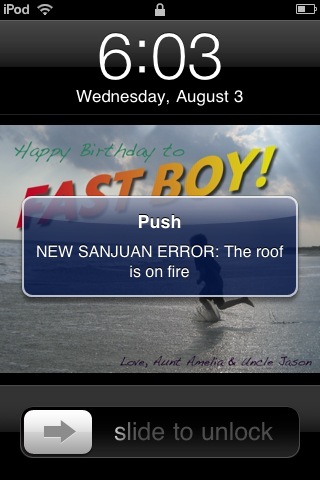
Remote Notification 1.5.2.2 Released for Windows Home Server

Fellow MVP Alex Kuretz has just released an update to his Windows Home Server add-in Remote Notification. And this update includes support for Apple, Android and Windows Phones!

Here is what Alex has posted:

The popular Remote Notification Add-In for Windows Home Server has been updated to version 1.5.2.2 and delivers several new features, including support for Push Notifications to Apple, Google Android, and Windows Phone mobile devices. The currently supported Apps are:

  • NMA – Notify My Android (Google Android phones and tablets)
  • Prowl (Apple iPod/iPhone/iPad)
  • Push – App Notifications (Apple iPod/iPhone/iPad)
  • Toasty (Windows Phone)

Another new feature is support for GrowlForWindows. This allows you to forward the server health alerts to GrowlForWindows which can then be used to forward alerts to services not yet supported by Remote Notification.

The Daily Reports feature has also been updated to include Google Image Charts for the server statistics in the HTML report format.

Visit RemoteNotification.com for more details and to download the new version, and let us know in the comments how you like the new features.

RIM Announce 5 New BlackBerry Smarphones with BlackBerry 7 OS

0

Today saw RIM announce 5 new BlackBerry Smartphones, all of which will be running the new BlackBerry 7 OS.

9900Bold_blk_Front

Here is what RIM said:

Research In Motion (RIM) (NASDAQ: RIMM; TSX: RIM) today announced plans to launch 5 new BlackBerry® smartphones based on the BlackBerry® 7 Operating System (OS).  RIM, in conjunction with carriers and distribution partners around the world, is rolling out two new BlackBerry® Bold™ models and three new BlackBerry® Torch™ models, all running the powerful new BlackBerry® 7 OS.

The launch of this family of handsets will be RIM’s largest global launch ever and more than 225 carriers and distribution partners have already commenced or completed over 500 certification programs for these 5 new handsets.

Featuring RIM’s next generation of hardware and software platforms, these five new BlackBerry 7 based smartphones offer users a variety of designs to choose from and deliver the ultimate in communications, multimedia and productivity.

The new BlackBerry® Bold™ 9900 and 9930 are RIM’s thinnest smartphones ever, each offering a large keyboard and brilliant touch display. The new BlackBerry® Torch™ 9810 smartphone builds on the popularity of the BlackBerry® Torch™ 9800 and combines a large touch display with a convenient slide-out keyboard. The BlackBerry® Torch™ 9850 and 9860 introduce an all-new, all-touch design featuring the largest display on a BlackBerry® smartphone to date.

“This is the largest global launch of BlackBerry smartphones in our history,” said Mike Lazaridis, President and Co-CEO of Research In Motion. “The BlackBerry solution offers a best-in-class mobile communications experience that customers love and we think they will be thrilled by the faster performance, enhanced browsing and richer multimedia delivered by these powerful new BlackBerry Bold and BlackBerry Torch smartphones.”

Next-Generation BlackBerry 7 OS
BlackBerry 7 introduces a next generation BlackBerry browser with a significantly faster, more fluid web browsing experience that is among the best in the industry. Combining the dramatically improved performance of the advanced WebKit browser engine together with the powerful hardware enhancements found in the BlackBerry 7 based smartphones delivers browsing  results that are up to 40% faster than BlackBerry® 6 based smartphones and up to 100% faster than BlackBerry® 5 based smartphones*.  Additional enhancements to this next generation BlackBerry browser have also optimized zooming and panning for smoother web navigation and optimized HTML5 performance for incredible gaming and video experiences.

RIM’s new BlackBerry 7 based smartphones also feature Liquid GraphicsTM technology, with each smartphone combining a dedicated high-performance graphics processor with a blazingly fast CPU and stunning high resolution display to deliver a highly responsive touch interface with incredibly fast and smooth graphics.

In addition, BlackBerry 7 based smartphones continue the tradition of delivering the world’s best mobile communications experience with a highly refined and integrated suite of phone, email, messaging and social apps to keep users connected and productive throughout the day. Recent enhancements include the newest release of BBM™ (BlackBerry® Messenger) which now extends the real time BBM experience to a range of other apps (see separate announcement on July 28, 2011). The updated Social Feeds (2.0) app has been extended to capture updates from media, podcasts, and favorites all in one consolidated view. The new Facebook® for BlackBerry smartphones (2.0) app introduces features like Facebook chat and BBM integration that makes it easier for users to connect with their Facebook friends in real time.

BlackBerry 7 OS also includes a number of other pre-loaded applications and integrated functionality for increased productivity and collaboration right out of the box. The Premium version of Documents To Go is now included free of charge, offering users powerful document editing features as well as a native PDF document viewer. BlackBerry® Protect is also pre-loaded**, offering customers the peace of mind that personal data can be backed up and secured in the cloud.  BlackBerry® Balance (announced May 2, 2011) is now integrated in BlackBerry 7, allowing users to enjoy the full BlackBerry smartphone experience for both work and personal purposes without compromising the IT department’s need for advanced security and IT controls. And further, the popular universal search capability has been enhanced with support for voice-activated search, so users can now simply speak to begin searching their device and the web for information.

A New Performance Driven Platform

RIM’s line up of next generation BlackBerry smartphones are built on a new performance driven platform powered by the latest BlackBerry software and hardware. In addition to supporting the new BlackBerry 7 OS, each smartphone also features a range of powerful hardware enhancements including a 1.2 GHz processor, HD video recording, 24-bit high resolution graphics, and advanced sensors enabling new augmented reality applications such as Wikitude that can be seamlessly integrated with BBM 6 – all designed to deliver the ultimate in communications, multimedia and productivity for users around the world.

BlackBerry Bold 9900 and 9930 Smartphones with Touch Display and Keyboard

9900Bold_blk_Back9900Bold_blk_BottomAngle9900Bold_blk_side angle

The BlackBerry Bold 9900 series is the thinnest BlackBerry smartphone yet (at only 10.5mm) and the first to offer the perfect union of a high performance keyboard and touch display integrated within the iconic BlackBerry Bold design. The new BlackBerry Bold 9900 and 9930 are also the first BlackBerry smartphones to include built-in support for NFC (Near Field Communications), a new technology that is  enabling many new and exciting capabilities, including the ability to pair accessories or read SmartPoster tags with a simple tap of the smartphone. Distinguished by its beautiful design, amazingly effective keyboard and brilliant touch display, the BlackBerry Bold 9900 series is crafted with premium materials including a brushed stainless steel frame that puts the finishing touch on a truly outstanding smartphone.

BlackBerry Torch 9810 Smartphone with Touch Display and Slide-Out Keyboard

Torch_9810_Back_ClosedImage converted using ifftoanyImage converted using ifftoanyImage converted using ifftoany
Building on the popular design of the BlackBerry Torch 9800, the new BlackBerry Torch 9810 is faster and more fluid with high performance hardware features and the new BlackBerry 7 OS delivering an enhanced multimedia experience. Featuring a large 3.2”, high resolution touch display and a distinctive BlackBerry keyboard that easily slides out to allow faster typing, the BlackBerry Torch 9810 truly delivers the best of both worlds.

All-Touch BlackBerry Torch 9850 and 9860 Smartphones

Torch_9860-9850_BackTorch_9860-9850_BottomAngleTorch_9860-9850_FrontTorch_9860-9850_SideAngleLeft

The BlackBerry Torch 9850 and 9860 smartphones offer the fast, fluid BlackBerry 7 experience in a stylish new all-touch design. With a spectacular new 3.7” display, the largest ever on a BlackBerry smartphone, the new all-touch BlackBerry Torch 9850 and 9860 smartphones are optimized for displaying web pages, photos, videos, and powerful gaming experiences and still deliver the real-time communication and collaboration experience loved by millions of BlackBerry smartphone users around the world.

Availability

The next generation of BlackBerry smartphones will begin to be available from carriers around the world starting later this month. Availability dates for specific devices from specific carriers will be announced in conjunction with RIM’s partners.

Additional Information

For additional information please visit www.blackberry.com

StableBit DrivePool for Windows Home Server Build 3141 Now Available

Today saw yet another beta version of the Windows Home Server Drive Extender replacement StableBit DrivePool released – this time its build 3141.

600px-Stablebit_drivepool_screen_thu[1]

  • Combine all your hard drives into one big storage pool (except the system drive with the OS).
  • Add and remove drives from the pool at any time without re-partitioning or manually moving folders.
  • Create duplicated folders on the storage drive pool that are protected against single drive failure. If a drive fails on which a duplicated file was stored, the contents of that file will remain readable even without the drive.
  • All your data is stored in standard NTFS files. You can always access your files even if the Windows Home Server completely crashes or this add-in can’t be used.

The changes in this version are:

1.0.0.3141 ———-

* Fixed renaming non-pooled shares.

* Implemented a different way of monitoring WHS folders.

* Resynchronize notifications for existing installs after last notifications fix.

* Old M2 mount point was not being removed for some reason. Added code to forcefully remove it in M3. This used to cause your pooled shares to not show up after the upgrade.

Download Stablebit Drivepool build 3141 here Learn more about StableBit DrivePool here

Have you tried it? What do you think?

AWIECO ServerCenter Add-in for AWIECO Servers and Release Dates

Back in June we told you about the AWIECO Windows Home Servers that were coming soon. Each AWIECO server will have an exclusive add-in called ServerCenter. We also have the exclusive on release dates!

AWIECO_Server_Side

The exclusive AWIECO ServerCenter add-in will be preinstalled on each AWIECO Server and will give you the possibility to change the displayed information on the front, so you can choose what should be displayed individually. Furthermore, you can also control and optimize the two security fans inside the case. In addition, all AWIECO add-ins will be preinstalled to enhance the functionality of the server.

AWIECO%20ServerCenter%20add-in

Sounds pretty cool!

The guys at AWIECO also revealed exclusively to UWHS that the AWIECO servers will be available from Friday and start shipping next week.

Visit the AWIECO Online Store now

Microsoft Mathematics: Useful Educational Tool

I recently stumbled across a cool application from Microsoft called Mathematics.  Read on for some details on how this could be useful to students, teachers, and anyone else who needs to work with mathematics!

Mathematics Graph

Here is how Microsoft describes the Mathematics 4.0 tool:

Now math and science teachers have a helpful, powerful way to introduce math concepts to their students. This free software application with its
powerful math engine can serve in helping to visualize math theories, foster understanding, and help improve students’ performance.

STEP-BY-STEP UNDERSTANDING

With its step-by-step features
to problem solving, Microsoft Mathematics shows the journey to the math solution, not just the destination. For teachers, it’s like having a math tutor available to their students when they get stuck on a problem. The step-by-step feature can help students improve their understanding of formulas and concepts as they do their homework.

Microsoft Mathematics is designed for subjects such as:

· Pre-algebra

· Algebra

· Trigonometry

· Calculus

· Physics

· Chemistry

To learn more, go to http://www.microsoft.com/mathematics

Drive Bender Beta 4 Release v1.1.6.3 Out Now

Today saw yet another update to Beta 4 of Drive Bender for Windows Home Server 2011 released, taking it to version v1.1.6.3.

image46_thumb1_thumb_thumb_thumb_thu

Here is what is included in the beta 4 update:

Release v1.1.6.3 – beta (2011-08-03)
– Bug fix: The Drive Bender service could crash at start up under some rare circumstances.
– Bug fix: “System Volume Information” folders are now explictly excluded from duplication.

For more information check out the Drive Bender website