Nokia Lumia 900 on AT&T gets an update

Nokia have released an update for it’s Lumia 900 phone, but only if you are on AT&T in the US.

UWHS---Nokia-Lumia-900-at-CES-2012--[7]

According to the Conversations by Nokia blog:

This update brings the following enhancements:

▪ Removes purple hue which affected the screen of some devices in low light conditions

▪ Improved sensitivity for the proximity sensor

▪ Other minor adjustments and enhancements

Let us know if you are on AT&T and have installed the update.

BYOB Podcast Episode 88 Out Now

0

The guys over at the BYOB podcast, including our very own Tim Daleo have just released episode 88.

BYOB300_thumb_thumb_thumb

Here is what is included in this weeks show:

[box style=”rounded” border=”full”]XBOX E3 hardware/compatibility updates, more server Issues, Windows on a laptop Mike gives us his experience. Thunderbolt comes to PC hardware, Cheap butt kicking HTPC, Server 12 first impressions.[/box]

As usual you can listen to the show from here.

A closer look at the Toshiba Portege Z930 Ultrabook

0

Earlier in the week we told you that Toshiba had announced a new Ultrabook for business called the Portege Z930. We had some hands-on time with it so here are our thoughts.

CDW - A closer look at the Toshiba Portege Z930 - 2

Weighing just 1.12kg, the Portégé Z930 is the world’s lightest 33.8cm (13.3”) laptop. The unique combination of an incredibly durable magnesium alloy chassis and an internal honeycomb structure offers outstanding support throughout the working day. Combined with an eight hour all-day battery life, the Portégé Z930 is the perfect companion for long-haul business trips or daily commutes, and robust enough to withstand the physical strains of day-to-day use. At just 8.3mm at its thinnest point, it is also compact enough to easily fit in tight spaces or carry cases.

The anti-glare, LED backlit display ensures working on documents is comfortable for long periods of time, while using the laptop outdoors in bright sunlight is possible without distracting reflections. A full-size tiled keyboard features a backlight, illuminating each key for ease of use in low light conditions. Additionally, a spill-resistant membrane beneath the keyboard lets users save important documents and fully shut down the laptop, helping to prevent damage to the internal components in event of a spillage. Up to a 512GB SSD provides plenty of storage space and fast access to documents and programs, while remaining more robust, compact and energy efficient, as it features no moving parts.

With powerful 3rd generation Intel Core processors for Ultrabook and up to 12GB DDR3 memory, the Portégé Z930 is capable of effortlessly working through office applications, performing memory-intensive tasks or running multiple programs simultaneously. Intel Rapid Start Technology delivers an incredibly quick boot-up time, making the Portégé Z930 fully operational within seconds.

CDW - A closer look at the Toshiba Portege Z930 - 3 CDW - A closer look at the Toshiba Portege Z930 - 4CDW - A closer look at the Toshiba Portege Z930 - 5 CDW - A closer look at the Toshiba Portege Z930 - 6CDW - A closer look at the Toshiba Portege Z930 - 7 CDW - A closer look at the Toshiba Portege Z930 - 8CDW - A closer look at the Toshiba Portege Z930 - 9 CDW - A closer look at the Toshiba Portege Z930 - 10

As you can see this new business Ultrabook is very slim, and looks like a business machine.

What makes it a business machine you may ask? Well, Toshiba feel that businesses require additional security, and they would be correct. The Z930 has both a fingerprint reader and also a TPM chip, which helps with things like disk encryption using BitLocker.

The screen is non-glare and it was very clear and easy to read.

Could this be the first real Ultrabook to grace business meetings with the security enforcing functionality that modern businesses demand? Time will tell…

The Portege Z930 Ultrabook will be available during Q3 2012, and prices start from £899.

A closer look at the Toshiba U840 Ultrabook

0

Earlier in the week we told you that Toshiba had announced a new Ultrabook called the U840. We had some hands-on time with it so here are our thoughts.

CDW - A closer look at the Toshiba U840 Ultrabook - 19

At just 19.9mm thin and weighing 1.58kg, the Satellite U840 is an excellent choice for anyone looking for a highly portable laptop, such as frequent travellers or style-conscious users. A durable and lightweight brushed aluminium chassis ensures the Satellite U840 looks and feels as premium as it performs.

Each Satellite U840 is fitted with an integrated 32GB solid state drive (SSD), a fast and robust storage solution that also helps to further improve overall performance, boot-up times and extend battery life up to nine hours. An additional 500GB hard disk drive (HDD) also provides ample storage space for large video files, photo libraries, music collections and more.

The Satellite U840 features SRS Premium Sound 3D, tweaking audio content to ensure bass, mid and treble tones reach their maximum potential, while stereo speakers deliver rich, distortion-free audio from movies, music and games, without the need for an external speaker system.

CDW - A closer look at the Toshiba U840 Ultrabook - 1 CDW - A closer look at the Toshiba U840 Ultrabook - 5CDW - A closer look at the Toshiba U840 Ultrabook - 6 CDW - A closer look at the Toshiba U840 Ultrabook - 7CDW - A closer look at the Toshiba U840 Ultrabook - 8 CDW - A closer look at the Toshiba U840 Ultrabook - 9CDW - A closer look at the Toshiba U840 Ultrabook - 10 CDW - A closer look at the Toshiba U840 Ultrabook - 11CDW - A closer look at the Toshiba U840 Ultrabook - 12 CDW - A closer look at the Toshiba U840 Ultrabook - 16

This is Toshiba’s first 14” Ultrabook, and it looks very nice!

It has Intel’s Wireless Display making it easy to send the display to a supported device. It also has a backlit keyboard making it easy to use it darker locations.

It has an 8 hour battery life, which is really good, although we will wait to test it properly before making any judgements.

It has a number of ports, including USB 3.0, Ethernet and a card reader, plus HDMI which is always useful!

It weighs in at 1.59kg so it’s pretty portable.

It has a 3rd generation Intel Core processor and can hold up to 8GB RAM.

The U840W Ultrabook will be released during Q3 2012 with a starting price of £599.

Media Browser 2.6 (Atlas) Released

The latest version of Media Browser, version 2.6, codename Atlas has been released.

MediaBrowser_thumb1_thumb

Highlights:

      • True searching with an on-screen keyboard has been added at all levels. The search screen is produced with ctl-s or the yellow button on your remote or via a search button in the theme
      • Box sets are now a recognized type and can have their metadata downloaded by the internal internet providers. To designate a folder as a box set simply include “[BoxSet]” in the folder name.
      • Playback has been completely revamped for both the internal and external players. Media Browser now has built-in support for MPC-HC, TMT5 and VLC2 offering position tracking and resume support
      • External players can now be setup by both media type and video format (standard or 3D)
      • A “Play All From Here” context menu has been added for episodes
      • A number of defects with the internal player have been resolved
      • The internal metadata providers have been improved in both their ability and speed. You can now have them save a local copy of all metadata and images which can greatly reduce the amount of time required for subsequent refreshes.
      • If you use the internal tmdb provider, it can automatically download actor images
      • Problems starting the service and configurator when MB is not installed in the default location have been solved
      • Many, many more features and bug fixes.

To see the full list of changes and enhancements see here

Download the latest version of Media Browser here

A closer look at the Toshiba U840W cinemascope Ultrabook

1

Earlier in the week we told you that Toshiba had announced a cinemascope laptop called the U840W Ultrabook. We had some hands-on time with it so here are our thoughts.

CDW - A closer look at the Toshiba U840W cinemascope laptop - 2

At only 20.8mm thin and weighing just 1.814kg, the 36.6cm (14.4”) Satellite U840W is an ideal travel companion. Constructed with a premium brushed metal finish that is both striking and robust, a woven pattern adds additional grip on the chassis, while metal speaker grilles and display hinges complete the Satellite U840W’s elegant feel.

A large gesture control touchpad lets users intuitively swipe, pinch, zoom and scroll through documents, while integrated buttons maintain its clean, minimalist appearance. The matte-black tiled keyboard complements the overall look, aided by a backlight that illuminates each key for typing in low light conditions.

CDW - A closer look at the Toshiba U840W cinemascope laptop - 5 CDW - A closer look at the Toshiba U840W cinemascope laptop - 9CDW - A closer look at the Toshiba U840W cinemascope laptop - 10 CDW - A closer look at the Toshiba U840W cinemascope laptop - 12CDW - A closer look at the Toshiba U840W cinemascope laptop - 15 CDW - A closer look at the Toshiba U840W cinemascope laptop - 16CDW - A closer look at the Toshiba U840W cinemascope laptop - 17 CDW - A closer look at the Toshiba U840W cinemascope laptop - 18CDW - A closer look at the Toshiba U840W cinemascope laptop - 19 CDW - A closer look at the Toshiba U840W cinemascope laptop - 20CDW - A closer look at the Toshiba U840W cinemascope laptop - 21

This really is the world’s first cinemascope 21:9 ratio display. You can watch movies the way they are shown at the cinema. The screen size is 14.4” and the resolution is actually 1792 x 768! You can get cinema visuals without the black bars at the top and bottom of the screen.

Toshiba offer a split screen mode enabling you to have both a 16:9 area and also a 5:9 sidebar, meaning you can easily work in one area whilst having something like Twitter or any other application in the sidebar, so sort of your own two screen desktop layout.

Audio is provided by Harmon Kardon speakers and SRS Premium Sound 3D which sounds very good, and again, we were in a very noisy environment when we played with the U840W, so expect even better quality when using it somewhere less noisy!

There is even a backlit keyboard for using it in darker environments.

The casing looks very nice as well with a metal finish.

It is a little on the large size at 368.5 x 200 x 20.8mm, but it is also quite lightweight for it’s size at 1.57kg. I think calling it an Ultrabook might be pushing it a little, as when I think Ultrabook I think of something smaller than the U840W!

All in all it’s an interesting idea and one that might just pay off for Toshiba.

The U840W will be available during Q3 2012 with a starting price of £899.

A closer look at the Toshiba LX830 all-in-one PC

0

Earlier in the week we told you that Toshiba had announced a new all-in-one PC called the LX830. We had some hands-on time with it so here are our thoughts.

CDW - A Look at the Toshiba LX830 - 13

The LX830 is a 23” freeview enabled HDTV with a 1920 x 1080 resolution.

It has HDMI inputs for connected various devices and comes with optional Blu-ray.

The audio is provided by ONKYO speakers and SRS Premium sound.

CDW - A Look at the Toshiba LX830 - 2 CDW - A Look at the Toshiba LX830 - 3 CDW - A Look at the Toshiba LX830 - 4 CDW - A Look at the Toshiba LX830 - 5CDW - A Look at the Toshiba LX830 - 10 CDW - A Look at the Toshiba LX830 - 12CDW - A Look at the Toshiba LX830 - 14 CDW - A Look at the Toshiba LX830 - 15

The screen was very clear and the touch screen was very responsive. The sound was very good, although we were in a very noisy area at the time of playing with the LX830, so we expect it to be even better in a home environment.

I think Toshiba may be on to a winner with the LX830 and I will look forward to testing it in depth later in the year.

The LX830 will be available during Q3 2012 and the price will start from £599 for the base model.

E3 2012: Singing along with the Nintendo Wii U SiNG game

0

At the Nintendo press conference at E3, one of the forthcoming Wii U games announced is called SiNG, and I somehow got roped into a singing session at the Nintendo booth.

WiiU_Sing_2_imgeP01_E3

Get the party started with SiNG (which is the current working title), from FreeStyleGames, a new, interactive musical performance game that will get you and your guests singing and dancing well into the night.

With dozens of popular songs to choose from, everyone from novice singers to experienced
entertainers will be able to join in the fun. While one person steps up as the main performer, others can dance, sing and clap along with the prompts on the TV screen, making sure everyone at the party is rocking out together.

FEATURES
• In “Party” mode, the lead singer uses the Wii U GamePad controller to view lyrics and receive cues, freeing them from the TV and allowing them to interact with the audience, making each performance more engaging and enjoyable.

• There’s no limit to the number of people who can join in at one time. Audience participation, such as singing, dancing, interacting with the lead singer and playing instrumental sounds with the Wii Remote controllers, is the key to a great performance.

• In “Sing” mode, up to two singers’ vocal and overall performance quality are evaluated on the TV in real time.

• The GamePad can be used as an audio mixer and to create a playlist.

• A variety of song selections, from the ‘60s to current pop hits, makes it easy for players from any generation to put on a show.

So, on to the SiNGing….

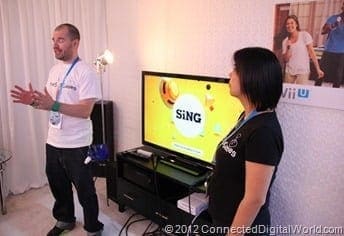
On the Nintendo stand, there was a specially designed room so that a small group could experience the game, sing along, and dance too! Somehow I ended up in that room!

CDW - Nintendo Wii U SiNG at E3 - 11

The room was set up like an average living room. The Wii U was under lock and key though!
CDW - Nintendo Wii U SiNG at E3 - 1

CDW - Nintendo Wii U SiNG at E3 - 7 CDW - Nintendo Wii U SiNG at E3 - 2

For this session, we were only offered a choice of three songs, and as there were no willing victims, er, I mean volunteers one of the Nintendo girls offered to sing, and she had a great voice!

CDW - Nintendo Wii U SiNG at E3 - 3 CDW - Nintendo Wii U SiNG at E3 - 4

One of the main differences to SiNG is that you actually face away from the screen, reading the lyrics on the GamePad rather than on the TV screen.

CDW - Nintendo Wii U SiNG at E3 - 6 CDW - Nintendo Wii U SiNG at E3 - 8

While she was singing, everyone else was dancing along by following the instructions on the TV screen. The screen contains all the dance moves to follow, so it basically combines two games in one.

CDW - Nintendo Wii U SiNG at E3 - 5 CDW - Nintendo Wii U SiNG at E3 - 9CDW - Nintendo Wii U SiNG at E3 - 12 CDW - Nintendo Wii U SiNG at E3 - 10

It was actually a lot of fun, and I can see this being one of those games that people buy with the Wii U.

It is important to note that the pictures above show the Wii U GamePad connected to the Wii U via a thick cable – this won’t be on the final version of the Wii U.

SiNG is due for release this Holiday for the Wii U. A specific date and pricing have yet to be released. So watch this space.

Twitter app for Windows Phone updated to 1.2.4525.19177

The official Twitter app for Windows Phone has been updated to 1.2.4525.19177.

fa5a9d87-7945-4827-ad10-f6736239d79c

Discover what’s happening right now, anywhere in the world, with the official Twitter for Windows Phone app. Tweets, real-time search, Suggested users, top Tweets, trending topics and maps show what’s happening everywhere—and nearby.

There doesn’t seem to be a changelog available so it’s not really obvious what is included in this update! So if you figure it out, let us know!

Download now from the Windows Marketplace

E3 2012: A look at Star Wars 1313

0

When I was at the airport heading out to E3 I received the press release about Star Wars 1313. When I was at E3 I was lucky enough to be invited to a private demo of the game and some insight into the making of it.

E3 12

The private demo took place in a room that had been designed to look like the inside of a transport ship. There was actually a lot of detail considering most people would be only interested in what was on the screen!

IMG_0168

LucasArts is bringing in top artistic and technical talent from all parts of the Lucasfilm organization, including Industrial Light & Magic, Skywalker Sound and Lucasfilm Animation Ltd. Through shared tools and technologies while using the Unreal engine as a foundation, the teams are able to create a more emotional and visceral connection between the game and the player. With cutting edge full body performance capture, high-end Hollywood visual effects techniques and leveraging Lucasfilm talent across the board, Star Wars 1313 promises to deliver a completely immersive experience set in a brand new mature Star Wars world.

Here are some screenshots of the game:

1313_Portal E3 5 E3 6 E3 7E3 13 E3 14

The game demo itself was amazing – the graphics were nothing short of breath-taking and the game looked amazing.

The character we were seeing is not the final character – LucasArts are keeping the identity of that character under wraps for now.

A few people had asked if the demo was running on a “next-gen” console, but we can reveal that it was actually on a PC!

At the start of the session we were told that it was running on a Core i7 processor with 16GB ram, and the amazing graphics were provided by an NVIDIA GeForce GTX 680 graphics card.

More details about Star Wars 1313 will surface in the coming months.

All I know is that I want this game!

Visit www.StarWars1313.com for the latest updates.

E3 2012: Hands-on with the Samsung Galaxy Player 4.2

Samsung were at one of the events at E3, and they were showing off their Galaxy Player 4.2, and we got to spend some time with it.

CDW - Hands On with the Samsung Galaxy Player - 1

This is how Samsung describes the Player:

Get instant access to your music with WiFi, without any monthly service fees. The Samsung Galaxy Player 4.2 gives you a choice among the top music apps, and the tuner radio function turns your player into a fully functioning FM radio. Use the music shortcut bar to easily play or pause your music on the go.

Explore all of the content you could ever want. Fast. The Samsung Galaxy Player 4.2 features Android’s Gingerbread OS, and a blazing fast 1GHZ processor, bringing you great performance and speed for multimedia and browsing Adobe Flash Player compatible websites. Fully integrated with services such as Google Maps and YouTube, you can search, view and easily download any of the over 450,000 apps available in Google Play.

With so many incredible applications available, you won’t know where to start. Discover the largest collection of applications for your Galaxy Player 4.2 with access to Google Play and Samsung Apps. Now you have the fastest growing app store and apps designed just for the Galaxy, together on one device. With two app stores at your disposal, you’re bound to find what you are looking for.

Basically it is a music and video player, that has WiFi access, can play games, download things from Google Play and much more. The only thing it can’t do is make phone calls!

CDW - Hands On with the Samsung Galaxy Player - 2

Games worked very well on the Player.

CDW - Hands On with the Samsung Galaxy Player - 3 CDW - Hands On with the Samsung Galaxy Player - 4

And as with any Android powered device, it was easy to surf the Internet.

CDW - Hands On with the Samsung Galaxy Player - 5

It has a 4.2” WVGA TFT display, and is 8.99mm thick. It has a Cortex A8 1Ghz processor, 802.11 b/g/n, bluetooth, Front and Rear cameras, a MicroSD slot, and FM Radio built in!

Here is a closer look at the Player:

CDW - Hands On with the Samsung Galaxy Player - 7 CDW - Hands On with the Samsung Galaxy Player - 8CDW - Hands On with the Samsung Galaxy Player - 9 CDW - Hands On with the Samsung Galaxy Player - 10CDW - Hands On with the Samsung Galaxy Player - 11 CDW - Hands On with the Samsung Galaxy Player - 12CDW - Hands On with the Samsung Galaxy Player - 13

At first glance it looks like another Samsung Android phone, and you would be right, sort of. It just can’t make phone calls.

I found it very responsive and easy to use, and because it’s running Android 2.3 you have access to all the usual features. Samsung couldn’t tell me if or when it would be upgraded to Android 4.0.

The speakers are on the front of the device (at the top and bottom to be precise). This means that the sound isn’t distorted if you use it on a surface.

The Galaxy Player 4.2 is available now and retails for $199.99.

Learn more from the Samsung website

WD Sentinel DX4000 firmware update released

WD have released a firmware update for it’s Sentinel DX4000.

groupfs_1601


Version 01.02.23.395 released last week resolves the following 3 issues:

  • Updated compatible hard drives (Knowledge Base 9443) for the Sentinel Storage Server
  • WD Monitor functionality during Server Recovery (6TB units)
  • Manual Software Update functionality in Japanese
Download the updated firmware from here

Dragon Dictation App for iOS Updated to Version 2.0.22

0

The Dragon Dictation app for the iPhone and iPad has just been updated to version 2.0.22.

mzl_xaneqvly_320x480-75_thumb_thumb_[1]

Dragon Dictation is an easy-to-use voice recognition application powered by Dragon NaturallySpeaking that allows you to easily speak and instantly see your text or email messages. In fact, it’s up to five (5) times faster than typing on the keyboard.

With Dragon Dictation you can also update your Facebook status, send notes and reminders to yourself, or Tweet to the world….all using your voice. So when you’re on-the-go, stop typing and start speaking – from short text messages to longer email messages, and anything in between. For best result, speak calmly and clearly.

Dragon Dictation supports a multitude of global languages. For a full list of currently supported languages visit www.dragonmobileapps.co.uk/.

Features

• Voice-to-text transcriptions that may be sent as SMS, Email, or pasted into any application using the clipboard
• Submit update to Twitter & Facebook
• Convenient editing feature that provides list of suggested alternatives
• Voice driven correction interface

What’s New in Version 2.0.21

Localisation updates

Download from the Apple App Store

electrongoo Releases Update to ISO Mounter

electrongoo has released an update to their ISO Mounter add-in for Windows Home Server.  Read on for details.

electrongoo

electrongoo has updated their Windows Home Server add-in ISO Mounter.  We first told you about it here.  As a refresher, here is how electrongoo describes the program.

ISO Mounter is a software add-in for Microsoft Home and Business server which allows you to mount ISO files (DVD and CD images) stored on your server so they can be viewed directly through your servers folder share on all of your PC’s and laptops.

Are you tired of burning ISO images onto physical CD and DVD and media?
Would you prefer not to install ISO mounting software containing ad-ware and annoying toolbars on all of your PC’s and laptops?


Product features:

  • Supports Windows Home Server 2011
  • Supports Windows Home Server (V1)
  • Supports Windows Small Business 2011 Essentials and Storage Server 2008 R2
  • Streams DVD and Blu-ray movies to approved DLNA devices
  • Creates bootable USB disks. Burn ISO images directly to removable USB devices
  • Integrates directly into the Server Console/Dashboard for simple administration
  • File system browser allows for searching and manually selecting of any ISO file
  • Mounted ISO files persist across server reboots
  • Configurable “Auto-mount” folders allow automatic mounting of new ISO files
  • Mounted ISO files will appear in the Server folders as a browsable read-only folder
  • “Relocation folder” to view all mounted ISO files in a single folder (WHS/SBS 2011 only)
  • Simple, easy-to-view heads-up status display to monitor status
  • Quick-launch feature allows viewing contents of ISO files directly from the Dashboard

Now for the change log:

New Features:

  • Support for Blu-ray iso images (now you can stream Blu-ray movies from your WHS to your XBOX or other DLNA device)
  • Added a 15 day free trial
  • Updated user interface for German localization

Enhancements:

  • Fixed issue where some iso images would not automatically remount after a server reboot
  • Updated the installer package to be friendlier with older versions of the Microsoft “C Run Time Library”
  • Minor bug fixes and enhancements

Anyone who has already purchased the add-in can upgrade for free.  Simply check for new updates directly from the ISO Mounter add-in by selecting More Tasks | Check for Updates.  If you are running ISO Mounter, go ahead and upgrade!

electrongoo Product Page