WHS Phone 1.3 for Windows Phone 7 Approved

Last week we told you that WHS Phone 1.3.3 had been released for Android – today 1.3 has been approved and will be in the marketplace today.

WHS-Phone

Here is how Paul describes his application:

WHS Phone is a phone application for Windows Home Server. Connect to your server and browse files, stream music, view photos, and much more.

WHS Phone for windows phone 7 let’s you stream music from your Windows Home Server directly to your phone using your wireless internet!

Capture photos with your phone and send them to your Home Server. You can also view your photos from your Home Server on your phone.

With WHS Phone you can view your server’s resources, manage users, view the status of your computers, and more.

Features in this release:

  • Completely new UI. I think you’ll like it!
  • Streamlined Photo browsing a little.
  • Cleaned up the Audio Playback a little.
  • Added Server Restart and Shutdown
  • Added full search of shares (uses windows search) and it’s pretty damn slick.
  • Added photo upload from the Gallery and/or SD card.
  • Ability to download ANY file to your phone.
  • Added the ability to add Users and Shares from the phone.
  • Video Streaming. YAY!

Jim told you about the beta here.

In addition, last week Paul Tweeted the news that he has begun development on an iOS version for iPhones and iPads. That is great news! I look forward to trying this application on my iPad soon.

If you are looking for mobile access to your WHS data and system, give this application a shot!

WHS Phone Our Prior Coverage of the Beta

Windows Home Server Migration Assistant Pro 1.0 WHS2WHS – Helping You Migrate from Windows Home Server to WHS 2011

The WHS Migration Assistant (WHS2WHS) from Mediadogg Software is designed to help you plan the data move from Windows Home Server V1 to WHS 2011.
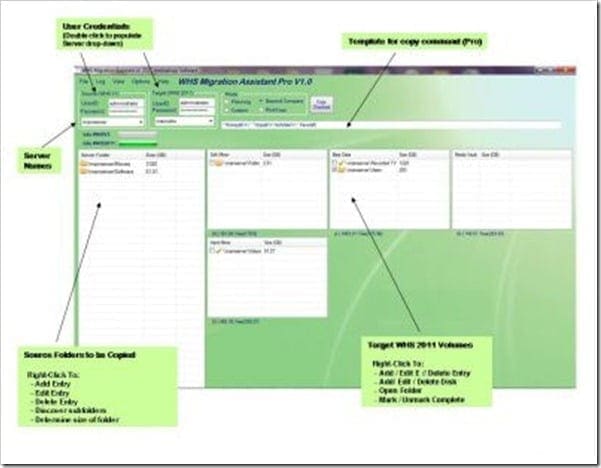
whs2whsHelp

Here is how Mediadogg Software describe WHS2WHS:

Product Information

(This version is for individual, non-commercial use. Future upgrades are free.)

The WHS Migration Assistant (WHS2WHS) is designed to help primarily with the planning of the data move from Windows Home Server to Windows Home Server 2011. There are two versions of WHS2WHS: the basic version and the Pro version. The Pro version, in addition to the planning functions, has functions for partially automating the actual data movements and other functions for saving, restoring and printing multiple plans. NOTE: WHS2WHS Pro does not directly copy, erase nor move any data. It provides a planning template as well as a framework for invoking other tools, using the plan as a guide.

Method of Operation:

Think of the move operation as going from left to right. WHS2WHS presents a screen that shows the shared folders from the source WHS system on the left, and the Volumes (drives) associated with the WHS 2011 system on the right. This is due to the fact that WHS 2011 uses a different scheme for managing shared folders. Instead of locating folders on a large pool of data that Drive Extender maps onto multiple drives, WHS 2011 requires the administrator to allocate shared folders to logical disk volumes, which usually correspond directly to physical disk drives, but not necessarily. Technologies such as RAID can be used to create logical volumes with various reliability and performance attributes comprised of multiple physical drives. WHS 2011 works with the logical drives (or “volumes”).

WHS2WHS supports two basic scenarios for operation:

A. Both Source and Target folders are network shares (e.g. “\\SourceServer\Movies” and “\\TargetServer\Movies” )

B. Source folders are network shares and Target folders are WHS 2011 folder names on local volumes (e.g. “\\SourceServer\Movies” and “D:\\ServerFolders\Movies” )

WHS2WHS automatically formats path names to handle these scenarios, regardless of where the tool is running, with one exception: In the case where WHS2WHS is running directly on WHS V1, you must select the Option: “Force Target Paths to WHS 2011 Format”, on the Options Menu. This allows you to install WHS 2011 volumes on WHS V1 and high-speed copy data from WHS V1 shares.

Migration Steps:

These steps assume that a working, operational WHS 2011 system has been setup and tested. It must be stable, and should have been making regular system (C: drive) backups, with no errors, for at least a week. Optionally, clients can be attached and backups started. By the time the planning and data movement have been completed, you will then have one or more backups of your client computers. Again, this is optional. This can be done after the other data has been moved.

1. Plan the placement of folders on a set of drives / volumes that you will configure on WHS 2011. Keep in mind that in WHS 2011, the largest block of data that can be backed up is 2TB, whether it be a set of folders or a complete drive. Multiple backup locations can be defined, and other techniques may be employed to make periodic, incremental backups of server folders. WHS2WHS allows you define volumes, then drag and drop folders into the volumes. You can play around with various schemes until you are satisfied. Nothing is actually being moved – it is just a plan. You can print the plan to keep track of your progress, and you can even modify the plan as time goes on, if you change your mind. It is advisable to keep a plan that reflects the target scheme.

2. On the source WHS Server, organize existing folders to exactly match the planned set of target folders. Folder names should match, for easiest migration. However, if Beyond Compare is used, WHS2WHS pauses at the Beyond Compare dialogue, giving an opportunity to make adjustments (e.g. WHS V1 “Photos” needs to copied to WHS 2011 “Pictures”). If you have online backups, such as a secondary WHS server, verify that the data you intend to copy to WHS 2011 has been backed up, and is in sync with the latest backup copy. In my case, I discovered a number of inconsistencies that had accumulated over 2 years – probably due to power glitches or hard drive errors, and my mistakes in setting up RoboCopy scripts. I am clearing these up as I go through the data migration.

3. Manually, or using the assistance of WHS2WHS Pro, start copying data from the source WHS to the target WHS 2011. After confirming that the data has been copied and verified correct, using any method, you will then erase the old copy of the data. On the source WHS system, you must then “Remove” a drive that with then be available to add to the WHS 2011 system. If you have a large amount of data, and large folders, this will require a skillful manipulation, so that there is always enough space on the target to complete the planned copy process.

You should have backups of all data being copied, even if you have to do it step by step, reusing the a spare external drive. Backup, then copy, verify, then erase the old copy, then on to the next chuck of data. You can remove drives from the source WHS system as a result of turning off folder replication after first ensuring that those folders are backed up elsewhere. It will be a personal decision as to whether any data pruning should be done prior to the move. If you are like me, the is an increased opportunity for mistakes when so much is going. I plan to blindly copy all the data over, and after running stable for awhile, then start a cleanup process.

Alternate Migration Process

You might wonder why WHS2WHS has not been implemented as an Add-in. My feeling was the most important thing missing was a way to organize and plan. There are many options for actually copying / moving the data. So WHS2WHS is primarily a planning tool. The available Disk Management Add-In is the perfect companion to WHS2WHS for users that prefer an add-in approach. In the case, the steps would be:

1. Same as steps 1 and 2 above.

2. Install WHS 2011 formatted drives on WHS V1, with folders already prepared (DO NOT add them to the DE storage pool).

3. Using the Disk Management add-in, manually move or copy the appropriate data from WHS V1 shares to the WHS 2011 volume.

4. Re-install the WHS 2011 volume back into the WHS 2011 server, verify the results, then repeat for the remaining volume(s).

Basic Features of WHS2WHS

· Drag and drop folders from the source to the target.

· Drag and drop folders between disks on the source.

· Manual edit of volume / drive properties such as drive letter, volume name and free space (GB)

· Manual edit of folder path names and size (GB)

· Ability to create text notes for each volume, e.g.: “This volume is a RAID 5 of 4 – 2TB drives, yielding 6TB usable”. Use only for non-criticaldata.

· Automatic recalculation of free space as folders are moved around

· Optional automatic discovery of folders on the source WHS server (whenever server name is updated)

· Optional automatic discovery of volumes on target WHS 2011 server (context menu)

· Optional automatic discovery of servers in network (right click on group box)

· Ability to use multiple credentials for discovery: source user/PW, target user/PW and alternate user/PW

· Optional automatic discovery of folder sizes (slow for large folders)

· Double click opens a network share

· Built-in screen view. Print this view to use for notes on progress.

· Plan is saved and restored between sessions. The plan can also be reset.

Additional Features of WHS2WHS Pro:

Advanced users, consultants and corporations may find the functions of WHS2WHS Pro useful.

· Load / Save multiple migration plans, by name (XML format).

· View / Print Log for diagnostic purposes (e.g. failed copy operation.)

· Automatic invocation of Microsoft RichTools RichCopy (“RoboCopy” successor): this process starts immediately upon confirmation. Real-time copy progress is provided

· Automatic invocation of Beyond Compare data tool. After conformation, Beyond Compare displays its dialog, whereupon additional tweaking of filters and any operations can be performed manually prior to starting the actual copy. Real-time copy progress is provided.

· WHS2WHS looks for RichCopy and Beyond Compare where they are normally installed on 32 bit systems. If WHS2WHS does not find the programs automatically, there is a menu option for manually specifying the location of those programs. I have found both of these tools to be invaluable in managing my data. Beyond Compare, in particular, has an astounding number of ways to compare, copy, view and validate data.

· Ability to call a custom script as part of the copy process. Your script may be called from within the CustomCopy.bat windows batch file, located in the WHS2WHS installation folder. The following parameters are passed to CustomCopy.bat:

%1 = Source (WHSV1) Path (Folder being copied)

%2 = Source User Credential

%3 = Source PW Credential

%4 = Source Dns Hostname

%5 = Target Path (Destination Folder for files from Source Folder)

%6 = Target User Credential

%7 = Target PW Credential

%8 = Target Dns Hostname

%9 = Target (WHS2011) Drive

Price: $15.95

Learn more from the Mediadogg website

UWHS Giveaway – You Still Have Chance To Win Diskeeper 2011

Our friends over at Diskeeper have been kind enough to give us a number of copies of their Diskeeper 2011 products to give away to you guys. We are giving away the final 4 copies of Diskeeper 2011. And you still have chance to win!

DK_2010_logo_cmyk-wht

Check out our review of Diskeeper 2011 for Windows Home Server here Check out our review of Diskeeper 2011 Professional here

So what do you have to do to win a full copy of Diskeeper 2011 for Windows Home Server or Diskeeper 2011 Professional?

[box size=”large” style=”rounded” border=”full”]At the top of every page you will see a Diskeeper 2011 Trial ad. Click it and go download a trial edition of Diskeeper 2011 (any version you like) and when asked, tell them we sent you. Then pay a visit to our forums and let us know you have done it and which version you would like if you win (either Professional or Windows Home Server V1). If you entered last time, or already have a trial copy, just click on the ad and leave us a message in the forum. The only other thing we ask is that you complete your forum profile as much as you can.[/box]

That’s it, simple!

We will then pick 4 people at random from the emails we receive.

The competition is open to anyone (even if you entered last time), so good luck.

The 4 winners will be announced on the site on Saturday 28th May, so get going.

And thank you again to our friends at Diskeeper for all the licences.

Remote Notification 1.5.1.2 Released for Windows Home Server

Today sees the release of Remote Notification version 1.5.1.2 for Windows Home Server.

Here’s how Alex describes his add-in application:

Home

Remote Notification is the Add-In for Windows Home Server that keeps you up to date on the status of your Home Server no matter where you are.

Home Users and Small Business Owners

Your Windows Home Server contains all your important files, and you want to know when an issue comes up. Remote Notification lets you know immediately whenever your Home Server has a new health alert by your favorite method of communication such as email, SMS (text messages), Twitter status updates, or RSS feed.

You also have a high level of control over what messages you receive, with the ability get only errors or both errors and warnings, configure Exclude Filters that prevent messages being sent when they contain specific text, and make sure you aren’t awakened at night with Notification Schedules.

Remote Notification can forward all health events generated by your Home Server, including those issued by other Add-Ins such as Home Server SMART or Remote Alert.

Even with so many features, Remote Notification is very easy to configure. SMTP Presets take the work out of configuring your email provider for sending messages, and there is full documentation available including tutorials to help you quickly set up all the features. And it’s all backed up by support from Windows Home Server experts that have been supporting the community for years.

See the features and requirements for a full list of everything you can do with Remote Notification.

IT Support Professionals and Windows Home Server Resellers

Remote Notification gives you the power to proactively monitor your customer’s Home Server, often allowing you to resolve an issue before your customer calls you or is even aware of the problem. Email and SMS messages let you know instantly whenever there is a new health event on the customer’s server. The Daily Reports serve as a daily “heartbeat” to notify that the server is running properly and also provides many useful statistics such as free space on the OS drive, free space in the storage pool, Windows Update status, client backup status, installed Add-In versions, and much more. Or set up the RSS feed and monitor the notifications from the home servers of all your customers via your RSS reader.

See the features and requirements for a full list of everything you can do with Remote Notification.

Future Products

Remote Notification currently runs on Windows Home Server with Power Pack 3 or later. We will be investigating opportunities for the next-generation products of Windows Home Server 2011, Windows Small Business Server 2011 Essentials, and Windows Storage Server 2008 R2 Essentials as those platforms become available.

Here is what Alex has said:

I’ve released an update to Remote Notification, bringing it to version 1.5.1.2 and delivering several new features for Mac users as well as a few minor bug fixes. New in this release is a Mac Connector application that offers a menu bar item to display your Windows Home Server health alerts, as well as an agent that monitors the Time Machine backups and reports status to your server for centralized monitoring and alerting.

Here are a few screenshots of the new features:

Mac-Backup-Health-AlertMac-Connector-Health-AlertsMac-Connector-PreferencesRemote-Notification-Mac-console-tab

Head on over to RemoteNotification.com to read the full release announcement and download the new version.

HDHomeRun PRIME 6CC now available for preorder for $499.99

With a release date of 07/18/11, you can now preorder the SiliconDust HDHomeRun PRIME 6CC for $499.99. This new six tuner CableCARD tuner would compliment any HTPC system that currently uses cable and Windows Media Center.

image

Six tuners may seem like overkill, but for those of you with multiple PCs in the house, six may be the right number!

Six Tuners? Really?

Say it is Monday night and you are watching football on the desktop (tuner 1) and your wife is watching Castle (tuner 2) on the laptop. You kids are watching Disney (tuner 3) over Xbox as an extender to the HTPC that is recording Muscle Car and Star Gate Universe (tuners 4 and 5). See how the tuners can add up quickly?


SiliconDust HDHomeRun PRIME 6CC

The tuner is at Newegg:

http://www.newegg.com/Product/Product.aspx?Item=N82E16815345009


If you want to know more about the SiliconDust HDHomeRun PRIME 6CC then you can heck out it out at SiliconDust.

Directly from SiliconDust:

Six Digital Tuners, Anywhere on Your Network
  • Home-theater form factor… add 6 premium cable-TV tuners to your home theater system.
  • Premium cable TV (CableCARD).
  • Watch TV from any computer on your network.
  • Record full 1080i broadcast resolution.
  • Watch, Pause, Record, & Rewind Live TV.
  • Schedule and record all your favorite TV shows.
  • Expand with multiple HDHomeRun devices.
TV sources
  • US digital cable TV
Windows 7 Windows Media Center:
  • Record all your favorite TV shows by name.
  • Schedule future or season recordings.
  • Integrated TV guide.
  • Never miss your favorite show.
Compatible With:
  • Windows Media Center on Windows 7
Specifications:
  • Based on two 3-tuner HDHomeRun PRIME units
  • 17″ home-theater form factor
  • US Digital Cable
  • M-Card CableCARD interface (x2)
  • USB Tuning Resolver interface (x2)
  • 1000baseT (gigabit Ethernet) network interface (x2) (compatible with 100baseTX networks)
  • 1 year warranty
Requirements:
  • Dual Core PC
  • Windows 7
  • 2GB RAM
  • 4-8GB disk space per hour of HD recording, 1-2GB per hour of SD recording
  • 100 or 1000Mbit Ethernet network (1000Mbit/GigE Ethernet switch recommended).
  • Subscription to digital cable service
  • CableCARD (M-Card) from your cable provider (x2)

Kingston Digital Launches its Fastest USB 3.0 Flash Drive – the DataTraveler Ultimate 3.0 G2

Last week, Kingston Digital launched its fastest USB 3.0 flash drive – the DataTraveler Ultimate 3.0 G2 USB Flash Drive.

DTU30_angleOpenTop_64GB

  • Allows users to transfer data faster than standard USB 2.0
  • Second generation solution offers higher performance
  • Backwards compatible with USB 2.0

Sunbury-on-Thames – May 18th 2011Kingston Digital Europe Ltd, an affiliate of Kingston Technology Company Inc., the independent world leader in memory products, today announced the launch of the Kingston DataTraveler® Ultimate 3.0 Generation 2 (G2). Kingston’s fastest USB Flash drive uses a native USB 3.0 controller for better performance and power management and is available in 16-, 32- and 64GB capacities.

Kingston’s DataTraveler Ultimate 3.0 G2 features the latest technology for USB 3.0 Flash drives, making it ideal for IT professionals and enthusiasts who want to take advantage of all the performance improvements offered by USB 3.0 technology right away. The new DataTraveler Ultimate 3.0 G2 has a read speed of up to100MB/s, and a write speed of up to70 MB/s. When plugged into a USB 2.0 port, the drive has read and write speeds of around 30MB/s.

“Kingston is committed to help drive market adoption of the new USB 3.0 standard and make it more accessible to the mass market,” says Jim Selby, EMEA Product Marketing Manager, Kingston Technology. “The growing number of platforms and computers supporting the USB 3.0 standard, as well as the benefits of the single chip controllers that allow better compatibility and performance, are helping drive the adoption of USB 3.0 technology.”

The Kingston DataTraveler Ultimate 3.0 G2 USB Flash drive is the perfect solution for easily storing and quickly transferring large documents, hi-res photos and HD video. It is also backwards compatible with USB 2.0**. The DataTraveler Ultimate 3.0 G2 is backed by a five-year warranty, 24/7 tech support and legendary Kingston reliability.

Kingston DataTraveler Ultimate 3.0 G2 Features and Specifications:

  • Capacities*: 16GB, 32GB, 64GB
  • Requirements: system with USB 3.0 port
  • Backwards compatible: with USB 2.0
  • Speed**: When plugged into a USB 3.0 system: up to 100MB/s read and 70MB/s write; when plugged into a USB 2.0 system: maximum specification performance (around 30MB/s read and write)
  • Dimensions: 2.90″ x 0.87″ x 0.63″ (73.70mm x 22.20mm x 16.10mm)
  • Operating Temperature: 32°F to 140°F (0°C to 60°C)
  • Storage Temperature: -4°F to 185°F (-20°C to 85°C)
  • Practical: durable casing with a solid lanyard loop
  • Warranty: 5 Years

* Some of the listed capacity is used for formatting and other functions and thus is not available for data storage. For more information, please consult Kingston’s Flash Memory Guide at kingston.com/Flash_Memory_Guide.
** Speed may vary due to host hardware, software and usage.

Kingston DataTraveler Ultimate 3.0 Generation 2

Part Number Capacity and Features MSRP (ex VAT)
DTU30G2/16GB 16GB DataTraveler Ultimate 3.0 G2 USB Flash Drive £40.10
DTU30G2/32GB 32GB DataTraveler Ultimate 3.0 G2 USB Flash Drive £60.15
DTU30G2/64GB 64GB DataTraveler Ultimate 3.0 G2 USB Flash Drive £110.70


Having high speed, high capacity USB flash drives is becoming more and more of a necessity every day. I know for me personally that not a day goes by when I don’t use one!

Look out for the UWHS review shortly.

For more information check out the Kingston Digital website

Western Digital Introduce WD Caviar Green Hard Drive with SATA 6 Gb/s Interface

Western Digital have now added SATA 6 Gb/s support for their WD Caviar Green Hard Drive range.

Cool, quiet, eco-friendly and extremely reliable. Due to WD´s innovative WD GreenPower Technology™ the WD Caviar Green internal hard drives offer reduced power consumption as well as best-in-class acoustics and operating temperature. With massive capacities of 1.5, 2 and 3 TB these drives are ideal for high-capacity custom PCs and external storage devices. Besides the award-winning WD Caviar Blue™ and the WD Caviar Black™ series now also the WD Caviar Green drives feature a future-ready SATA 6 Gb/s interface.

wd

Here is what WD say about their SATA 6 Gb/s range:

Over the years the industry has increased bus bandwidth from PATA through SATA 1.5 Gb/s and SATA 3 Gb/s to keep up with the demand for higher transfer rates. The next evolution of bus bandwidth has now been achieved with the introduction of SATA 6 Gb/s, (SATA 3.0). We’ve added a SATA 6 Gb/s interface to our award-winning WD Caviar Blue, Green, and Black desktop hard drives in capacities from 250 GB – 3 TB. This transition to a SATA 6 Gb/s interface aligns with the introduction of SATA 6 Gb/s-supporting chip sets and motherboards coming to the market.

Learn more from the WD website

Drive Bender Home Edition Discount Offer

Following on from last weeks news about the release of Drive Bender Beta 3 and that Tranquil PC will be incorporating Drive Bender into its Leo hardware, they have a pre-release offer you might be interested in.

image46_thumb1_thumb

Here is what they said:

We also have some other exciting news we’d like to share… we have set down a “pre-release” offer for everyone involved in the beta program.

Announcing Drive Bender – Home Edition. Home Edition will be a single license that supports a single pool, containing any number of drives.

For our devoted and dedicated beta testers, we will be offering a “pre-release”, heavily discounted version of Drive Bender Home Edition for $20 USD. This pricing will be available to all current members, and those that register prior to the beta cut-off date (mid-June). The pre-release sale will start in June and finish two weeks after the final release.

No news yet on just how much it will be, but if $20 is”heavily discounted” then it might be quite an expensive add-in.

More news when we get it.

For more information check out the Drive Bender website

BYOB Episode 44 Out Now

0

The guys over at the BYOB podcast, including our very own Tim Daleo have just released episode 44.

BYOB300_thumb_thumb_thumb

Here is what is included in this weeks show:

[box style=”rounded” border=”full”]Z68 roundtable, Issues with Vertex 3 and WHS, a great mini ITX build with bad execution, and HDHR Prime on this week’s BYOB Podcast.[/box]

As usual you can listen to the show from here.

Review of the Fractal Design Array R2 Mini-ITX Case

13

Back in January at CES, I met up with Fractal Design to talk about some of the cases, including the Array R2 Mini-ITX case. Well now it is time for our review of it.

UWHS Review - Fractal Design Array R2 Mini-ITX Case

The Array R2 Case

Here is how Fractal Design describe the Array R2:

The Array R2 Mini ITX NAS case is setting new standards for the Home Server/DIY NAS market. With it’s whopping six(!) hard drive bays in a very small enclosure, hardly bigger than your average bread toaster, it’s certainly creating a new niche.

Built in high quality aluminium straight through with a nice touch for details, the Array R2 case provides a very exclusive way to store all your important data. The hard drive cage with room for six 3,5-inch HDD and one SSD, is removable and fitted with silicone anti-vibration grommets to minimise noise from the hard drives. In the front our award winning Silent Series 140mm is fitted, together with a washable filter. It takes in air from the side ventilation holes in the front panel. This ensures an efficient, but yet silent, cooling over the hard drives.

Furthermore, there is a SFX 300W PSU included, rated at more than 80% efficiency, with a silent temperature controlled fan. We have decided to include this PSU in the package, since it’s fairly hard to find quality SFX PSU’s in the market that is also silent, and not too expensive.

You can fit a Mini ITX or a Mini DTX motherboard into the case and there’s also room for two expansion cards, for example a RAID card which you’d typically want to get the most out of your six hard drives. All necessary components and software naturally needs to be purchased separately, but we can recommend to use specialised NAS/Home Server software such as FreeNAS or Windows Home Server. Please note that there is no room for a 5,25-inch drive, we deliberately left this out since you don’t generally use that in a NAS/Home Server environment, and it saved us a lot of space which we could use for fitting hard drives instead.

Who Are Fractal Design?

This is how Fractal Design describe themselves:

The concept – Design

The concept of Fractal Design is to provide products with an extraordinary design level, without compromising the important factors of quality, functionality and pricing. The computer of today has come to play a central role in most people’s home, creating a demand for appealing design of the computer itself and its accessories.
Our main product areas are computer enclosures, power supplies, cooling, and Media Center-products, such as Home Theatre-enclosures, keyboards and remote controls.

Designed and engineered in Sweden

All Fractal Design products have been thoroughly designed, tested and specified in our Swedish head quarter. The well known ideas of Scandinavian design can be found through all of our products; a minimalistic but yet striking design – less is more.

Visions and goals

Our vision is to have a constant, healthy growth together with our partners worldwide. Our goal is to be widely recognized for our designed products and to have them available in all major market regions within EU and US. We should be a good alternative to the already established retail brands of today. It’s of great importance for us that our partners understand the values of Fractal Design, therefore we are putting great effort into choosing the right partners from the start. We will work actively to maintain sales territories and profitable business for our partners.

The way to reach our goals

In the competitive market of today, it’s not enough to just provide excellent products. Regular and well planned marketing activities in close cooperation with the channel and the available media, are key points to succeed. We are well experienced in marketing brands in the IT business, and we will use this to create efficient marketing tools – to gain a bigger market share and good earning possibilities for our channel.

Specifications

Case Specifications
  • Built in high quality aluminium
  • Silent, efficient 300W SFX PSU included
  • Room for six silicone mounted 3,5-inch HDD
  • Room for one SSD
  • Removable HDD cage for easy mounting
  • Silent Series 140mm fan included in front, with washable filter
  • Space available for CPU cooler: circa 90mm height
  • Space available for expansion card: circa 140mm length
  • Fits Mini ITX and Mini DTX motherboards
  • Two expansion slots
  • Case dimensions (WxHxD): 250x200x350mm
  • Net weight: 4.1kg
PSU Specifications
  • 80 PLUS rated SFX 300W PSU
  • Silent, temperature controlled fan
  • 7x SATA-connectors, 1x Molex, 1x 4-pin and 1x 20/24pin
  • Meets CE, TUV safety requirementsDC Output
    Max load
    Max output+3.3V
    20A
    125W (combined +3.3V and +5V) 

    +5V
    22A
    125W (combined +3.3V and +5V)

    +12V1
    14A
    216W combined 12V1 and 12V2

    +12V2
    16A
    216W combined 12V1 and 12V2

    -12V
    0.5A
    6W

    +5VSB
    2.5A
    12.5W

    Total combined power
    300W