Parallels Desktop for Mac Build 7.0.15052 Available

0

There has been an update to Paralles Desktop for Mac which bring bettering compatibility with Mac OS X v10.7.2 Launchpad, and some other fixes.

Screen Shot 2011 12 26 at 11 30 15

What’s in this Update?

This update for Parallels Desktop for Mac (build 7.0.15052) includes the following fixes and improvements:

  • Better compatibility with Mac OS X v10.7.2 Launchpad.
  • Improves network stability.
  • Addresses the issue of Linux virtual machine not resuming upon waking the Mac from Sleep mode.

Microsoft Office for Mac 2011 14.1.4 Update Available

Microsoft have released another update for it’s Microsoft Office for Mac 2011 product suite.

Screen Shot 2011 12 26 at 11 20 08

Improvements that are included in the update

The Office for Mac 2011 14.1.4 Update includes the following improvements.

Improvements for all Microsoft Office for Mac 2011 applications

  • Update installation reliability is improved.; ;
    This update fixes issues that cause the installation of previous Office for Mac 2011 updates to fail in the following situations:
    • When the user’s home directory contains a space.
    • When you deploy updates through Secure Shell (SSH).
    • When you install multiple updates at the same time.
  • Reliability is improved when you open IRM-protected documents.
    This update fixes an issue that prevents Office applications from opening some Information Rights Management (IRM)-protected documents. ; ; ;

 Improvements for Microsoft Excel for Mac 2011

 Stability is improved.

  • This update fixes an issue that causes Excel to exit unexpectedly or stop responding when you open some workbooks or when you use data validation. ;

 Improvements for Microsoft Outlook for Mac 2011

 Password expiration notice issue is fixed.

  • This update fixes an issue that causes Outlook to display an incorrect password expiration notice.
  • Sync efficiency is improved
    This update improves sync efficiency with accounts on Microsoft Exchange servers when the permission settings are changed for a shared or delegated folder.
he Office for Mac 2011 14.1.4 Update includes the following improvements.
Improvements for all Microsoft Office for Mac 2011 applications
Update installation reliability is improved.; ;
This update fixes issues that cause the installation of previous Office for Mac 2011 updates to fail in the following situations:
When the user’s home directory contains a space.
When you deploy updates through Secure Shell (SSH).
When you install multiple updates at the same time.
Reliability is improved when you open IRM-protected documents.
This update fixes an issue that prevents Office applications from opening some Information Rights Management (IRM)-protected documents. ; ; ;
Improvements for Microsoft Excel for Mac 2011
Stability is improved.
This update fixes an issue that causes Excel to exit unexpectedly or stop responding when you open some workbooks or when you use data validation. ;
Improvements for Microsoft Outlook for Mac 2011
Password expiration notice issue is fixed.
This update fixes an issue that causes Outlook to display an incorrect password expiration notice.
Sync efficiency is improved
This update improves sync efficiency with accounts on Microsoft Exchange servers when the permission settings are changed for a shared or delegated folder.

BYOB Podcast Episode 71 Out Now

0

The guys over at the BYOB podcast, including our very own Tim Daleo have just released episode 71.

BYOB300_thumb_thumb_thumb

Here is what is included in this weeks show:

[box style=”rounded” border=”full”]SkyDrive on mobile, the ESXi saga begins, Fractal Define R3 case, HTC Titan/Focus S/iPhone4S/Skyrocket comments, Xbox has a new console and Cord cutting has a setback. Its BYOB show 71[/box]

As usual you can listen to the show from here.

WD TV Remote for Android Now Available

A few days ago we told you about WD TV’s new services for WD TV owners. At the time the Android app was coming soon, now it’s available.

wd android 1

WD TV® Live Hub™ media center or WD TV Live™ streaming media player

Turn your smartphone into a touch-screen remote for your WD TV® Live Hub™ media center or WD TV Live™ streaming media player.

Control your WD TV experience with the tap of a soft key or the swipe of a finger using the WD Remote™ app. Simply launch the app on your Android™ mobile device and instantly take control of any WD TV Live Hub media center or WD TV Live streaming media player that is connected on the same network.

Key Features:
• Control your WD TV from anywhere in your house using your wireless network

• Get one-touch access to launch any online service available on your WD TV

• Enter text using your Android smartphone or tablet keyboard

• Use the gesture pad for quick and easy navigation

• Connect multiple Android mobile devices with the WD Remote app and conveniently play multiplayer games

Minimum Requirements:
• Android device running mobile operating system version 2.1 or higher

• WD TV Live Hub media center or WD TV Live streaming media player (Gen 3, released October 2011)

• Wireless access to your WD TV media player on your network (Your media player may be connected to your network via Ethernet port or wirelessly)

wd android 2

Get WD TV Remote from the Android Market

Microsoft Web Platform Installer Guide for WHS 2011

My friend and fellow WHS MVP Nigel Wilks has just released a guide to the Microsoft Web Platform Installer which will work on WHS 2011.

Wordpress

Here is how the guide starts:

Some time ago, I created a couple of Add-Ins for Windows Home Server V1 to make things easier for installing applications such as WordPress, PHP and MySql. Since the release of Windows Home Server 2011 I have had numerous requests to port them to the new platform which I was loath to do due to the age of the Add-Ins and the versions of the software I used.

Now that we have a good foundation Operating System in Windows 2008, the installation of web applications is easy enough that I won’t be fulfilling these requests. This is where the “Microsoft Web Platform Installer” comes in.

The installer will enable you to easily install a whole suite of applications from Sql through to WordPress, even Forum software such as PhpBB.

Read the full guide here.

XBMC 11.0 Eden Beta Available Now

The guys over at XBMC.org have just released the XBMC 11 Eden beta in time for Christmas.

xbmc-eden-beta-announce-xmas-wide

Here is what they said:

The sheer number of new features, platforms, and improvements to nearly every facet of the XBMC experience found within Eden are nearly too numerous to count.

Milestones include Addon Rollbacks, vast improvements in Confluence (the default skin), massive speed increases via features like Dirty-region rendering and the new JPEG decoder, a simpler, better library, additional protocol handling, better networking support, better handling of unencrypted BluRay content and structures, adjustable display refresh rate in OSX (to match the already available feature in Windows and Linux), AirPlay support, an upgraded weather service, and much more. Check out the highlights in the summarized changelog.

In addition to our many software improvements, we’ve increased our reach in the realm of hardware support since Dharma was released. Eden marks the first in-sync stable release for the Apple TV2, iPad, and other iOS devices. We’ve vastly improved the method by which we handle input, including heavily upgrading JSON-RPC support, making remote control support much, MUCH simpler in Windows, and enabling unique methods of device communication with hardware like the HDMI-CEC Adapter. And now even AMD devices are supported for GPU video decoding in Linux to some extent, thanks to the inclusion of VAAPI.

We are also in the process of drastically altering XBMC Live to make it more like a full “*Buntu” version of XBMC with massive changes to the boot and install process. That alteration is not quite ready for prime time (and, thus, is not available at this time), but our devs are working on it round the clock. Keep an eye out for a more in-depth article on this in the next week or so. The XBMC Linux PPA is also not immediately available, but check back a few days after Christmas. It should be online at that time.

Because this is Beta software, you can likely expect minor issues over the course of the next few weeks. For example, you may discover issues with playing movie trailers that may require a manual install of the Youtube addon. If, after asking in the forum and updating to the most recently available Beta, your issue is not solved, feel free to follow the above link to the Trac service and create a ticket with the issue. As always, when troubleshooting, providing a debug log will be essential to resolving issues.

And with that, we invite users one and all to backup your userdata folder (which is always a good idea)(also, iOS users, you should follow this link for info on your slightly different backup process), and get to downloading!

Downloads may be found here.

My Movies Online Collection

The My Movies Online Collection is an online website of your movie collection, hosted on the My Movies website. It allows you to synchronize your collection with their servers, and then share the details of the titles you have in your collection with family and friends.

Functionality wise, the online collection is not a product of it’s own, but an integrated part of the My Movies Collection Management product, which is also part of our My Movies for Windows Media Center product. The online collection is also available for users of My Movies for iPhone in both the Light and Pro versions.

Once you have created your collection in My Movies Collection Management or in My Movies for iPhone you can enable the online collection from either of these products, and your collection website is available for you instantly.

Password protection

If you are ready to share the details of your collection with a selected number of persons, but aren’t ready to share it with the world, you can choose to password protect your online collection, and share the password only with the people that should be able to see the details your collection.

Selected groups

You can using the configuration for your online collection choose to include all or only select groups, such as owned for keeps, owned for sale, wished or similar. By using the groups, you can use the online collection actively when selling or swapping titles on online forums or when family or friends would like to see your wishlist when buying gifts – link to your online collection, and other users can see titles you have for sale, for trade or which ones you are currently after.

Filtering

Your online collection is by default available on the address http://c.mymovies.dk/demonstration, where “demonstration” should be replaced by your username on your My Movies account. By extending the address, you can link to a filtered subset of your online collection, or link to a specific title. Some examples using a demonstration online collection could be a direct link to all your Blu-ray titles on the address http://c.mymovies.dk/demonstration/bluray or you can link to a specific group by adding “wished”, “owned” or similar keyword to the address.

You can even link directly to a title by adding the barcode of the title to the collection address.

Demonstration

Our system have a demonstration user set up with an online collection, allowing you to see specifically how the online collection looks and functions. You can open the demonstration online collection by clicking the below screenshot:

Merry Christmas 2011 Everyone

0

From everyone here at UWHS we would like to wish you all a very merry and safe Christmas.

UWHS-Xmas-2011

If you haven’t yet read it, take a look at Tim’s Christmas post, it’s brilliant. Yes, it’s a repeat, but isn’t that what Christmas is all about?

So everyone have a safe and joyful Christmas and thank you for making UWHS what it is.

From : Andrew, Jim, John and Tim.

tWHSas the Friday night before Christmas Yet Again

As it’s Christmas again, it’s time for our usual UWHS Christmas fable, written by Tim….

A little fable for your enjoyment…

Happy Holidays

Equipment Needed:

  • Eggnog (Captain Morgan’s optional)
  • Sense of Humor (Available at your local Walgreens or CVS)

And so it…

‘Twas the night before Christmas, when all through the house,

Not a creature was stirring, not even a Microsoft Wireless 6000 Mouse;

The computers were sleeping on the network with care,

In hopes that Windows Home Server Backup soon would be there.

The children were nestled all sung in their beds,

While visions of Windows Media Center danced in their heads;

And the wife with her netbook, and mine removed from my lap,

Had just settled our brains for a long winter’s nap.

Happy Holidays

When inside the office there arose such a clatter,

I sprang from the bed to hear a clicking hard drive platter;

Away to the laptop I flew like a flash,

Remote Desktop the server, to diagnose the crash.

Admin and password and the trusty Console,

Gave the hope that this sound, away it would go;

When, what to my wondering eyes should appear,

But a glowing red error and file conflicts listed here.

Happy Holidays

With an outdated driver and firmware SD1A

I knew in a moment it must be the Seagate;

More rapid than eagles the conflict errors they came,

It hummed and it clicked while I called it bad names.

Now, sh&#head, now f*&kstain, now d*$kwad and a$$*ole,

On restart, on error log, on to disk manager I go;

To the side of the server, to the bay of the drive,

If I do not stop cursing I will wake up my wife.
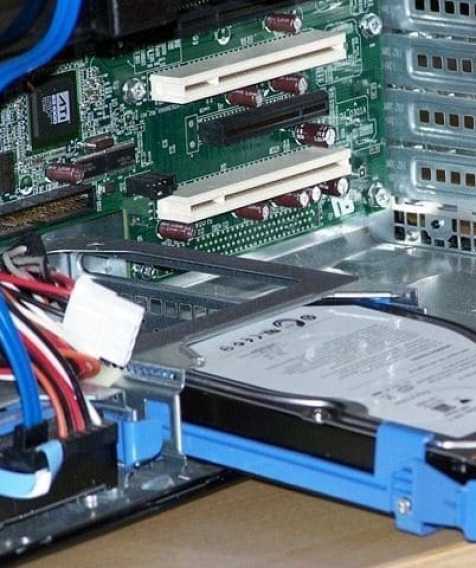
Happy Holidays

As shiet that hits fans would then start to fly,

I shut down the server and unplugged the drive;

So out to the garage, the slippers and I flew,

To a drawer full of old IDE drives, I hope a SATA one too.

And then, in a twinkling, I saw in the drawer,

An old My Book World Edition that I had dropped on the floor;

As I drew in my head, and was turning around,

To the work bench I went with the drive I had found.

Happy Holidays

It was made in all white, from head to rubber feet,

And the sides were slightly scratched from being dropped on concrete;

A bundle of power cords were attached to the back,

Crap, this might not work, as I heard plastic crack.

My eyes – ah who cares, garage damn cold and I so weary

My cheeks were like roses, my nose like a cherry;

A little drool from my mouth was about to ice over,

Onto the beard of my chin, well it is a goatee, a summer leftover.

Happy Holidays

So the Craftsman screwdriver was jammed, tight in plastic teeth,

The cover would not budge, I would have to get underneath;

But then I remembered, there had to be a trick,

And it shook when I opened it, with just one simple click.

Inside was the 500GB SATA, a trusty WD drive,

And I laughed when I thought it could be brought back alive;

A shake and a turn and a twist of a screw head,

Soon gave me to know I had nothing to dread.

Happy Holidays

I spoke not a word, and went straight back to the case,

And removed the old drive, this one in its place;

Replacing the cables and side cover I arose;

And giving a nod, Power On, here it goes.

As she sprang to life once again, the drive gave me a whistle,

And away flew the error messages, like the down of a thistle;

And the wife heard me exclaim, as I turned off the light,

Drive Extender for all, and to all a good-night!

* * *

Happy Holidays To Everyone!

Amazon Instant Video Channel on Roku Updated

As part of the Roku update, the Amazon Instant Video Channel has been updated and improved.

TV-grid

Here is what Roku had to say about it:

Amazon has improved the very popular Amazon Instant Video channel on Roku. If you’re a movie lover (and seriously what Roku owner isn’t?), you’re going love these new changes.

Amazon has never looked better!:

  • The home screen is now split into two areas with viewing choices on the left and gorgeous artwork that highlights a new release on the right. I’m looking at Queen Elizabeth at the moment!
  • Once inside a section like Movies you can quickly scroll through titles with the new grid screen format.
  • You can search from almost anywhere within the Amazon channel by pressing the options (*) button on your remote control. (Pssst…If you have an older Roku remote without an options button, you can use the new Roku iPhone app.)
  • There’s a new category called “Editor’s Picks” in both the Movies and TV sections. If you are struggling with what to watch, give this category a spin.

The channel update is available to all Roku players today. Just make sure you have the latest Roku software. Select Settings > Player info > Check for update from your Roku player. To ensure you have the latest Amazon channel, simply go the Roku Channel Store from the Roku home screen and select Amazon Instant Video.

If you haven’t tried it recently, Amazon Instant Video is a great way to enjoy recent studio releases. Amazon boasts an incredible selection of new movies and TV episodes that makes the service a favorite in my own household. And, if you have an Amazon Prime membership, you can watch 13,000 movies and TV episodes for free!

Amazon-Home-Screen

Have you tried it yet? What do you do think? Let us know….

Software Update 3.1 Available for First Generation Roku Players

Roku have released software update 3.1 for it’s first generation Roku players brining with it a number of enhancements.

Roku_HD-XR_CNET

This is what Roku said:

Just in time for the holidays, we’re pleased as punch to release a pretty substantial update to the first generation of Roku players. Unless your Roku player is smaller than a hockey puck, this update applies to you. Roku 2 and Roku LT players received an update last week.

There are many improvements and typical bug fixes in this update; below are some of the features in software version 3.1 that we think you’ll appreciate:

  1. Support for new Amazon channel – The Amazon Instant Video channel has been updated with a gorgeous, new design and you’ll need this update to run it. (More details on this channel will be shared on the Roku blog soon.)
  2. Mobile support – Added enhancements to support the official Roku iPhone app, launched in the iTunes App Store last week.
  3. Improved MP4 playback – Improved playback of MP4 files streamed over the Internet and over USB via the USB Media Player channel.
  4. Shop Roku Deals in the Roku Channel Store – Added the ability to purchase Roku players, accessories and toys within the Roku Channel Store.
  5. Improved grid performance – Fixed issues when navigating channels that display content in a grid screen.

This update combined with the launch of dozens of new channels in the past several weeks brings a better experience to our earliest Roku players as promised!

The software update will be pushed automatically to all first-generation Roku players over the next 48 hours. If you can’t wait for it you can download it. Just select Settings > Player info > Check for update from your Roku player.

Details on what we updated in the previous software release for first-generation Roku players can be found here.

Star Wars: The Old Republic Game Launched

0

Star Wars and multiplayer online gaming fans will be pleased this week as Star Wars: The Old Republic was launched.

SWTORpcPFTeng

Set thousands of years before the classic films, Star Wars: The Old Republic is a story-driven, massively multiplayer online game challenging players with epic quests, featuring dynamic combat across iconic worlds in the Star Wars galaxy such as Tatooine, Alderaan, Hoth and more. Each of the game’s eight primary classes will enjoy their own unique storyline, all of which are fully voiced by a huge cast of actors and features a sweeping musical score.

Included with the purchase of every copy of Star Wars: The Old Republic is 30 days of access to the game, after which players can continue to play through subscribing at either £8.99 per month, £25.17 for three months (£8.39 per month) or £46.14 for six months (£7.69 per month).

fav_Alderaan_007jedi_tython_017jedi-consular-screenshot-004T7 (5)

For more information on Star Wars: The Old Republic, please visit www.StarWarsTheOldRepublic.com

Drobo Release Updated Firmware and Dashboard

This week, Drobo released updated firmware and update dashboard software for it’s range of products.

drobo

The firmware update is 1.2.1 and the dashboard update is 2.1.1.

You can download the relevant updates and view the release notes from here.

LogMeIn App for iPhone and iPad Released

0

The guys and girls over at LogMeIn have just released a LogMeIn app for the iPhone and iPad so you can access your PC or Mac from your iOS devices.

mzl_stspvxrj_320x480-75

From your couch, on the train or in the air – get anytime, anywhere access to your PC or Mac.

Remotely control your PCs and Macs over WiFi/3G with the free LogMeIn app on your iPad or iPhone. It works with LogMeIn’s free award-winning software installed on as many computers as you like. You can remotely access your files, run your applications and control your desktops from anywhere. With everything at your fingertips, you’re finally free to go.

Access your information and get stuff done.

• Access your home and work computers on the go.
• Control your Mac or PC as if you’re sitting right in front of it.
• Get to your computer files and edit them from your iPad or iPhone.
• Remotely run any application on your computer from your iPad or iPhone.
• Fix computer problems remotely for business or personal IT.
Upgrade in-app to experience these LogMeIn Pro features, and more:
• HD video and sound streaming for seamless remote control from any device or Pro enabled computer (available for Windows, Mac coming soon)
• My Cloud Bank integration that links your LogMeIn app with popular cloud services
• File Manager for transferring files and folders between computers and saving them to your device
• Remote printing to any AirPrint compatible printer
• Photo App Management for accessing and transferring photos from/to your iPad or iPhone photo library

Remote control features include:

• Intuitive and flexible control modes
• Multi-monitor support
• Supports use of special key combinations
• Start a sleeping computer with Wake-On-LAN

How does the in-app subscription upgrade to LogMeIn Pro work?

• Downloading the app is free, and includes FREE remote control of all your computers
• If you choose to upgrade to a LogMeIn Pro subscription, simply select yearly ($39.99)

Download LogMeIn from the App Store now