Time Traveler for Windows Home Server Add-In Update and Offer

A few weeks ago we reported about a new Windows Home Server Add-In called Time Traveler.

Well it has been updated this week and along with the update we have a very special offer for readers of Using Windows Home Server. If you purchase Time Traveler, you will receive $5 off with the coupon “USINGWHS5” during checkout.

For more information about Time Traveler and to buy it, click here.

New Features:
  • Selectable rollback target folder – rollback directly to the original Share/folder or a separate cache folder
  • Rollback version finder – easy viewing of rollback points to find time/date of the file you want to rollback. A more informative selection of files/folders during rollbacks
  • Updated status display – now easier to view the current action being performed by Time Traveler; Online, Updating database, Updating Folder List, and Expired Trial
Bug fixes:
  • Set full read/write permissions for all WHS users when creating the “Time Traveler Rollbacks” share during installation
  • Fixed selection of deep folders within the Rollback Single File selector
  • Fixed apparent hang when selecting a Share containing many files/folders. i.e WHS Console could become unresponsive for a few minutes
  • Fixed installer failure on some Power Pack 2 and Power Pack 3 systems
Installation tips:
  • From the WHS Console select Settings | Add-ins | Installed then Uninstall the previous version of Time Traveler
  • Download the new version of the software, via the link above, to your \\server\software\add-ins folder
  • From the WHS Console select Settings | Add-ins | Available then Install the new version
  • The WHS Console will restart
  • All existing settings and rollback information will be saved from the previous version. You’re done!

Diskeeper 2010 for Windows Home Server Giveaway – The Results

Last week we started our latest giveaway which was 5 copies of the brand new version of Diskeeper – Diskeeper 2010 for Windows Home Server.

Diskeeper 2010 HomeServer edition key features and benefits:

  • New! IntelliWrite™ fragmentation prevention technology: a major advancement in system speed and efficiency.IntelliWrite prevents up to 85% of the fragmentation every system suffers from. It intelligently writes contiguous files to the disk so system resources are not wasted creating fragmentation. The results? A whole new level of system speed and efficiency beyond what can be achieved with defragmentation alone.
  • Gain unlimited defrag volume size capacity. Terabyte Volume Engine™ technology has the necessary horsepower to quickly and thoroughly defrag even the largest drives and volumes found on today’s powerful home servers.
  • Eliminate rapid fragmentation build-up. InvisiTasking® technology is a truly transparent, background processing technology that allows your PC to be defragmented in real-time, so your high traffic-traffic volumes don’t experience the detrimental effects of fragmentation between scheduled defrags.
  • Windows Home Server Console Integration. Only Diskeeper 2010 HomeServer includes full integration with the primary WHS management console. From any PC or laptop in your home you can adjust a setting, or view the History graphs — everything you need is available for easy access.
  • Extend the productive life of your Home Server. Extend the effective life of your Home Server by as much as 3 years.
  • Increase your Windows home server reliability. Hang-times, freeze-ups and other fragmentation-based crashes on your Home Server affect every other PC and laptop in your home. Fragment-free drives will ensure your gigabyte-sized movies stream to your video screen without a hitch.
  • Speed up your anti-virus scans. Experience faster back ups and avoid system crashes resulting from fragmentation-related problems.
  • Protect your system from crashing. Boosts the reliability of your Home Server by automatically preventing crash-inducing fragmentation of critical system files. Leave hang-times, freeze-ups and other fragmentation-related crashes in the dust.
  • Defrag even with less than 1% free space. Defragment even in the most extreme hard drive environments — with less than 1% free space or with files split into millions of fragments

We asked you to leave us a message in our forums telling us what you wanted to for Christmas.

So, as they say, in no particular order, here are the five winners:

elnath

raechten

jcollison

theho1

alvey65

Congratulations guys, Diskeeper will be in touch shortly with your licences and download instructions.

And for all those who didn’t win – stay tuned to Using Windows Home Server as we have a number of cool giveaways planned for the next few weeks – after all, it is Christmas 🙂

Home Server Show Podcast 68 Out Now

Dave over at the Home Server Show podcast has just released show number 68.

home_server_show_small

Here is what Dave has to say about show 68:

The Home Server Show 68

In Today’s show we will be going over news items with John, Jim, and Chris.  I also have two interviews for you.  One is with Nigel Wilks, AKA, Cougar.  He is going to tell us about his new Add-In,WHS Health.  I’ll also be speaking at length with Tom S.  You know him in the forums as WODYSWEB.  This will be the first of a couple of interviews about going virtual.  Virtualization is a hot topic and we will be covering everything you need to know to get started.

Could Anti-Virus on WHS keep this from happening?

Refreshed Home Computer Restore CD

The Download of the Restore CD

Windows Home Server PP3 Trial Download

The 12 Hour Undelete for WHS

Add-In: WHS Health

So, as usual you can listen to the show by clicking here.

Windows Home Server Health Add-In

Fellow WHS MVP Nigel “Cougar” Wilks has been in touch to let us know about a new Windows Home Server add-in he has written that is out now called WHS Health.

This is what Nigel says about WHS Health:

A few weeks ago, Sam Wood highlighted a new feature that Microsoft has included in Power Pack 3 to expose the state of various components of your server.
Microsoft are using the this feature to generate the content to Windows Media Center’s new Home Server Console View, and I thought it would be useful to expose these to my iPhone so I can follow up on any messages that are generated from Alex Kuretz Remote Notification Add-In.

Several hours later and I had a pretty simple app that renders the pages well on an iPhone or iPod Touch display and lets me see the status of various components of my server. Once I was reasonably happy with the concept I passed the link to Alex and we both started bouncing ideas around and WHS Health was born. So the project grew from a couple of web pages for personal use, to a full Add-In that we are releasing to the community today. There is a similar Add-In available already, P80 that more functionality but I found it too much effort to drive on my iPhone or Touch.

WHS-Health-0031 WHS-Health-0081 Console

You can learn more about WHS Health and download it from here.

Nice one Cougar! Keep up the good work.

Tech Tip on a Tuesday – Windows Backup or Restore Wizard

Sometimes we need to back up files of PCs away from our WHS. Microsoft makes a great utility just for this purpose. This utility walk through is for XP but there are similar versions of this utility for Vista and Windows 7.

Microsoft Backup

LINKS

If you are running XP Home you will need your installation disk and to follow the instructions at: http://support.microsoft.com/default.aspx?scid=kb;en-us;q302894

More information on XP Backup Made Easy:

http://www.microsoft.com/windowsxp/using/setup/learnmore/bott_03july14.mspx

A similar version of backup can be found in Vista Business, Ultimate and Enterprise Editions. For more information about Vista backups go to:

http://www.microsoft.com/windows/windows-vista/features/backup.aspx#complete

Windows 7 Backup and Restore:

http://www.microsoft.com/windows/windows-7/features/backup-and-restore.aspx

BACKUP UTILITY

Click on Start > All Programs > Accessories > System Tools > Backup

Click on Next

Microsoft Backup

Click on Back up files and settings and then Next

Microsoft Backup

Click on Let me choose what to back up and then Next

Microsoft Backup

We want to make our own choice because the tool will try and backup all drives it sees. I always just choose my C: drive and the System State. Click on Next.

Microsoft Backup

Select the drive you want the file to save to or Browse to another drive. You must also choose a name for your file. Click on Next.

Microsoft Backup

You can click on Finish or click on Advanced to verify the data.

Microsoft Backup

After clicking you can choose different type of backups. I will just click on Next.

Microsoft Backup

I select Verify data after backup. This selection basically doubles the time to backup but will let you know if something does not copy correctly. Click on Next and Finish.

Microsoft Backup

Click on Replace the existing backups. This will only replace backups with the same name. Click on Next.

Microsoft Backup

All Done

It makes ONE file. I save to different locations each time I backup. One day is my USB drive and one day is my network folder. I always have two days of backups.

Microsoft Backup

How Long?

45 minutes for my 32GB over the work network. Not too bad. The verification took about the same. You should decide if verification is worth it.

Microsoft Backup

You can also set a schedule and/or do incremental backups.

Schedule

Microsoft Backup

Different Types of Backups

Microsoft Backup

It takes a while the first time but once you get used to it the utility is easy. Just before I walk out the door each night I start it. It just takes 30 seconds.

It is a quick and simple tool you should be aware of. It is a great option for backing up systems that have no other option. In addition, the simple file output is easy to keep track of in case of emergency.

Next week I will walk through a folder restore and some other tips next week.

See you next Tuesday,

Tim

Newbie Windows Home Server Developer Kit Released

Nick over at Asoft has contacted us to let us know that he has put together a collection of really useful documents and guides to help would-be Windows Home Server add-in developers get to grips with their first add-in.

Here’s what Nick had to say:

“What I tried to do is create 1 package with all kinds of tutorials by combining them and walking you through the different steps of setting up a development environment up until the release, but also by including on how to create help files, localize an add-in, test it, release it,…”

Two of the best Windows Home Server developers, Brendan Grant and my friend Sam Wood have given permission for Nick to use some of their work in the kit, and Sam even reviewed it! I really don’t know where Sam finds the time 🙂

A lot of this information is available scattered throughout the internet, so this is a really good single source of information – nice job Nick!

So, if you are interested in learning more about creating add-ins for Windows Home Server, why don’t you get a copy of the kit now.

I would love to give developing an add-in a go, but I really don’t have the skill, although I will look through the kit, and who knows?

You can download the WHS Developer Kit here.

Buy an HP EX490 MediaSmart Windows Home Server from HP in the UK and get a little extra

If you are in the UK, and are thinking of buying an HP EX490 MediaSmart Windows Home Server this Christmas, why not buy it direct from HP?

HP are giving a little extra this Christmas, in the form of free delivery and a free Marks and Spencer hamper worth £50.

So why not buy yourself a Windows Home Server and either keep the hamper or give it to someone else for Christmas? They will think you are very generous 🙂

HPEX490 UK

Click here to buy the EX490 from HP and claim your £50 M&S Hamper.

D-Link and Boxee Join Forces to release the Boxee Box

12

DSM-380_white_front

As you know, we here at Using Windows Home Server are big fans of media streaming devices and devices that enable you to watch or listen to digital content on your television. There is a new device in town and its called the Boxee Box.

What is Boxee?

D-Link describe the Boxee box:

Boxee is the best way to enjoy entertainment from the Internet or a computer on a TV. Their free, open source, downloadable software for Mac, Linux and Windows brings all your entertainment into one place – whether it’s from the Internet or from your hard drive or home network. Plus, they overlay everything with a heaping helping of social by letting you share what you’re playing with friends on Boxee, Twitter, and Facebook.

The Boxee Box by D-Link takes the same popular software and offers it up as a great device — the perfect companion to a high definition TV. The Boxee Box by D-Link provides access to more than just traditional TV content. It includes a huge library that spans the Internet, such as university courses, panel discussions, academic lectures, presentations, web-only videos and more from TED, Stanford, FORA.tv, Kid Mango, Next New Networks and more. Boxee also makes it easy for users to add their own favorite entertainment sources with simple RSS or XML feeds available for most online video.

In addition to video content, Boxee users can access great music from sites like Pandora, last.fm, shoutcast, and We are Hunted as well as fun photos from sites like flickr, Picasa and the Facebook.

The Boxee Box By D-Link

The specifications of the Boxee Box are as follows:

Specifications
  • Item (WxDxH): 120mm x 120mm x 120mm
  • 1 HDMI Connector
  • 1 Optical Digital Audio (S/PDIF) Connector
  • Composite Audio Connectors
  • Power Button
  • AC Power Connector
  • Ethernet Connector
  • 2 USB 2.0 Connectors
  • SD Card Slot

DSM-380_white_back DSM-380_black_front DSM-380_black_back Movie_Sidebar

For more information click here. It looks very interesting and I want one 🙂

The full statement is as follows:

D-Link/Boxee Partnership Statement

In front of a packed house at their Boxee Beta Unveiling event in Brooklyn this evening, Boxee revealed that D-Link has been named first choice as the hardware partner to release a Boxee branded device for the living room.

Boxee is the best way to enjoy content from the Internet or a computer on a TV screen. With the Boxee Box™ by D-Link®, the two companies have created the easiest way to bring this experience into the living room, allowing people to watch tens of thousands of movies & TV Shows, organize and play their favorite home movies and photos, and play great music from their home network or from Internet sources like Pandora.

“By pairing Boxee’s innovative social entertainment platform with D-Link’s technology we’re able to create a solution that introduces people to what TV should be. Additionally we’re bringing a new level of social interaction to the living room,” said Daniel Kelley, senior director of marketing, D-Link Systems, Inc. “We can’t wait to bring this product to market and are looking forward to demonstrate the Boxee Box by D-Link at the upcoming Consumer Electronics Show in January.”

“We are happy to be working with D-Link as a hardware partner because we share the same vision for creating solutions to help anyone get the most out of technology,” said Andrew Kippen, vice president of marketing for Boxee. “D-Link has great reach and together we are able to offer consumers an attractive inexpensive solution to bring the Boxee experience directly onto the TV.”

The Boxee Box by D-Link, which has already won a Best of Innovations award from the Computer Electronics Association, reinterprets what TV should be, delivering all the movies, TV shows, music and photos from a user’s computer, home network and Internet to their HDTV with no PC needed. Additionally, Boxee’s core social features make it easy for friends to discover new content from each other through social networks like Facebook, Twitter and more.

In addition to its many software features, The Boxee Box by D-Link makes it easy for consumers to connect the device via HDMI, SPDIF, RCA Audio. The box has 2 USB for expansion and can quickly connect to a home network using both Wi-Fi (802.11n) and wired ethernet.

The Boxee Box will be available through D-Link’s network of etail and retail outlets in the first half of 2010. The manufacturer’s suggested retail price is still undetermined.

Windows Media Center – Ceton Prime Part One (Case and Power Supply)

Tonight I start my first Windows Media Center PC build from scratch. I am going to build a gigantic Windows Media Center that will service all of my home media needs for 2010.

Behind the Veil

Background

Over the last few years we have seen a variety of great systems that offer media recording and playback. The systems range in size and shape and have all sorts of configurations. Some of these systems have been designed very small and work on low power. This is not one of those systems.

Some systems go so low on power that it becomes an issue when recording and streaming. I plan on never ever having that issue. I am going to need some serious power and network connectivity. Ceton Prime will be just that.

The plan is to have this system replace my Moxi Charter Cable DVR AND my WMC PC. I will also be building a rolling test stand to support future PC work.

Timeframe

I get paid every two weeks and will get one item each paycheck. I should be done just in time for the Ceton release. I bought the case and power supply over the last two paychecks. I am not on a strict budget but I am not going to pay more than if I would have just bought a new comparable system from Alienware directly.

Ceton Prime? WTH?

I am naming her Ceton Prime in honor of the Ceton Multi-Channel Cable TV Card I hope will be released someday soon. March 2010?

http://www.cetoncorp.com/

With their 4-tuner card, according to the Ceton web site, I will be able to have:

  • 1 TV set watching live TV while the Media Center DVR records 3 other shows at the same time (4 live streams total)
  • Four HD channels recording on 1 TV set while other TVs in the home are playing back previously recorded shows.
  • 2 TV sets each recording 2 live shows at once (4 live streams total)
  • 2 TV sets watching a different live channels each, while 2 other TV sets are each recording 1 different show to the DVR (4 live streams total)

The Case – Alienware P2 Chassis

I think I was the last person to buy an Alienware P2 chassis from Dell (ever?) during the $125 sale they had before Thanksgiving. I guess these cases have been around for a while but I had not seen them. I am used to seeing the newer black Cylon looking cases. I think this one looks better. I should have named it Ripley.

Someone should make a case that looks Ancient. Seriously.

My wife and I picked it up from FedEx last week. She calls it the monster. I needed a cool case with a boat load of room. I think this case has a two boat load rating actually.

P2 Alienware Chassis

Chassis Interior

What is inside? All sorts of space, EATX mounting, seven card blanks, three media bays, a light kit and room for four drives. I hope it will not be too loud. There are three fans in the case and another fan on the panel not shown. I have another fan on the power supply, one for each video card I plan to purchase and one for the CPU. This thing will have more fans than Tiger Woods.

Inside P2 Alienware Chassis

PC Stand

I moved the case from the table to my new rolling PC stand. The stand is just a $120 Craftsman roller with a static mat but I have big plans. Just you wait. Just you wait and see. I am not a Gooney…

P2 Alienware Chassis on stand

Power Supply

The power supply is a Corsair CMPSU-750TX 750W ATX12V / EPS12V SLI Ready CrossFire Ready 80 PLUS Certified Active PFC Compatible with Core i7 Power Supply.

Whatever. It was $100 and got a good rating on Newegg. It comes with a pretty black felt bag.

Corsair Power Supply

Who puts their unit in a sack? Not me. Pardon me while I whip this out.

What the hell am I going to do with all of these cables? Seriously.

Corsair Power Supply

This is a big ass case yet all of those wires have to go in that little space?

Inside P2 Alienware Chassis

Trust me. I know where it goes. I am used to holding this much cable.

Inside P2 Alienware Chassis

Just four screws and she is ready. Something tells me I better get a motherboard in there soon. I am glad this is not a transparent case.

Inside P2 Alienware Chassis

What is next?

For my next purchase I have to decide on a motherboard. I want to have as many PCI Express slots as I can afford. I will need at least two for video cards and one for the Ceton card. I have narrowed it down to three choices. I want to go with a Core i5 EVGA board. I am choosing the EVGA boards for their reputation, sound, included cables/components and great manuals.

The current models (in order) I have narrowed it down to are:

  • EVGA P55 FTW 200 – MSRP $300
  • EVGA P55 FTW – MSRP $230
  • EVGA P55 Classified 200 – MSRP $350

I would prefer not to blow my budget on the most expensive i5 board so I am leaning towards the FTW 200 bought through Tiger Direct with Bing Cashback for $275. I get paid this Friday so I want to buy it then.

If anyone has built on a P2 chassis I could use a mentor. The whole light kit and chassis seems a little strange. Thank you Dell for the crappy documentation.

Maybe I will find some good stuff at CES. Did anyone see Ceton on the Exhibitor list?

See you next paycheck,

Tim

A Quick Overview of Zune on a Friday night

I have always been an iPod guy but I bought a Zune anyway. The prices have been so low lately that I just had to buy one and try it out. I have been using it for two weeks and I am very impressed with the Zune.

Zune Article

Background

Over the last month I had been seeing Zune on sale for dirt cheap. Dell had a sale on a new 8GB model with the Car Pack for $80. I had an eight hour Reno T-Day trip coming up so I thought this would be a great opportunity to try one out.

How can you pass up these prices? You can also find refurb models all over. You can get a refurb 80Gb at Walmart for $130 and then get 10% Bing CB! How about a 30GB from TigerDirect for $64 after 8% Bing? Crazeee.

Equipment Needed

  • Zune Player
  • $14.99 a month (huh?)
  • Two beers (one shown, optional as always)

Zune Article

Download Zune Software

Downloading is easy. Just go to http://www.zune.net/en-US/default.htm to get started.

Zune Article

All done!

Zune Article

ZUNE MONTHLY COST – IMPORTANT

Ok, so here is the thing with Zune. It is $14.99 plus tax a month for the service. What? Now before you say NO realize you get 10 song credits (permanent downloads) each month. So if you are comparing Apples to Apples at $.99, and you buy one ten song album a month, then you are only out $5.09. But you are really not out anything! You get so much for the $5.

Really? What do you get for the remaining $5.09?

  • Download an unlimited number of songs on up to three computers
  • Play the songs an unlimited number of times
  • Sync the downloaded songs an unlimited number of times with up to three Zune players
  • Listen to Zune through an internet browser

Microsoft allows you to download most songs for free.You do not need to buy them! It is part of your subscription. I have downloaded almost 1,000 songs over the last few weeks and have not bought a single one! If I really needed to buy one I could but they are already on my Zune and available to play now.

Zune and You

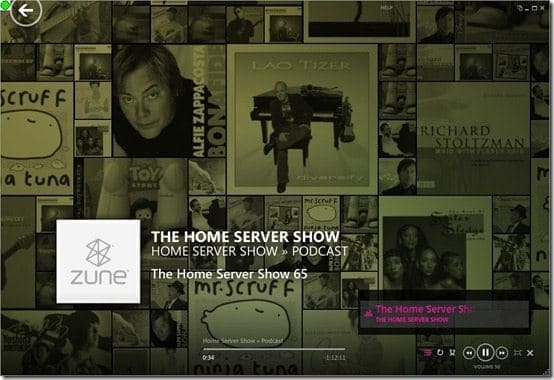
After Zune starts it will start to look around for your media. You can start playing your media immediately. It has some cool graphics while it plays.
Zune Article

Zune finds your media and puts it into different categories. Each category has different types. It can track all of your media.

Zune Article

Connecting your Zune

Once you connect the actual Zune player it recognizes the device and will start a Sync of your stuff. You control what is on the Sync.

Zune Article

Mental note: You can sync up to three Zune on a PC.

The first Sync takes a little while due to the amount of files but subsequent Syncs are quick.

Zune Article

You can also get stats on your player. I am not going to Sync photos or videos on the 8GB player.

Zune Article

Zune even looks at your music and gives you picks you might like.

Zune Article

The 8GB Zune Player and Car Kit

The 8GB is fine for music and short videos. The screen is a little small for videos and pictures and since the video and picture file is the same size you might want to get the larger player.

The Zune plays fine in the car although we had to keep changing stations as I drove up the 99 highway. The Zune also has a built in FM Radio! Sweet.

Map to your iTunes music

This is easy. According to Microsoft:

“You can import music and videos from iTunes directly into your Zune collection, so long as they do not have digital rights management (DRM). Follow these steps to import your DRM-free iTunes media directly into Zune software.

Import DRM-free music and videos from iTunes into Zune software

  1. In Zune software select Settings, then Software.
  2. Under Monitored folders, add a folder under Music that corresponds to the location of your iTunes music files, and another one under Video that corresponds to the location of your iTunes video files. Zune software will automatically add them to your collection.”

Playing Music

Now that I am up and running I am going to get me some Zune music…

Zune Article

…and play some of my favorites…

Zune Article

Movies and Recorded TV on Zune

Below is a SG1 movie (not in HD) I recorded in WMC and WHS TV Archived last month. It was automatically found by Zune.

Go Teal’c.

Zune Article

The SG1 file looked like the screen below in Zune:

Zune Article

I am not sure where my other shows are. They all are moved automatically to my Windows Home Server via TV Archive. I even have more of the same V shows. WTF?

Strange. Will have to look into that. Crap. And the one “V” show I had recorded that shows up? My Recorded TV show “V” had no sound.  #()$&*#@(%*$&

No HD AC3 encoding for Microsoft. Really? You are Microsoft right? Seriously.

Zune Article

Conversion option for non-protected WMC TV Recordings

This is SGU (not in HD) this week. I recorded it over WMC and wanted to have it on Zune as well as WHS. It is on WHS like the other SG show but in NOT in Zune. I do not have the patience to figure this out right now. Seriously.

Here is what I did:

  1. Move the file from your WHS back to your Windows 7 PC
  2. Right mouse click on the file to convert it to dvr-ms
  3. Use Windows Movie Maker to open the file
  4. Save it to WMV and let it finish in the background (it takes a while)

Once the conversion was complete Zune would finally see it.

I know there are other “toolboxes” that convert the files but I wanted to use Microsoft products. Why should I even have to do this?

Zune Article

Home Video

You can see my other video cam files, screen videos and converted SGU video in Zune. You can map any additional folders you want. Once the files are in the right format Zune instantly finds the files and any changes you may make.

Zune Article

Zune offers so much more…

I am only scratching the surface of Zune. I did not cover Channels, Podcasts, Social or multiple devices. It has games, videos and movies too!

I loved my 8GB so quickly that I bought a 30GB refurb from NewEgg for $62. How can you beat these prices?

iTunes and Zune?

I just heard a new group called Avenue H. Zune did not have the album so I bought it on iTunes. As soon as the download was complete I opened Zune and it had found the iTunes files. Sweet. I can have both and not choose sides. I use the radio streaming on iTunes anyway. Could you add that Zune?

Conclusion

If you are a music lover then Zune is for you. Once you do the math, and account for the one CD a month download, then the remaining cost is well worth it. I have actually saved money already by listening to a few albums I would have probably bought via Apple and then NOT liked them.

I am very happy with the performance and plan to get the HD version once (if) Microsoft works out the AC3 thing. I would ALSO like my TV Archive to automatically compress the shows I record. This AC3 thing is stopping all of that! Seriously, you are Microsoft. We look up to you to push the envelope of media integration.

See you next Friday night,

Timothy Daleo

Avast AntiVirus Bad Definition File

One of our readers, Todd Godlin has contacted us to advise about a problem with an update Avast released a few days ago which has caused havoc on his Windows Home Server, including deleting a number of program files! Thanks for the heads-up Todd!

It appears that Avast had a few problems and so you should be aware of this issue in case you are having any issues. If you are experiencing problems on your computers then you could use your Windows Home Server backups to recover.

This is what Avast have posted on their website:

“You may have heard that we released a virus database update early Thursday morning (or Wednesday night depending on the time zone). We are deeply sorry for releasing this update and the trouble it caused you. Of the users that received the update, most encountered no problems, some encountered minor issues, and some had significant problems.

I apologize to each and every one of you—I realize that security is fundamentally about trust and you have to trust your security provider. We made a mistake here and it won’t happen again.

We have highly automated systems and processes for testing and releasing virus updates. Updates are thoroughly tested before being released. But the process failed due to a “human failure”. This was an example of the old proverb “the road to hell is paved with good intentions”. Some engineers thought they were doing the right thing by sending out an out-of-cycle update to fix a problem. Unfortunately, they circumvented the automated systems and ended up sending out the wrong update—one that had not yet been tested.

There are detailed explanations of this issue and how to fix it on our support forum (http://support.avast.com/index.php?_m=knowledgebase&_a=viewarticle&kbarticleid=377). And our CTO has authored a detailed explanation of how this happened (http://forum.avast.com/index.php?topic=51783). In the next few days I will write another blog entry about how we are changing our processes to ensure this problem does not ever occur again.

In the meanwhile, please accept mine (and the company’s) apologies for the troubles we have caused you. We won’t let it ever happen again.”

The Home Server Show Podcast 67

Dave over at the Home Server Show Podcast has just released show number 67.

home_server_show_small

Dave says this about this weeks show:

The Home Server Show 67 – PP3 In Depth

Today, John, Jim, Chris, and Dave talk about PP3 in depth.  We will go over what we like and what we don’t like.  We will also go over a few tweets and forum posts about PP3.  Chris un-installs the beta and installs PP3 during the show.  This is another fun one with some outtakes at the end that you will not want to miss.

Are you going to CES?  I’ve added a forum to discuss all things CES.  Please drop by.

AJ and Diehard have been added as a moderators of the forums.  Due to fundage and time I’ve decided to stick with bbPress for now.  After the new year I’ll take another look at it but if you have suggestions for the forums there is a thread for that.

Show us your Tech – Mark Pendergrast

Add-In: Time Traveler I’m happy to see another “Pay Per Use” add-in coming to WHS.  I’ve always said, if It’s good software I don’t mind paying for it.

TV Archive Rights Issues – We talk about TV Archive a bunch.  Give a listen and please offer up your experiences.  Chris mentioned one article about rights but we were unsure if it applied to this instance.

Click here to listen to the show.

Diskeeper 2010 for Windows Home Server Giveaway

A few weeks ago we reported that the newest version of the disk defragmentation software Diskeeper 2010 for Windows Home Server was now available.

Well, its also been a little while since we did a giveaway, and you know how much we love to give things away here at Using Windows Home Server, so we have arranged with our very good friends at Diskeeper to giveaway 5, yes 5, full copies of Diskeeper 2010 for Windows Home Server worth $59.95 each.

So what do you have to do this time to win a copy?

Well, its simple. Just got to our forums and just tell us what you want for Christmas (and try to make it something fun and interesting!).

Click here to be taken directly to the correct forum.

The closing date is Friday 11th December, and I will announce the winners on the site on Saturday 12th. The 5 winners will be picked at random.

Good luck, and keep checking out Using Windows Home Server for more giveaways soon.

Diskeeper 2010 HomeServer edition key features and benefits:

  • New! IntelliWrite™ fragmentation prevention technology: a major advancement in system speed and efficiency.IntelliWrite prevents up to 85% of the fragmentation every system suffers from. It intelligently writes contiguous files to the disk so system resources are not wasted creating fragmentation. The results? A whole new level of system speed and efficiency beyond what can be achieved with defragmentation alone.
  • Gain unlimited defrag volume size capacity. Terabyte Volume Engine™ technology has the necessary horsepower to quickly and thoroughly defrag even the largest drives and volumes found on today’s powerful home servers.
  • Eliminate rapid fragmentation build-up. InvisiTasking® technology is a truly transparent, background processing technology that allows your PC to be defragmented in real-time, so your high traffic-traffic volumes don’t experience the detrimental effects of fragmentation between scheduled defrags.
  • Windows Home Server Console Integration. Only Diskeeper 2010 HomeServer includes full integration with the primary WHS management console. From any PC or laptop in your home you can adjust a setting, or view the History graphs — everything you need is available for easy access.
  • Extend the productive life of your Home Server. Extend the effective life of your Home Server by as much as 3 years.
  • Increase your Windows home server reliability. Hang-times, freeze-ups and other fragmentation-based crashes on your Home Server affect every other PC and laptop in your home. Fragment-free drives will ensure your gigabyte-sized movies stream to your video screen without a hitch.
  • Speed up your anti-virus scans. Experience faster back ups and avoid system crashes resulting from fragmentation-related problems.
  • Protect your system from crashing. Boosts the reliability of your Home Server by automatically preventing crash-inducing fragmentation of critical system files. Leave hang-times, freeze-ups and other fragmentation-related crashes in the dust.
  • Defrag even with less than 1% free space. Defragment even in the most extreme hard drive environments — with less than 1% free space or with files split into millions of fragments.

Review of the Swann ADW-300 Digital Wireless Security Camera

Here at Using Windows Home Server, we have reviewed security cameras in the past. This time we got sent one of the new Swann ADW-300 Digital Wireless Security Camera sets, that includes a high quality security camera and receiver.

IMG_1912

Swann describe the ADW-300:

  • Clearer Picture, better sound, every time
  • Zero Interference from bluetooth, microwave, web routers, cordless phones etc & is truly wi-fi friendly
  • Combine with up to 3 cameras for 100% privacy with a secure encrypted signal
  • Wireless 2.4GHz transmission between camera & receiver up to 165ft (50m)*
  • 26ft (8m) infra-red night vision
  • Perfect for professional uses & DVRs with motion detection
  • Installing wireless security has never been easier, just plug & play*Depending on local conditionsSPECIFICATIONSspecsFor full specifications, take a look here. WHATS IN THE BOX?

    The box is well packaged, and contains the camera and mount, the receiver, the wireless antenna, various cables and a manual and software.

    IMG_1913 IMG_1914 IMG_1915 IMG_1916 IMG_1917 IMG_1918 IMG_1919 IMG_1920

    INSTALLING THE SOFTWARE

    Installing the software was very simple, just pop the disc in and follow the on screen instructions.

    install 1 install 2 install 3 install 4 install 5 install 6 install 7 install 8 install 9 install 10

    At this point in the process you have to connect the wireless receiver to the computer.

    29-11-2009 08-55-14 29-11-2009 08-56-23

    This is where I first hit a problem. I was using a Windows 7 machine I just couldn’t get the drivers to install or appear. No matter what I tried. I even went to the Swann website and the download section, but there is no download options for this camera at the moment.

    So I built a Windows Vista machine to try and it worked first time!

    THE SOFWARE

    The first time you run the software you will be prompted to register. If you choose not to then the software will only run for an hour, so get registering, it only takes a minute.

    need to register

    When that’s done you can see the interface itself.

    The interface is very easy to use, with only a few buttons including record.

    29-11-2009 08-57-17 29-11-2009 08-57-45

    You can make various settings changes very easily, such as the sensitivity level of the camera and where the recordings are stored.

    29-11-2009 08-58-29 29-11-2009 08-58-41 29-11-2009 08-58-50 29-11-2009 09-02-01 29-11-2009 09-04-03

    FINAL THOUGHTS

    This camera was very easy to set up and use and the quality was very good. I had a number of other wireless kit running in the house and there was no interference what so ever, which is always a plus.

    The recordings were small and easy to view being avi files. Below is an example recording I took on the default settings. The quality is not as good as it could be because I was recording through a dirty window!

    My only criticism was the lack of Windows 7 support or information on the Swann website, but given Windows 7 has only been out 6 weeks it is not surprising!

    Cost wise, you can by the ADW-300 in the US for around $180 and in the UK for around £150. Thanks to Alastair for the update!

    So, if you are in the market for a good quality wireless security camera, you should seriously consider this one.