Seagate Adds Netflix and more to FreeAgent Theater+ HD Media Player

0

Yesterday Seagate announced that they were adding support for various popular Internet streaming providers to its FreeAgent Theater+ HD Media Player. These providers include Netflix and YouTube, amongst others.

fa_theaterplus_leftangle_remote_02_320x340

I have one of these devices and I have been meaning to post a review for some time, so expect it shortly, including this update!

Here is the complete release:

SEAGATE ADDS POPULAR STREAMING CAPABILITIES TO SEAGATE® FREEAGENT THEATER+™ HD MEDIA PLAYER

Addition of Internet-based Services and Enhanced Features Deliver Streaming of Licensed Content

London, UK — April 19, 2010Seagate (NASDAQ: STX), the worldwide leader in hard disk drives and storage solutions, today announced that its FreeAgent Theater+™ HD media player now delivers easy access to content from Netflix Inc. and other providers such as YouTube, vTuner and Mediafly. Customers of these services will have access to an even larger pool of both user-generated and licensed Internet-based media on their TV using the FreeAgent Theater+ HD media player. All new enhancements are being offered to existing FreeAgent Theater+ HD media player owners through a free, automated firmware update[1] that can also be downloaded from Seagate.com, and will be included as part of all future product shipments.

According to a recent report conducted by the University of California, San Diego and other sponsors[2], Americans consume information an average of 12 hours per day—41 percent of which is spent watching TV (including DVDs, recorded TV and real-time watching). Additionally, nearly 37 percent of broadband households in North America are extremely or very interested in viewing “Over-the-Top” video content on the home TV, according to market research firm, In-Stat[3].

A World of Content at the Click of a Button

Seagate’s media player is providing a gateway for people to consume digital media, whether it is stored locally or streamed through a network or the Internet. With the FreeAgent Theater+ HD media player, people can enjoy collections of photos, movies and music saved on a FreeAgent Go™ portable drive or any other USB-connected storage device. They can also choose to access and stream content using the included Ethernet port or optional wireless adapter, or connect directly to various video feeds including the Internet’s largest library of user-generated videos on YouTube.

“FreeAgent Theater+™ HD media player plays an important role in the evolution of how people are now enjoying digital media,” said Dave Mosley, executive vice president, Sales, Marketing and Product Line Management at Seagate. “We first envisioned this product as a way to move highly valued family photos and videos from the PC environment to the home entertainment center, but it has now become much more. The combination of access to local storage and streaming media playback with access to a wealth of online content makes the FreeAgent Theater+™ HD media player a valuable addition to modern home entertainment systems.”

People who own FreeAgent Theater+ HD media players can now also access more Internet content through services such as Mediafly, an aggregator of free and user generated content including podcasts, news, sports, comedy, pop-culture, technology and more. FreeAgent Theater+ HD media player can also serve up audio feed from vTuner, which provides access to more than 8,000 terrestrial and Internet only radio stations.

The media player is also now UPnP/DLNA compliant, enabling access and sharing of digital content using any DLNA compliant device on a network, including the Seagate® FreeAgent DockStar™ network adapter.

“People today have so much of their memories captured in a digital format —family photographs, home videos, and music libraries—locked away in PCs,” said Carl Howe, director, Anywhere Consumer Research, Yankee Group. “Devices that can present those digital memories in a comfortable living room environment as well as connect to burgeoning Internet content are those that will delight today’s ‘anywhere’ consumers.”

Improved User Interface, Additional Features and More File Formats: Easy Navigation and Usability

Following in its tradition of allowing consumers to sit back, relax, point, click and enjoy as digitally captured memories and favorite movies come to life, the FreeAgent Theater+ HD media player includes user interface and feature enhancements for video, photo and music navigation. The new capabilities include:

  • Improved MP3 cover art and tagging
  • Redesigned homepage view featuring better access to Internet and network applications
  • Redesigned thumbnail view for easier browsing of movies, pictures and music
  • Skip time option when watching movies to jump forward by 20 minute intervals
  • Ability to create screensavers using personal photos
  • Easy sorting of files when browsing network attached devices
  • UTF 16 character support
  • Ability to skip by 1000 items for faster browsing of files
  • WMA Pro audio support, enabling sound in the most of high definition of WMV files
  • Motion JPEG support commonly used by Digital Cameras and multi-compression PNG file support

[1] FreeAgent Theater+ HD media player owners will automatically receive the new feature enhancements and capabilities if the media player is connected to the Internet using the Ethernet port on the back of the device or the optional USB wireless adapter. If the device is not connected to the Internet, a copy of the new firmware encompassing the latest additions can downloaded by visiting the Home Entertainment Downloads section of Seagate.com.

[2] “How Much Information? 2009: Report on American Consumers,” Roger E. Bohn and James E. Short, Global Information Industry Center, University of California, San Diego.

[3] “Global Web-enabled Device Market Set to Explode,” Norm Bogen, January 2010.

Six Minute and Six Second Installation of a Sound Card and Media Card Reader on a Friday night – Video Edition

Another slow WHS week so I am doing a video of the final steps for my new budget HTPC. This week I will install a sound card and 3.5” media card reader in 6 minutes and six seconds.

Background

This is the last article on my cheapie HTPC build. The previous two articles are at:

https://moviesgamesandtech.com/2010/04/05/the-easy-250-outlet-htpc-on-a-friday-night/

https://moviesgamesandtech.com/2010/04/11/six-minute-and-six-second-installation-of-a-60-blu-ray-drive-on-a-friday-night-video-edition/

Equipment Needed

  • PCI Sound Card
  • 3.5” Media Card Reader
  • Six Minutes and Six Seconds
  • One Beer (optional as always)

I got these basic components cheap at Newegg. For those of you really into sound there are much better, and more expensive, sound options available. For most of us though, a sound card like this is fine.

image

image

Installation Video

This is a quick video of the installation. Although every computer model is different, the basic concepts are the same. If in doubt, check with the manufacturers website for service instructions and warranty information.

Here are a few quick links:

Dell

HP

Gateway

Sony

If you have a video camera why not do a video of your own?

Conclusion

After I started the PC, the drivers for the sound card and media card reader automatically installed. Sweet.

The HTPC was then moved into the house and placed behind the 50”. The wife accepted the location and we watched “The Hangover” in Blu-Ray stutter free. Super Sweet.

This project should be an easy sell to your family. For about $320 you not only get a Blu-Ray player and Windows Media Center but you also get other great features of Windows 7 such as Internet Explorer and Zune. In addition, you can also download applications like Google Earth, Skype and  iTunes. Netflix and Hulu also run great on a 50”.

100_4049

See you next Friday night,

Tim

Plextor Announces New PX-NAS2 Consumer NAS Drive

2

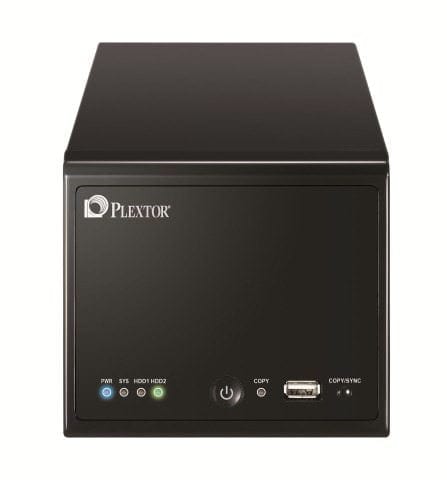
Plextor have this week announced the launch of a new consumer NAS drive, the PX-NAS2.

PX-NAS2 Front and Upper (High Resolution)PX-NAS2 Right Art (High Resolution)PX-NAS2-1T1 Retail Box (High Resolution)

The PX-NAS2 facilitates data back-up and storage as well as file sharing and streaming to other devices across a home or small office network. With security features, excellent cross platform
compatibility and the ability to effortlessly sync and share data – even without technical knowledge – the PXNAS2 is the ideal file management solution for the whole family.

PX-NAS2 Key Features:

Back-up, store and share data across a home or office network
Secure – user access control and data encryption to protect privacy
PX-NAS2 Utility enables easy detection and connection to device
Cross platform – compatible with PC or Mac system
DNLA 1.5 compliant – share data with media players, XBox, PS3
One-touch back-up from USB drives and cameras
Memeo software enables automatic backup to multiple locations
Auto resume feature following power outages
Three versions available – no HDD, 1TB or 2TB options
Pricing starting from £156 SRP
2 year collect and return warranty

The PX-NAS2 will be available from May 2010 in three versions:

PX-NAS2-BL1 – 2-Bay NAS without Hard Disk (SRP £156)
PX-NAS2-1T1 – 2-Bay NAS with 2 x 500GB (total 1TB) Hard Disk (SRP £248)
PX-NAS2-2T1 – 2-Bay NAS with 2 x 1TB (total 2 TB) Hard Disk (SRP £339)

More information can be found at: www.plextor.com

Review of the Icy Dock MB877IK Hard Drive Enclosure

If you want to swap out SATA or SAS drives on a regular basis from your desktop computer but you don’t want to continue to open the computer up, then you should take a look at the MB877IK Hard Drive Enclosure from Icy Dock.

Over the years I have collected a number of older SATA hard drives as I have replaced them. Some of these go in my Windows Home Server and some are just used to store older stuff on. Whenever I need to access those drives, I either have to open my main desktop computer and sway things out, or I use an external device that enables me to sit the drive in. However, both of these are not ideal, the external device often plays up and I don’t like leaving my drives “exposed”.

This is where the MB877IK comes into play. This enclosure sits in your desktop and enables you to just slide a drive in and use it. As with other Icy Dock equipment it also cools the drive as well.

One great addition to this enclosure over other drive enclosures I have seen and used is that this one enables you to use SAS drives. SAS stands for Serial Attached SCSI and these drives are a lot smaller and faster!

Icy Dock MB877IK

WHATS IN THE BOX?

The box is very small, in fact only slightly bigger that the drive enclosure itself. It contains the enclosure, a set of keys to lock the drive in place and a small user manual.

Icy Dock MB877IKIcy Dock MB877IK

Icy Dock MB877IKIcy Dock MB877IK

A CLOSER LOOK

As you would expect from a drive enclosure, it is very simple to use and fit. The rear of the enclosure has a power connector, a fan and two SATA ports.

Icy Dock MB877IKIcy Dock MB877IK

Icy Dock MB877IK

ADDING A DRIVE

Adding a drive to the enclosure is very simple. You just open the front of the enclosure and slide the hard drive in and as it slides in, the front closes up with a click. You can then choose to either lock the drive in place or not bother. For ease of showing this, the pictures below show the enclosure outside of a desktop computer, although you would do this with the enclosure already fitted in the desktop.

Icy Dock MB877IKIcy Dock MB877IK

Icy Dock MB877IK

CONCLUSIONS AND FINAL THOUGHTS

There isn’t really much else to say on using the enclosure. It is very easy to fit, easy to use, and works very well. Simple!

The enclosure remains powered up at all times when the computer is switched on. I suppose I would have preferred an on/off switch at the front perhaps, but this isn’t a huge problem. And in the past I have certainly used Icy Dock enclosures for all my drives, even those I had no intention of swapping out.

Make sure that you connect the SATA cable to the correct port on the back of the enclosure, because yes, the first one I connected it to was no the right one! Still, that only took a moment to correct.

Overall I can highly recommend this enclosure as it works and does what it says on the tin. Yet another product from Icy Dock worth having.

To learn more about this enclosure, and other products from Icy Dock, click here: http://www.icydock.com/product/mb877ik-b.html

The MB877IK Hard Drive enclosure retails for less than $35, so it certainly won’t break the bank.

Tranquil PC Harmony T7-S Windows Home Server

With the news that HP have stopped production and will no longer be selling their single drive LX195 Windows Home Server, Tranquil have released a special edition single drive WHS.

Tranquil PC Harmony T7 Series 2 WHS

Here’s how Tranquil describe the Harmony T7-S:

Fitted with a high performance dual core Intel D510 CPU and 1GB of high speed RAM this server will tear through its tasks with ease !

Yet, it consumes so little electrical power, you could leave it on 24/7 and it will only cost approx £17.00 per year !

With the near silent operation (you’ll only know it’s turned on as the power LED is blue) and tiny size, this is a Home Server for everyone, everywhere !

· Very low running costs

· Almost silent

· Tiny cabinet size

· Can be secured to walls / desks

· Excellent reliability

· Long term warranty

· Includes the AVA Media CD ripping engine

· UK designed and manufactured

· First Class technical support / knowledge

  • Harmony T7-S Home Server in Black cabinet
  • 1x 500GB HDD (2.5” fitted)
  • 64 bit ready Dual Core Intel Atom D510 (2 x 1.66GHz)
  • 1GB RAM
  • Media Kit and Server Restore kit
  • Universal Power Supply and country specific power cord
  • 24 months RTB warranty

    Order now – http://www.tranquilpc-shop.co.uk/acatalog/Home_Server_Specials.html

  •  

    Get one now, and save over £40.00 against the standard price and as a special UWHS offer, enter SUB300 at the checkout and get a further £25.00 off – bringing the price to Sub £300 incl VAT !!

    Microsoft Office 2010 RTM Today

    Microsoft Office 2010 has just been released. You can pre-order it directly from the Microsoft website.

    Microsoft Office 2010

    The link is at MICROSOFT OFFICE

    “Free ground shipping only available to the 50 United States and D.C. No APO/FPO addresses, PO Boxes or U.S. Territories. Offer is not valid on previous orders, and is non-transferable and not redeemable for cash.

    A credit card is required for pre-order, but your card will not be charged until your order is shipped or the product is made available for download.

    Pre-orders are covered by our Pre-Order Price Guarantee and can be reviewed, updated, or canceled at any time before pre-order items are released.

    Please see our Pre-Order Policy for more information.”

    Excerpt from: http://store.microsoft.com/Category.aspx?CatId=210

    Software acronyms you might want to know about…

    RTM = Release to Manufacturing

    RC = Release Candidate

    SR = Service Release (aka Service Pack)

    WR = Web Release (no DVDs or other media)

    EOL = End of Life

    Alpha = Software Testing

    Beta = Software Development

    Hope you get a chance to try it. I have been running the beta since last year and it has some nice features.

    Tim

    Now We Know – Microsoft hohm beta

    Microsoft has recently created a new website for the eco-geek in all of us. Head on over to the Microsoft hohm website and get started today on tracking your energy usage!

    Microsoft hohm

    Microsoft hohm

    Microsoft hohm beta is a free web application from Microsoft that will help you track the energy usage in your home. According to the hohm website it will allow you to:

  • Understand where your energy goes and how to start saving today
  • Compare your energy use to friends and neighbors
  • Engage with our active community to get tips and share your own
  • Build a project list based on how much you want to spend or save
  • Take charge of your home energy use and learn how to help our planet
  • For those of us that are early adopters, this is a great opportunity to be ahead of the game.

    Sign up at Microsoft hohm !

    Energy Survey and Usage Input

    Once you sign up for Microsoft hohm with your Windows Live ID you can then take an energy survey about your home.

    Mental Note: Do not leave the “default” data in the survey even if it is the same information as you would normally enter. The percentage complete does not count “default” data!

    After you complete the survey, or as much of it as you can, then you need to spend some time entering your current energy bill information. I had all of my water and electrical usage in an Excel sheet so it was easy to input. I did NOT have my gas bill but I just went to my gas company website and downloaded my history. It only took me about 30 minutes to get all of my data on to the website (and take the survey) and now I only need to enter data once a month to keep up with it.

    Microsoft hohm

    Eventually the website will be able to download data from the major energy service providers!

    Charts and Graphs – What Do They Mean?

    Once you have entered your usage data you can see how your statistics relate to your energy usage and how that usage compares to others.

    Overall I am very efficient in my home compared to the average.

    Microsoft hohm

    Is It Useful? YES!

    My wife and I recently installed all new argon filled windows ourselves, had cellulose insulation installed, new eco-washer and dryer, put in solar attic fans (PITA) and replaced wall insulation (another PITA) where we could. While our heating and cooling usage is now very low, my appliances are now the high use items. And from those appliances I can see that my “other” (meaning electronics and PCs) are almost as much as the rest of our appliances!

    This chart shows my electricity usage as compared to last year. I am over my last years number so I need to start looking at reducing my usage even more. More electronics, more use!

    Microsoft hohm

    This cool chart shows the temperatures so I can relate that to usage.

    Microsoft hohm

    This chart shows the breakdown of the energy. You can see that my major appliances and “other appliances” (meaning my PCs, servers and drives) use almost the same amount of energy. Time to start putting some systems to sleep!

    Microsoft hohm

    The Future of Microsoft hohm

    Overall this web site is really cool. Someday soon your Nissan Leaf will not start charging until your evening electricity rate kicks in. Image in our near future that our kitchen appliances all start, stop and be monitored over Wireless-N!

    Microsoft will end up tying in to power companies, meters and vehicles as time goes on. Microsoft even has a short animated video showing the end state at:

    Check out some of their other videos on YouTube!

    I hope you get a chance to check it out and sign up!

    Now We Know

    Tim

    The Home Server Show Podcast Number 85

    Dave and the guys over at the Home Server Show have released podcast number 85.

    home_server_show_small

    Here is what Dave has to say about this week’s show:

    Today’s episode features an interview with Windows Weekly podcaster Paul Thurrot.  We get in depth with Paul about his home server, storage, and Add-Ins.  Also on show 85, we talk about our favorite Add-Ins.  News, new Add-In releases, and more!

    Here are the links to items discussed on episode 85.

    Jim’s Add-Ins
    Advanced Admin Console
    Add-In Central

    Chris’s Add-Ins
    AutoExit2009
    Disk Management

    John’s Add-Ins
    Add-In Central
    Digital Archound
    MyMovies
    PerfectDisk 11

    Dave’s Add-Ins
    Grid Junction
    Remote Notification
    MyMovies
    KeepVault

    Antivirus for Windows Home Server

    ClamAV for Windows Home Server updated

    ESET Nod32 on Windows Home Server

    As usual you can listen to the show from here: http://homeservershow.com/the-home-server-show-85.html

    I wonder if the drinking game will be on tonight?

    Tranquil PC SQA-5H SuperStor Windows Home Server Ships Today

    If you have pre-ordered one of Tranquil PCs SQA-5H SuperStor Windows Home Servers then today is the day it ships.

    Tranquil describe the SQA Superstor :

    Do you have a large media collection? The SQA SuperStor is possibly the world’s largest non-industrial digital storage appliance when coupled with suitable HDD housings, i.e. the SQA-Ex – servicing up to 40TB (40,000GB) of data capacity ! That’s approx 9000 DVDs or 60,000 CDs

    IMG_2229

    You can check out our exclusive review here: https://moviesgamesandtech.com/2010/03/29/exclusive-review-of-the-tranquil-pc-sqa-superstor-windows-home-server-and-sqa-ex/

    And you can order your SuperStor from here: http://www.tranquilpc-shop.co.uk/acatalog/SQA-SuperStor.html

    Six Minute and Six Second Installation of a $60 Blu-Ray drive on a Friday night – Video Edition

    We all know that Blu-Ray has the best picture quality available for television, but did you know it is available for your existing PC for as low as $56 online? If your computer meets some basic requirements you can be watching Blu-Ray in a matter of minutes. This Friday night I will show you how to quickly add a Blu-Ray drive to your desktop computer.

    Blu-Ray Front View

    Typical Blu-Ray System Requirements

    • Blu-ray Disc drive
    • Dual or quad core processor recommended
    • 512 MB RAM (minimum), 1 GB or more recommended
    • 256 MB Video graphics or higher
    • Operating System – Windows XP with Service Pack 2 (or higher)

    More information can be found at

    http://www.cyberlink.com/stat/bd-support/enu/system-requirement.jsp

    Which One Do I Buy?

    Blue-Ray drives for desktop computers are identical to DVD drives having the same form factor and cable connections. You can order these drives from most online retailers such as Newegg, TigerDirect, Frys, Microcenter etc. I think there are six major manufacturers out there now. Choose the drive based on your price point and brand preference.

    Blu-Ray Drive

    Before you purchase a new drive make sure you have an extra 5.25” bay in your case. If you do not have an extra bay then you will have to remove your existing DVD drive. This may not be an option if your system is still under warranty. In addition, the less expensive Blu-Ray drives are ROM, meaning they only read the disks and do NOT burn DVDs.

    Newegg Invoice

    Other Considerations

    If your computer is more than three years old you may want to look inside and make sure you have the proper connections. You need to make sure you have an available SATA port on your motherboard. Older PCs had IDE DVD drives (not SATA) so if you are replacing a drive, verify that you can change it out and have the proper cables before you start.

    Choose a Blu-Ray drive that comes with playback software. Your PC probably does not have the correct software to play the Blu-Ray once it is connected and installed. Some OEM Blu-Ray players do NOT ship with software. Try and find a drive that has the software.

    You can also buy Blu-Ray playing software online but it costs anywhere from $50 to $100!

    Ok, enough of the specs. Lets set this pig on fire!

    Equipment Needed

    • PC with available SATA port
    • Blu-Ray drive
    • SATA cable
    • Blu-Ray software (should come with drive)
    • One Beer (optional as always)

    Installation Video

    This is a quick video on the installation of a Blu-Ray player. Although every computer model is different, the basic concepts are the same. If in doubt, check with the manufacturers website for service instructions and warranty information.

    Here are a few quick links

    Dell

    HP

    Gateway

    Sony

    If you have a video camera why not do a video of your own?

    Once you have upgraded to Blu-Ray I doubt you will ever go back to DVD!

    See you next Friday night,

    Timothy Daleo

    The Gadget Show Live 2010

    7

    This week the NEC in Birmingham is home to the Gadget Show Live, and I paid a visit.

    Gadget Show Live

    The Gadget Show is a TV programme on Channel 5 here in the UK. Each week the presenters look at different gadgets, and for a few days each year there is an event held for the public to come along and see different gadgets and even get hands on with them.

    I decided to go along yesterday and see for myself. The event had been sold out for a few months now and when I got near the NEC there were huge queues of cars waiting to get into the car park. Once all that had been done, it was the long walk from the car park to the event itself (anyone who has ever been to the NEC will know just what I mean).

    I’m not really sure what I was expecting from the show. I have been to CES in Las Vegas a number of times, but that isn’t open to the public, so I think the first thing that really surprised me was the huge number of families and children at the event. Also, the event was more about companies selling their products rather than showing off their technology.

    The Gadget Show Live 2010The Gadget Show Live 2010

    Some big names were there, such as Sony and Panasonic, showing off 3D televisions along with High Street names like PC World and The Game selling computer systems and games.

    For those of us who have been into gadgets, computers and consoles for a lot longer than we might care to admit, there was the Gadget Hall of Fame. Here you could see games consoles and computers dating back to the 70’s, including my very first computer, the Sinclair ZX Spectrum.

    The Gadget Show Live 2010The Gadget Show Live 2010

    What was also nice was this area also has a Windows Media Center PC running. What wasn’t so good was that it kept blue screening!

    The Gadget Show Live 2010

    I even managed to get a closer look at the Data Robotics Drobo FS I posted about earlier in the week: Data Robotics Launch the Drobo FS

    The Gadget Show Live 2010The Gadget Show Live 2010

    The Gadget Show Live 2010The Gadget Show Live 2010

    The event as a whole felt a lot more like the Ideal Home Exhibition with gadgets than CES, but I suppose it wasn’t really that sort of show. I was expecting to see a lot more tech and a lot less sales, but on the whole everyone seemed to be enjoying themselves which is what the point of the show was.

    For more information on the Gadget Show Live, click here: http://www.gadgetshowlive.net/

    Dragon NaturallySpeaking 10 and UWHS Giveaway Results

    2

    Our friends at Nuance provided us with 4 copies of Dragon NaturallySpeaking 10 Preferred Mobile edition, worth around £200 each to give away, and now it’s time to announce the winners.

    Dragon NaturallySpeaking 10 Preferred Mobile includes the great Dragon software, plus a headset an also a cool digital recorder from Philips.

    Dragon UWHS Giveaway

    And all you had to do was answer 3 simple questions:

    Question 1: How many main editions of Dragon NaturallySpeaking 10 are there (hint, check the above article)?

    Answer: 5

    Question 2: At this year’s CES in Las Vegas I did a video of a drone along with a post or two. Who makes that drone?

    Answer: Parrot (its the AR Drone)

    Question 3: How many devices can a Powermat charge at the same time just by using the mat itself?

    Answer: 3

    We had a huge response to the giveaway, and we have selected 4 lucky winners at random:

    Robert Echten, Mexico

    J. Manders, Australia

    Neil Graham, UK

    Todd Godin, USA

    Congratulations, your prize will be winging its way to you shortly – for those of you outside of the UK I will send it airmail so it should be with you soon.

    Keep checking out UWHS for future giveaways – we have some cool stuff planned for 2010!

    Made for Media Center Windows Media Center Addin

    2

    Back in November last year, we reported on the great work that my friend and fellow MVP Ian Dixon was doing with the Made for Media Center App Store : https://moviesgamesandtech.com/2009/11/17/made-for-media-center-the-app-store-for-windows-media-center/

    Made for Media Center

    Yesterday Ian announced an add-in for Window Media Center that enables you to download add-ins directly from Media Center.

    Here is what Ian had to say:

    We have been really pleased with the response to the Made for Media Center app store, with thousands of registered users it shows there is a market for quality Windows Media Center applications and the benefit of having them in one location. At the time we launched we said we were working on a 10 foot UI so you could download Windows Media Center apps directly from the Media Center UI and I am very pleased to say we have a beta of the Media Center Addin ready for you to play with.

    First you will need an account at MadeforMediaCenter.com and then go to the download page and selection either the 32bit or 64bit version.

    The first time you launch the application you will be asked for your MadeforMediaCenter.com account details, in the current version the PIN number feature is not enabled in future versions you will be asked for your PIN (set via the download page on the websites) when you download an app.

    From the app you can install any of the Media Center apps without leaving Windows Media Center,

    We are still working on a few minor issues but all the main features are there. If you have an issues, comments or feedback you can leave them in the Made for Media Center forum and don’t forget to follow @4mediacenter on twitter.

    Well done Ian, this is great! Keep up the excellent work.

    If you have Windows Media Center, then you have to get this add-in now.

    HP X510 Data Vault Now with 3 Year Warranty and KeepVault EMEA News

    Earlier this week, HP got in touch to let us know that they are extending the 1 year warranty on all HP X510 Data Vault servers to 3 years at no charge.

    Here is what they said:

    As of last week, all new and existing HP StorageWorks X510 Data Vault customers will now benefit from a three year return-to-base warranty on their device.  HP has updated all of its warranty and support databases, so anyone needing to ring HP with an issue will not have to “re-register” or notify the support teams of this change.  This is a significant enhancement to the product and should give users greater confidence and peace of mind when considering whether to invest in HP’s emerging business Windows Home Server solution.

    (Note: this change applies to Data Vault only; MediaSmart Server warranty remains 1 Year)

    It is very interesting to note that HP clearly see that businesses (who the X510 is primarily aimed at) require more than just a 1 year warranty.

    The other piece of news from HP is that Proxure’s KeepVault add-in is being offered at a 20% discount for EMEA customers.

    Here is what they said:

    Also, HP has launched Proxure’s KeepVault as the de facto online backup add-in for X510 Data Vault customers in EMEA.  The service is available in English, French, German and Spanish and HP customers can enjoy at 20% discount on Proxure standard pricing.

    HP is excited to present users with KeepVault, an online backup service that is designed for WHS customers.  With KeepVault, users can select individual subfolders and top level WHS shares for real time, continuous protection or schedule regular backups when convenient.  Data is encrypted prior to transfer, and remains encrypted in the vault.  KeepVault provides notifications to email, SMS, or Twitter.  In case of lost data files, users can recover all missing files on their PC with the One Click Recovery feature, and all of this for a fixed annual subscription price that can easily be upgraded as your storage needs grows.

    The Keep Vault is available in two flavours, standard “Keep Vault” and “Keep Vault Pro and Business”.  KeepVault Pro and Business has all of the features of KeepVault, and additional value for small businesses and advanced users.  KeepVault Pro and Business sports best in class upload speeds, up to 3X regular KeepVault speeds.  Data is encrypted prior to being sent, and remains encrypted in the cloud with secure 128 bit encryption (soon 256 bit).  Customers can backup multiple HP Data Vaults to the cloud, and can access their files from any internet connected computer – at home, office, or on the road.  KeepVault Pro and Business includes administrative features such as enhanced alert notification, proxy server support, and admin lockdown.

    Customers can get access to KeepVault Online Backup and full service details from the offer site at http://hp.keepvault.com/offer.php?refer=rr_hpwhs.

    We reviewed KeepVault for Windows Home Server last year: Add-In Review – KeepVault v3.0 for Windows Home Server