Internet Explorer 8 Released Today

IE8

Later today see’s the launch of Microsoft’s Internet Explorer 8 browser. IE8 has been available as a beta for quite a while now, but today it’s finally moved to a released version and it is available in 25 different languages.

Some of the new features of IE8 include:

Accelerators. Accelerators make it faster and easier to perform common tasks online by making Web-based services such as ESPN.com, Live Search and Sina available for use directly from the page people are viewing. Users can simply right-click a word or phrase and instantly map, e-mail, or share it.

Web Slices. Web Slices in Internet Explorer 8 makes favourite information from sites such as Digg, Yahoo! Mail, OneRiot, and eBay instantly available wherever someone goes on the Web.

Visual search suggestions. The Instant Search Box in Internet Explorer 8 enables rich, real-time search from sites such as The New York Times, Amazon.com and Wikipedia, as well as sites from people’s own Favourites and History, complete with visuals and detailed information that saves time.

There are also a number of security enhancements in IE8, including:

InPrivate. InPrivate helps to protect people’s data and privacy from being retained locally on the PC they are using. This protects against third parties who might be in a position to track a consumers’ online activities. Consumers have the ability to use either of the features (InPrivate Blocking or InPrivate Filtering) independently.

InPrivate Browsing. When activated, InPrivate Browsing helps ensure that History, temporary Internet files and cookies are not recorded on a PC after browsing. When in InPrivate Browsing, toolbars and extensions are automatically disabled, and browsing History is automatically deleted when the browser is closed.

InPrivate Filtering. InPrivate Filtering helps protect privacy by enabling the consumer to filter content coming from third parties that are in a position to track and aggregate their online behavior. Users are provided with notice, choice and control of which third parties to allow and which ones to filter.

I have been using the beta of IE8 now since the middle of last year and while some of the earlier beta releases had problems, I have to say that I actually do like it. There are some websites that it has problems with, but there is this Compatibility View which you can choose to show those websites instead.

To download Internet Explorer 8 today, click here.

Note: If you are one of those people, like myself, who is running Windows 7 in beta as well, you cannot upgrade to IE8 at this time, you will need to wait for the release candidate of Windows 7.

Windows Home Server on TechNet and MSDN – Not Quite Yet

Further to yesterday’s post, it appears that Windows Home Server is not quite yet ready to be on TechNet and MSDN and that it was just a test of the system.

Don’t worry though, it is coming….. stayed tuned, there will be an announcement very very soon 🙂

Windows Home Server Finally Available on TechNet and MSDN

Phil over at MSWHS.com is reporting that Windows Home Server is finally available on both TechNet and MSDN.

This is great news and has been a very long time coming. I’m not going to get into all the details as to why it has taken so long, but what I will say is that the guys in the Windows Home Server team have been working very hard for a very long time to make this happen. Well done guys!

And just to prove it is there, I took this from my Subscription page 2 minutes ago 🙂

WHS TechNet

The 2008 Engadget Awards – Voting Now Open

Engadget awards

The 2008 Engadget Awards are now accepting votes for the technologies that you loved in 2008. The categories include Best, and Worst, Gadget of the Year, but also you will notice that the HP MediaSmart Server ex487 is listed as a finalist in the Storage Device or Technology of the Year category. That is great news that a WIndows Home Server is listed. So go and vote for it 🙂

Engadget awards 2

To cast your votes, click here by March 25th 2009 at 11.59pm.

Building an Astaro Personal Firewall with Spare or Low End Parts – Part Two now available

Last week I posted that my friend, and fellow MVP Pete Stagman had just published the first in a series of articles on how you can build your own Astaro Personal Firewall with either spare or low end parts, and no other cost.

Well this week he has posted part two which includes how to connect your new Astaro firewall to your network, an explanation on IP addressing and subnet masks, and even information on if you want to run a Web server or a Windows Home Server on the network.

To read part two, click here.

New Windows Home Server Article in the Sydney Morning Herald

Today’s Sydney Morning Herald newspaper has an article on Home Servers in their Digital Life section under the Buyer’s Guide called Are you being served?

The article is relatively short and in fact, Windows Home Server only gets a mention at the end of the article, but its worth a quick read to see what else is out there.

To read the full article click here.

UK Windows Media Center and Windows Home Server Usergroup Event

April 21st 2009 will see the first UK Windows Media Center and Windows Home Server Usergroup Event taking place at the Aston Science Park in Birmingham.

Ian Dixon of the Digital Lifestyle.com has organised this event and it should be a great day.

I am presenting a session on Windows Home Server, so why not come along and support me / heckle me (delete as appropriate). I’m still not sure how Ian roped me into doing it, but I think it may have been something to do with the Digital Lifestyle.com t-shirt he gave me at CES 🙂

More details on the event will be available in the next few days, but for now go and register for the user group by clicking here.

Upgrading Windows Home Server to a gigabit network on a Friday night

Equipment required:

Gigabit capable Windows Home Server and at least one other gigabit capable computer

Gigabit router and switches

Cat 6 Cables of various lengths

4 Beers (2 of which are optional)

Windows Media Center playing your favorite party mix

7,246 zip ties

Background

In my home office for the last six years I have been growing a 100 Mbps network. I water half an inch twice a week in partial shade for best results . The current network is comprised of a cable modem connected to a WRT54G Linksys wireless router with two Netgear 100 Mbps switches. I have four Dell laptops on docking stations, two Dell desktops, a fax, multiple NAS devices, a HP3600 printer, one beer (as shown in the picture) and WHS running on a Dell SC440 PowerEdge. One office, two people, seven computers and nine LCD screens. The ratio sounds about right.

DSC_0023_stitch

I would like to say thank you to my wife for always letting me go free range and another thank you to Microsoft and the Image Composite Editor for creating the above panoramic.

http://research.microsoft.com/en-us/um/redmond/groups/ivm/ICE/

Mental Note: That little girl on the MS commercial totally smoked me on the quality of the panoramic picture of her fort. Loser.

Why am I upgrading to Gigabit?

In the last few months I have expanded my network out of the office to the living room with a HP Media Connect and Netflix Roku. In addition, five of the seven Dells have underutilized gigabit controllers and my Roku and HP are just screaming to get off of wireless G. Now, while I only get 10 Mbps from Charter out of the modem, I am constantly battling slow speeds inside the house during file transfer, streaming and backup. I like HD content through Miro downloads and WMC and have been waiting for 1000 Mbps to come down in price. Apparently, this week was the price point for which I have been waiting. Sorry wife, this might hurt a little. Remember prom?

My shopping list was the following:

  • D-link DGS-2205 5-Port Switch for $24.99 after rebate
  • D-link DGS-2208 8-Port Switch for $34.99 after rebate
  • D-link DIR-655 Wireless-N Router for $92.99
  • 15 Cat 6 patch cables ranging from 1-50 feet for $58.00
  • 12 pack of Taurino from Fresh and Easy for $6.99

Total for this upgrade is $217.96 plus tax.

100_2561

I have always been a Linksys man but the latest performance statistics for a new gigabit network led me down a different path. You should choose your own equipment based on need, price point and coolness factor. All of my network is hidden under the desk so I do not care what it looks like. For performance I referenced the site below to get speed ratings for all of the equipment I purchased.

http://www.smallnetbuilder.com/

This website tests almost every piece of network hardware you can imagine. The menu bar at the top of their website directs you to all of their tests. This website also did a review of the HP MSS a few weeks ago that was very comprehensive. There are other sites out there so find at least one to research before you shop.

So back to my Friday night…

Installation

Every installation will be different and I will suggest one thing: Replace your router/wireless (gateway) first, and then the rest of the cables and switches. I changed my router first and once everything was working again I started on the remaining network changeover. The last thing you want to do is gut your network, have a problem and then try and troubleshoot the whole system. Do not do it. Seriously.

I upgraded from the WRT54G to the new DIR-655 and it is working well. I will have to adjust the settings and reconnect all of the wireless devices after the install.

I am going to skip the narration of the equipment change out and cabling runs. I will say that all of my existing 100 Mbps Cat 5 cable is blue and I went out of my way to order yellow Cat 6. The color change will always keep me from mixing up cables in the future. I have also finished running the cables and everything looks good.

100_2564

This is the underside of my IKEA desk. The one white cable is the one that I used to connect to the other switch in the server closet. The router LEDs change color based on 100 or 1000 Mbps speed.

100_2562

I have my printer and server on the switch shown above.

While I was down on the floor I cleaned up the APC for each of my five power groups and moved the NAS boxes (will hook up again someday) to the closet. NAS? Oh really? I mentioned that earlier. I, probably like you, started out with an external hard drive, then moved up to a NAS (or two or three) and then realized that I could have spent the same amount I paid for multiple NAS boxes on a home-built WHS. Lets join together and stop others from making our mistakes. Seriously. Viva WHS. Viva WHS. Viva WHS.

Testing

Now that everything is connected, and the network is up and running again, let’s see if it was worth the $217.96 plus tax. I will need a significant increase in speed if I am going to continue to justify future expenses to the wife.

For testing the new network speed I am going to do two tests. I am going to copy the first episode of Star Trek Voyager which is 952MB to the server and one folder with 973 MB (240 SLR pictures) from our hiking trip last weekend. My purely scientific timing method goes like this:

  1. Right eye looking at the sidebar clock through the bottom of my full Taurino bottle. Left eye on the progress bar.
  2. Start file upload and start drinking.
  3. If I complete the file transfer before I finish the beer then we have a successful test.
  4. Document the results in Windows Live Writer (to qualify these results as “scientific”).

Let’s set this pig on fire…

Download Before

Download After

Upload Before

Upload After

952 MB Video File

1:37

:55

1:31

:44

973 MB Picture Folder

2:12

1:16

2:52

1:04

What the heck? What happened to my pig? Where are my superfast increased speeds?  If I did the math right, I think I went from 78 Mbps to 138 Mbps on the download of Voyager? How can this be? Double the speed is good but I was expecting more. Crap². My upload is 173 Mbps? I was expecting like 600 Mbps. Crap³.

Well, after an hour of searching around to see if I had made some massive mistake, I found an article that I wish I had read before I started this endeavor.

http://on10.net/Blogs/EnglishBloke/how-can-i-speed-up-my-windows-home-server-file-copies/

After reading this article I realize that my speeds were not too bad considering I am using folder duplication, full sharing and have a Seagate Desktop Pro USB drive as part of my WHS storage. Should I be thankful for my transfer speeds? I would not mind a few comments from the readers about their file transfer times. Please make me feel better about this people. Seriously.

Your Mileage Will Vary

I have left out some topics that you might want to address for your specific installation.

  • I am not going to use Jumbo frames (4K or 9K) since I still have some older computers on my network.
  • Flow control should also be researched to see if it can help your network speed (My WHS Flow Control was already disabled and I adjusted each gigabit card accordingly)
  • I did not talk about managed switches and segmenting your network or VLAN. Maybe I can talk about that later in the Friday night series.

You can find detailed information on these topics at:

http://www.smallnetbuilder.com/content/blogcategory/22/54/

In addition, if you have VoIP, integrated home security or home automation you may have additional concerns. Our alarm backup plugged back in without any issues.

Conclusion

If you have an existing 100 Mbps network you may want to do you own research and time trials before moving up to gigabit. Upgrading the router was worth it since my extenders use Wireless N. For the switches and cabling, although I did see increases in speed, it was somewhat costly compared to the net change.

See you next Friday.

Windows Home Server Facebook Group

facebook

So unless you have been living in a cave for the last couple of years, in which case Welcome, you would probably have heard of Facebook. Facebook is a social networking site that people use to communicate with their friends and colleagues, post pictures and information about themselves, join groups that interest them, and generally just be social.

Did you know that there is a Windows Home Server group on there? Well, actually, there are several Windows Home Server groups on there, but there is only one run by some of the guys in the Windows Home Server team at Microsoft.

This group was actually created on the 5th November 2007 and as of today has 627 “fans”. It has some interesting things on there – you should go have a look.

If you would like to join the largest Windows Home Server Facebook group, click here.

Hacking The HP EX470/475 MediaSmart Servers : Get Your Hack On

The other night I posted that Ed Tittel has put together a great post that explained where to get the latest drivers if you happen to own an HP MediaSmart EX470 or EX475 Server.

Ed has now published a much longer article on Tom’s Hardware site that includes this information but also lots more including how to change the processor and also benchmarking your MediaSmart Server.

This is a useful read as this information can be found all in one place, rather than having to search around for it which has been the case up until now.

You can read Ed’s full article here.

Windows Home Server – The Next Version Webcast

Microsoft are advertising a webcast for Microsoft Partners called “5W/50 Series – Windows Home Server – The Next Version”. This is a free to attend webcast due to take place on Friday 5th June 2009 at 9am Pacific US time, for an hour.

I am not sure at this stage now much information on “Vail” – the next version of Windows Home Server, will be included, but certainly there will be information on Power Pack 2, and some other things as well, but you will have to wait and see just what that is – I don’t want to spoil the fun.

The event is going to presented by my friends and fellow MVPs Kevin Royalty and Grey Lancaster, and I will also be helping out, so it should be fun.

Spaces are limited for this so make sure if you are interested in attending that you register soon, even though it is not until June!

You need to be registered as a Microsoft Partner to register for and attend the webcast event, but it only takes a few minutes to register if you are not one already, and can be done from the link below.

To register for the webcast (and also to become a Microsoft Partner), click here.

Epson to Release New Windows Home Server

According to Akihabaranews in Japan, Epson are going to release a new Windows Home Server called the SV120h.

Epson SV120h Windows Home Server

This machine started life as the Epson ST120 Endeavor and the size is only 75x185x195mm.

There will be a choice between two CPUs, with a Celeron 575 (2GHz) or a Core 2 Duo P8600 (2.4GHz) from 160GB to 2x500GB (1TB) of HDD. By default the SV120h will be powered by an Intel GM45 Express video chipset, have 1GB of RAM (up to 4GB).

The entry price of the SV120h will be around 65,000 Yen for the Celeron version (€520).

No news yet as to release anywhere else outside of Japan – more news when we get it.

Single Sign-on with ASP.NET on Windows Home Server

Brendan Grant has just published an article on utilising single sign-on with ASP.NET on your Windows Home Server in order to use with custom web applications.

You can read the full article here.

Brendan you may recall wrote the excellent Web Folders add-in for Windows Home Server (amongst others) before joining Microsoft and the Windows Home Server team.

Sam Wood, another brilliant developer of Windows Home Server’s add-ins also talks about the article here.

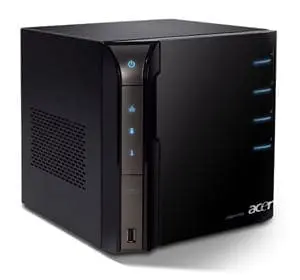
Acer easyStore Home Server European Pricing Revealed

aceraspireeasystore

Terry over at We Got Served has the low down on the European pricing of Acer’s two easyStore Home Servers.

The two models are the TS.R360W.011 and the TS.R360W.012. Both have the Intel Atom 230 processor and 1Gb of ram. The only difference between the two is that the .011 has a single 640Gb hard drive where as the .012 has two.

To read the article click here and to view the complete price list click here.