Two Minute Review of the Plextor PX-256M2S SSD

It’s time to do a two minute review the Plextor PX-256M2S Solid State Drive.

UWHS Review - Plextor PX-256M2S SSD 5

The Plextor M2S series SATA 6Gb/s SSD offers 256 GB high-speed data storage with stable long-term performance, and a predicted 10-year lifespan. Engineered for exceptional data transfer rates throughout its long lifetime the Plextor M2S is unrivaled in delivering sustained performance.

The drive achieves this unequaled long-term stability by incorporating Plextor’s unique Instant Restore technology to overcome the performance loss associated with constant use. A server grade Marvell controller provides additional drive reliability. Featured is the latest high bandwidth SATA 6Gb/s interface for fast transfer times. Performance, stability, and lifespan are improved by both the generous 128MB DDR buffer and even disc usage through the Dynamic Wear Leveling system.

The Plextor M2S series is ideal for users who require consistently high transfer rates from their SSD, who expect a long product life, and who demand uncompromising stable performance in real use situations.

Who are Plextor?

From their website:

The history of Plextor goes back almost 100 years. Shinano Kenshi Corporation was founded in 1918 to manufacture Spun Silk Yarn, which at the time was one of the most “High-Tech” industries in the world. The silk required a very delicate and precise production process. The right to wear silk was reserved for the highest government officials and dignitaries only, and therefore the quality standards were extremely high. In these circumstances, Shinano Kenshi developed their own business philosophy: “Never Compromise, Always Think Quality”, because only providing the best quality could satisfy their exceptional customers.

As the years passed, Shinano Kenshi embarked on other industrial markets that would grow more progressively, while maintaining its proud history in the Silk Industry.

In the 1960s, Shinano Kenshi decided to diversify its business to electric motors, a fast growing market at the time. Despite changing its core business, the company kept its business philosophy, “Never Compromise, Always Think Quality”. These ventures insights led to the successful expansion into technology-driven, knowledge-intensive fields, such as Electrical Division, Electronic Equipment Division and Printing Equipment Division.

In the 1980’s, Shinano Kenshi expanded their sub-contracting position by recognizing the evolution of the digital age with the advancement of compact discs replacing the older generation of analog tapes. The company began to manufacture their own compact disc players for the audio industry, and developed a separate brand for the department. The Electronic Equipment Division introduced its first CD-ROM optical disk drive under the TEXEL brand name in 1989. Faced with the prospects of a healthy and ever-increasing demand for its products, Shinano Kenshi identified the importance of this segment, with the Professional and IT markets demanding performance-oriented products. The company naturally transitioned into the optical disc drive industry. Through every generation of optical disk drives, Plextor has continually sought ways in which its CD-ROM’s, CD-RW’s and DVD+R/RW’s could stimulate market demand by offering higher speed and higher reliability devices, while winning numerous awards worldwide.

While maintaining and strengthening its core competences, Shinano Kenshi continued its global expansion by establishing subsidiary companies and promoting its products on a worldwide basis. In 1982 Shinano Kenshi began to expand overseas. The United States was the first country where the company started overseas operation. PLEXTOR US was officially founded in 1990 and three years later a European branch (PLEXTOR EU) was opened.

The subsidiaries are chartered with the continual growth of Resellers and OEM’s in their respective territories, who have come to rely upon Shinano Kenshi for performance, quality oriented and technically superior optical peripheral products. In 1994, Shinano Kenshi announced their new brand name PLEXTOR for their digital technology products, including optical disc drives.

Plextor CD-R/RW drives were introduced in 1998 with technologies developed by the corporation in support of the market growing demand for CD-ROM’s. DVD+R/RW were added to the Plextor product line in 2003. High performance drives enable our users to write and re-write data on a stable platform that has evolved throughout the years. Plextor has also invested heavily on the certification of media to give our users a wide range of compatibility between the various manufacturers.

Plextor’s CD-R, CD-RW and DVD+R/RW optical disk drives have been tested worldwide and evaluated as the “Professional Choice” to satisfy even the most discerning customers. Plextor products have been adopted by financial institutions and government agencies, which require highly reliable data storage technology. Recording studios have come to regard the Plextor products as the “drive of choice,” which they can rely upon for the accurate extraction and creation of Digital Audio.

The business philosophy “Never Compromise, Always think Quality” generated from tailoring luxury silk for the highest dignitaries did not fade over time but became the company’s core value. Also in the optical storage business, Plextor provided the best quality products to high-end customers and professional users in a heavy duty environment, instead of general users. In order to satisfy these professional users and to meet their strict specifications, PLEXTOR always invested many resources in R&D and product testing before any product was released to the market. In line with its high quality standards, Plextor always offered excellent warranty conditions.

In the 21st century PLEXTOR successfully entered new markets with external Hard Disks, Multi Media Players, Network Attached Storage, and more to come…..

Elgato Launch HDHomeRun PRIME App for the iPad 2

Elgato have launched an app that enables you to use your SilconDust HDHomeRun PRIME with your iPad 2. And all for $17.99!

mzl_wsmffzyw_480x480-75

Watch live cable TV wirelessly on any iPad 2 in the house! Use this app with Silicondust’s HDHomeRun® PRIME™ and turn your iPad 2 into a sleek, handheld television.

APP FEATURES

Receive premium cable TV channels on your iPad 2!
Elgato’s app teams up with HDHomeRun PRIME to stream cable TV “copy freely” channels to your iPad 2. If you have Verizon FiOS or Comcast cable television, you’re in luck, because a majority of channels are sent with a ‘copy freely’ flag. And of course, you also get all the unencrypted digital cable TV (Clear QAM) offered by your cable provider.
Record TV on your iPad!

If your iPad can be a television, then why not a DVR? With Elgato’s HDHomeRun app, you don’t have to miss a moment: Pause live TV, use instant replay, and of course record TV shows directly to your iPad. You even have the option of transferring those recordings to your computer.

Works with iPad 2

The HDHomeRun app is only available for iPad 2. All you need to get started is the app, a CableCard decoder for your HDHomeRun PRIME, and a valid cable subscription — and a PC running Windows 7 Media Center for the initial setup of the HDHomeRun PRIME.

iPad 2 App


No computer required

The best part? Your computer does not even need to be turned on while you use the app. HDHomeRun PRIME hardware sends the TV signal straight to Elgato’s HDHomeRun app running on your iPad 2.

The HDHomeRun PRIME “Primer”

There are a few things about CableCard support and the HDHomeRun PRIME that you should know:

Q: What channels can I receive?
A: It depends on your cable company. For instance, Comcast and Verizon FiOS offer most channels with “copy freely” programming, and those channels are what the HDHomeRun app can receive at this time.
Generally, digital basic channels are tagged as “copy freely”, some premium channels are tagged with “copy freely” and some premium channels are tagged as “copy once”. Pay-Per-View and Video-On-Demand services are always tagged as “Copy Never”.
Other cable providers can lock down all their channels with more stringent content protection, and can change the content protection at any time.

Q: What about the other channels?
A: At this time, Elgato’s HDHomeRun app cannot play CableCard channels that are tagged as “Copy Once”. These channels are subject to a much more stringent digital rights management (DRM) system than “Copy Freely” channels. DRM systems restrict what you can do with TV programming once it is in your device, such as recording for later viewing, or copying, or exporting.
The only approved DRM system at the moment is Windows Media DRM, which is not available on Mac OS X or iOS.
Channels that are tagged “Copy Never” such as Pay-Per-View and Video-On-Demand are not supported at all by current CableCard technology.

Q: Can I play back HD channels?
A: iPad 2 is capable of playing back standard-definition TV only. You’ll find that most of your HD content is also available in standard definition.
To learn more about copy protection, visit Elgato’s support web site.

SYSTEM REQUIREMENTS

• Silicondust HDHomeRun PRIME cable TV tuner hardware.
NOTE: This app is EXCLUSIVELY compatible with SiliconDust’s HDHomeRun PRIME hardware, not previously debuted HDHomeRun products.
• Requires PC running Windows 7 Media Center to set up HDHomeRun PRIME with CableCard
• The HDHomeRun app is not supported outside the local Wi-Fi network.
• 802.11n Wi-Fi and 1000Base-T Ethernet are recommended.
• Only MPEG-2 standard definition video is supported.
• Supported television standards: Unencrypted digital cable (Clear QAM); Encrypted, access-controlled digital cable signals decrypted through a CableCard™ decoder for programming with the “copy freely” content protection flag set.
• Works with iPad 2; iOS 4.3.3 or newer

Learn more from the Elgato website

Firecore Updates Seas0nPass Jailbreak Tools Package for AppleTV 4.3 Users

Seas0nPass has been updated to support an un-tethered jailbreak of the new AppleTV 4.3 (8F455) software.

Here is what they said:

A big thanks goes to comex for helping port the Saffron jailbreak to the AppleTV. For the uninitiated, Seas0nPass is the simplest jailbreaking tool available for the AppleTV, and the first to support the new 4.3 version.

What’s new in AppleTV 4.3?

– iTunes TV Shows: Purchase your favorite TV shows directly from the iTunes Store, and watch the shows you already own, in HD.
– Vimeo: Browse and play videos from Vimeo, access your video inbox, and mark videos you want to watch later.
– 4.3 is also required to access Movie and TV Show rentals.

What happens to my jailbreak and settings if I choose to update?

If you choose to update you will lose your current installation of aTV Flash (black) and any related settings. If the above features don’t excite you the auto-update feature can be disabled through the Maintenance –> Settings menu.

Is aTV Flash (black) compatible?

Yes! aTV Flash (black) Beta6 is compatible with the new 4.3 software. Simply re-run the aTV Flash (black) installer after jailbreaking and you’ll be automatically be updated to the latest and greatest version.

Additionally we have a shiny new version of Media Player (0.7.1) for you!

What’s new in Media Player 0.7.1?

  • Added more subtitle encoding types
  • Added subtitle options (size, color, border)
  • Added support for folder cover art
  • Improved audio track detection
  • Improved AFP/SMB streaming
  • Improved chapter support
  • Improved .srt subtitle support
  • Improved subtitle settings (persistent)
  • Improved DVD playback and menu handling
  • Improved appearance of Loading/Buffering box
  • Resolved crashes when trying to access a broken/unavailable share
  • Resolved issues related to displaying metadata
  • Other miscellaneous fixes

Great! How do I update?

The latest version of Seas0nPass (and user guides) can be found at seas0npass.com.

The new version of Media Player can be downloaded on your ATV2 through the Maintenance –> Manage Extras menu. If you need to re-install aTV Flash (black), links for the latest version can be found under the Downloads tab in your account.

New users can pre-order aTV Flash (black) here.

HP TouchPad $99 for 16GB/$149 for 32GB!

PreCentral is running a story that claims that HP is asking affiliates to fire sale the webOS tablets.

tp-front-horizontal

Wow.  $149, I may buy one for my parents at that price.  Here is the relevant part of the story from PreCentral:

In a memo sent to HP affiliates, the company issued the declaration to begin liquidating TouchPad inventories, with a price cut of $300 or more:

HP will be lowering the price of the TouchPad beginning Saturday 8/20/11. This is the lowest price ever for the TouchPad so please post it as soon as it goes live.  16GB TouchPad- $99; 32GB TouchPad – $149

So are these prices low enough for you to bite?

PreCentral Story on TouchPad Price Cut

Ceton InfiniTV 4 USB Tuner Now Available for Pre-Order

We told you earlier this month that Ceton’s new InfiniTV 4 USB Tuner had been CableLab certified. Now it’s available for pre-order and will be shipping within 30 days.

infinitv4usb117lg

Here is what Ceton posted yesterday:

Ceton Corporation today announced InfiniTV 4 USB, the company’s new, external CableCARD quad-tuner that turns virtually any style of Windows 7-based PC into an entertainment platform for television. InfiniTV 4 USB will be available for pre-order tomorrow, August 19, 2011, from Cannon PC and Fluid Digital at a suggested retail price of $299, with pre-orders expected to ship on September 19, 2011. InfiniTV 4 USB will be available from the company’s other retailers — Amazon, Micro Center, the Microsoft Store, Newegg, Velocity Micro and Zones – later in September at the same price. Ceton also announced a reduction in suggested retail price for the company’s InfiniTV 4 PCI Express (PCIe) model to $299.

InfiniTV 4 USB brings the company’s award-winning multi-tuner CableCARD technology to an external, USB-connected design, making it an ideal solution for virtually any compatible Windows 7-based PC, including laptops, tablets, All-in-One PCs, desktops, towers, home theater PCs and slimline entertainment PCs. InfiniTV 4 USB joins the company’s currently shipping InfiniTV 4 PCIe model, positioning Ceton as the only company offering both internal and external solutions for CableCARD-based premium digital cable TV services through the PC.

A Ceton InfiniTV-equipped PC makes exciting new entertainment scenarios possible in the home, including:

  • Watching and recording up to four live HD channels at once;
  • Streaming live HD channels or recordings to multiple TVs and making Digital Video Recording (DVR) available on virtually every TV using Windows Media Center Extenders;
  • Enjoying cable TV, Internet TV, music, photos, videos and more, all through one device, with the Media Center experience from Microsoft;
  • Eliminating cable set-top boxes and their expensive rental fees;
  • Sharing individual tuners with other Windows 7-based PCs to enable watching TV programming on PC displays as well as TV sets.

“The Ceton family of InfiniTV digital cable tuners is transforming the PC into the world’s most advanced entertainment platform for television,” said Gary Hammer, president and chief executive officer of Ceton Corp. “With the introduction of InfiniTV 4 USB, Ceton now offers solutions for the full range of PC platforms, bringing a new generation of television and entertainment services to almost any consumer.”

“In Windows 7 we enabled support for premium cable TV services in the US to create a high-quality entertainment experience on your PC,” said Todd Rutherford, Windows Entertainment Product Manager at Microsoft Corporation. “with the availability of the Ceton’s InfiniTV 4 USB tuner, a wider range of PC platforms and consumers will now be able to enjoy this entertainment service.”

Running VMware Server on a Windows Server 2003 Based Operating System including Windows Home Server V1

images    V1A

Introduction

Installing VMware Server on a Windows Server 2003 Based Operating systems while nothing new is not exactly as straight forward as it should be. When I first installed VMware Server on a clients WHSV1 computer over a year go I ended up having to consult my Google crystal ball in order to make it work, something of course I never had a problem with before installing on my own personal Windows XP 32 bit laptop. So after I completed my WHS 2011 Article on Installing VMware Server I revisited an idea I originally had on documenting on what I had learned through my Google Crystal Ball into a how to article so other people could have an easier time than I did when initially installing VMware Server on a Windows Server 2003 based operating systems.

Who this Article is for

This How To article can be used for any Windows Server 2003 based Operating System which includes all Windows Server 2003 editions and platforms, Windows Home Server Version 1, and Windows XP Professional 64 bit edition (The Code used for the Windows XP Professional 64 bit Operating System is based on the Windows Server 2003 64 bit Operating System Platform).

Acknowledgements

I want to give a big thanks to the people over at the “We Got Served” forums for answering my Google Crystal Ball call over a year ago, through one particular thread entitled “Installing VMware Server on WHS Fails”. If it had not been for the hard work of the “We got served” forum members I may not have gotten through that hard spot over a year ago. This first Third of this article is based on that thread.

End of Support for VMware Server

As of June 30, 2011 VMware no longer supports the VMware Server application and the last version released was in October of 2009 with Version 2.0.2. so the only support you maybe able to find will maybe be in the VMware support forums. That being said this is still a very useful application that runs a variety of different Operating systems with virtually all of the Windows Operating Systems up to and including Windows 7, Windows Server 2008 R2, and Windows Home Server 2011. This can also support Linux, Solaris (Unix), and even unofficially the MAC OS 10.

Disclaimer
The How to information is intended as a guide or helping resource to those who are doing a VMware Server 2 Installation. There is no 100% guarantee that this will install correctly the 1st time installing the VMware Server Virtual appliance. I assume no responsibility for any consequences of the install and the user will assume the full risk of any adverse effects of a bad installation. I recommend backing up your system before proceeding (I know this is easier said than done with a Windows Home Server Version 1 system).

Guest Operating Systems Legality

It is the responsibility of the user to obtain the the legal licenses and genuine copies of any operating system that is used for the Virtual Machine on the Virtual Server. Yes, even if the OS is not being installed on a physical machine the same legal rights do apply.

Prerequisites Needed

– Keyboard, Mouse, and Monitor or Remote Desktop

– PC/Server that has a minimum of a Pentium Dual Core or AMD equivalent processor with at least 3GB of system memory

– VMware Server 2 Install Executable (This can be obtained at http://downloads.vmw…CpiZCVqdGJkZWRq , The Software is free however you will need to Register to Download it). Insure it is the Windows Installer and not the Linux install package.

–  Download the following Windows Server 2003 Patch http://support.microsoft.com/kb/925336 (N/A for Windows XP Professional 64 Bit)

– Internal or External Hard Drive (Optional for any other Windows Server 2003 based Operating System)

–  Insure your Windows Home Server has a Static IP

Installation Instructions

1) Install the Windows Server 2003 Patch (KB925336) that what called for in the Prerequisites (Skip to Step 4 if this is Windows XP Professional 64 bit).

2) Once the patch is applied reboot your home server (Even if it does not ask you to).

3) Once your Home Server has rebooted log back in either by Remote Desktop or Console.

4) Click on the “Start Menu”, Administrative Tools, and finally “Local Security Settings”.

V21A

5) Click on “Software Restriction Policies”

V22A

Microsoft Publish Media Streaming Known Issues Help for WHS 2011 and WSS Storage Server 2008 R2 Essentials

Microsoft have today published a new article detailing known issues with media streaming on Windows Home Server 2011 and Windows Storage Server 2008 R2 Essentials.

WHS 2011 Logo

Media streaming known issue with Windows Home Server 2011 and Windows Storage Server 2008 R2 Essentials

“Repeat” button does not function for single file streaming from Remote Web Access Page

Symptom:

While playing single music/video on RWA page, you will find that the repeat function does not work.

Consider following steps:

  1. Log on to RWA page, navigate to Media Library;
  2. Click Browse Music;
  3. Click a music file;
  4. Turn repeat on for the single music file;
  5. The music finished playing, however, does not repeat.

Root Cause:

The single music/video repeat function was not successfully enabled on the RWA page. This will only happen if you have single file in the playlist.

Solution:

You can add at least one more music file to the playlist.

The repeat function will work when you have multiple files in the playlist.

The media file will still be displayed in the media player, after they have been moved to a new folder

Symptom:

After moving video/photos/music files to a different folder that is out of the default media folder, these files will still be displayed on media streaming gadget on RWA and Windows Media Player.

Consider following steps:

  1. On the server, move any media files from D:\ServerFolders\Music, D:\ServerFolders\Video, or D:\ServerFolders\RecordedTV to any other folders.
  2. Log on to RWA page, navigate to Media Library, or log on to the server, open Windows Media Player directly;
  3. The Moved media files are still displayed on the playlist, however, when you click to play, it will not function.
  4. After you have deleted these files from the new folders, they will still show up in the playlist.

Root Cause:

Indexes in Windows Media Player are not updated after the files are moved.

Solution:

  1. Log on to any network computer that has access to the server shares.
  2. Open the media folders (D:\ServerFolders\Music, D:\ServerFolders\Video, or D:\ServerFolders\RecordedTV) through a UNC path, for example,

\\Server\ServerFolders\Music.

  1. Delete or move files to a new folder from the share. The file will be deleted and will not show up in the RWA media library anymore.

Music Album Art & Tags get overwritten

Background

To ensure imported music file can be refreshed automatically with online album art, a scheduled task will sync media metadata regularly for files on WSH music shares. However, this task will also overwrite some customized properties of the tags.

Symptom:

Consider following steps:

  1. Log to Remote Access website, upload music files to the default music share, or from any network computer, copy music album files/folders to the default music share.
  2. Customize the music file tags manually, or through 3-rd party tools. For example, update the album art cover pictures.
  3. Wait for at least 24 hours.
  4. Note online new Album Art Meta data are automatically downloaded with standard Windows Media Player attributes.
  5. The original customized tag, for example, the album art cover picture, is overwritten.

Root Cause:

There is a scheduled task that will sync the media metadata (including album arts) automatically every 24 hours.

Solution:

You can follow these steps to disable the Scheduled Task:

  1. On server, open Task Scheduler by clicking Start->Administrative Tools -> Task Scheduler;
  2. Navigate to location \Microsoft\Windows\Windows Server;
  3. Right click “Media Streaming Metadata Synchronizer” and click “Disable”.
  4. If the task shows as “Running”, select “Display all running tasks” on the “Action” Pane.
  5. Select “Media Streaming Metadata Synchronizer”, click “End Task”;
View the original article here

Office 365 and SBS 2011 Essentials – Working Together : More Videos

Yesterday we posted about a new video showing Office 365 and Small Business Server 2011 Essentials working together. Today we have two more videos to share with you.

See the SBS 2011 Essentials and Office 365 Integration Module working together.

Office 365 and SBS 2011 Essentials


Manual Domain name configuration with Office 365 and SBS Essentials.

Office 365 and SBS 2011 Essentials


And don’t forget Working With Windows Small Business Server 2011 Essentials, the book I have written with Charlie and Sharon which will be available very soon.

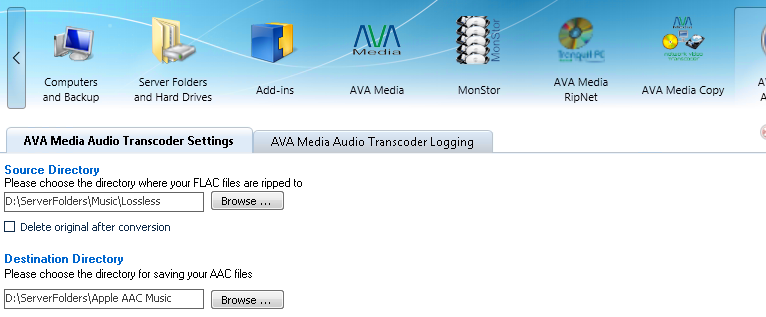
Tranquil Preview AVA Media Audio Transcoder Add-in for Windows Home Server 2011

Today Tranquil have released a little bit of information on their forthcoming AVA Media Audio Transcoder Add-in for Windows Home Server 2011.

Here is that they said:

New Add in for WHS2011 is now being completed, prior to release.

The AVA Media Audio Transcoder is a neat little Add In for WHS2011, that quietly watches a source folder for new music files (FLAC format), and transcodes them to a second format ie AAC. There is nothing for the user to do, other than to set up the source / target folders.

The AVA Media CD ripper (available on our Leo HS4 servers) is normally set to rip to FLAC (maximum quality for audiophile systems playback). The AVA Media CD ripper then can transcode these FLAC files to MP3 for mobile use.

This new Add In can then transcode the FLAC files to other formats too.

Whether the FLAC files are generated by the ripping of CDs, or because you have just copied 10000 ripped CD folders (FLAC format) into your WHS2011 Music folder – the Add In will get busy and transcode them for you automatically.

The Add In will be released later in August

So watch this space – and as usual we will tell you more when we can!

StableBit DrivePool Moves to Beta M3 Build 3703

There has been another beta build from CoveCube! StableBit development marches on – now is build 3703.

600px-Stablebit_drivepool_screen_thu16

Here is how CoveCube describes this application:

  • Combine all your hard drives into one big storage pool (except the system drive with the OS).
  • Add and remove drives from the pool at any time without re-partitioning or manually moving folders.
  • Create duplicated folders on the storage drive pool that are protected against single drive failure. If a drive fails on which a duplicated file was stored, the contents of that file will remain readable even without the drive.
  • All your data is stored in standard NTFS files. You can always access your files even if the Windows Home Server completely crashes or this add-in can’t be used.

This version’s change log:

1.0.0.3703 ———-

* Remove any empty directories in the mount point before mounting pool.

* Add new folder wizard now respects HomeGroup permissions and publishes the folder properly to the HomeGroup.

Get More Information About the Beta Here Download Stablebit Drivepool build 3703 here

HP Looks to Dump Personal Systems Group, Kill webOS

Today comes the surprising news that HP is looking to divest its personal systems group and will shut down its webOS group.

Here is what HP had to say in their press release:

HP today commented on the recent announcement by Autonomy Corporation plc (LSE: AU.L). HP confirms that it is in discussions with Autonomy regarding a possible offer for the company.

HP also reported that it plans to announce that its board of directors has authorized the exploration of strategic alternatives for its Personal Systems Group (PSG). HP will consider a broad range of options that may include, among others, a full or partial separation of PSG from HP through a spin-off or other transaction.

In addition, HP reported that it plans to announce that it will discontinue operations for webOS devices, specifically the TouchPad and webOS phones. HP will continue to explore options to optimize the value of webOS software going forward.

According to this financial presentation from Q2, the personal systems group is a low-margin hardware supplier.  It is hard to see who would want to buy a 5% operating margin PC assembly business; we’ll have to see how that progresses.

The acquisition of Autonomy looks like a major transaction in the same class as Compaq or EDS.  It is a software company; initial valuation of $12 billion USD looks to be a premium over its $7 billion USD current market value.  Here is some feedback on Autonomy:

Founded in 1996 and utilizing a unique combination of technologies borne out of research at Cambridge University, Autonomy has experienced a meteoric rise. The company currently has a market cap of $7 billion, is the second largest pure software company in Europe and has offices worldwide. Autonomy is a global leader in infrastructure software for the enterprise that helps organizations to derive meaning and value from their information, as well as mitigate the risks associated with those same assets. Autonomy’s position as the market leader is widely recognized by leading industry analysts including Gartner, Forrester Research, IDC and Ovum.

Autonomy was founded upon a vision to dramatically change the way in which we interact with information and computers, ensuring that computers map to our world, rather than the other way around.

Human-friendly or unstructured information is not naturally found in the rows and columns of a database, but in documents, web pages, presentations, videos, phone conversations, emails and IMs. We are facing an increasing deluge of unstructured information, with 80% now falling into this category and, according to Gartner, the volume of this data doubles every month. As the amount of unstructured information multiplies, the challenge for the modern enterprise is trying to understand and extract the value that lies within this vast sea of data, whilst minimizing the risk.

Many companies believe that access to information is the answer to dealing with the unstoppable spread of information of all forms – if people can find information, they can process it themselves. Autonomy believes that although access to information is important, there is far greater value in forming an understanding of data and automatically processing it, freeing up people to focus on higher-value activities that computers are unable to do.

By providing a pan-enterprise software infrastructure that automates advanced operations, Autonomy presents customers with a compelling value proposition. With this ability, Autonomy enables organizations to penetrate their information silos, derive maximum value from their corporate assets, and boost productivity while minimizing the risks endemic to information proliferation.

The new management at HP is aggressively looking to put the accent on software and services.  These moves help advance that agenda.

We’ll bring you more information as we get it.

News Release froim HP HP Q2 Earnings Presentation Autonomy plc

Drive Bender Beta 4 Release v1.1.7.5 Out Now

Today saw an update to Beta 4 of Drive Bender for Windows Home Server 2011 released, taking it to version v1.1.7.5.

image46_thumb1_thumb_thumb_thumb_thu

Here is what is included in the beta 4 update:

Release v1.1.7.5 – beta (2011-08-18)
– Update: Applying file security and / or file attributes to a file in a folder marked for duplicate, will also apply those same security / attribute setting to the duplicated file.
– Update: Much improved start up performance.
– Update: Smooth Streaming is now file type sensitive, and when enabled, will only kick in for common audio and video files.
– Update: Drive Bender core driver updated.
– Bug fix: Exception from either the Manager or WHS add-in no longer occurs if the Drive Bender server is still starting when these clients start.
– Update: Implementation of the Windows Server Health system (important Drive Bender events are now flagged with server alerts).

For more information check out the Drive Bender website

The Home Server Show Episode 148 Out Now

Dave at the guys at the Home Server Show have released episode 148.

home_server_show_small_thumb_thumb_t

Here’s what Dave has to say about this weeks show:

How about we relax after all that RAID and drive extender talk?  We are talking about the news for the week and anything else we can think of.  We also go over the forums upgrade on homeservershow.com and the new features available.

As usual you can listen to the show from here.

64GB HP TouchPad Makes Appearance in Europe

Only a short time after permanently dropping the price of their TouchPads, HP have a 64GB version of the TouchPad showing as available soon in Europe.

64GB HP TouchPad

So not only does it have 64GB of memory, it also has an upgraded faster processor – the 1.5GHz Qualcomm Snapdragon.

The price is showing as €599. Exact shipping dates are not known, neither is other locations where this will be available (the above is from HP France). But what is interesting is that it appears that this might be in Europe only!

More information soon!