Now We Know – Microsoft hohm beta

Microsoft has recently created a new website for the eco-geek in all of us. Head on over to the Microsoft hohm website and get started today on tracking your energy usage!

Microsoft hohm

Microsoft hohm

Microsoft hohm beta is a free web application from Microsoft that will help you track the energy usage in your home. According to the hohm website it will allow you to:

  • Understand where your energy goes and how to start saving today
  • Compare your energy use to friends and neighbors
  • Engage with our active community to get tips and share your own
  • Build a project list based on how much you want to spend or save
  • Take charge of your home energy use and learn how to help our planet
  • For those of us that are early adopters, this is a great opportunity to be ahead of the game.

    Sign up at Microsoft hohm !

    Energy Survey and Usage Input

    Once you sign up for Microsoft hohm with your Windows Live ID you can then take an energy survey about your home.

    Mental Note: Do not leave the “default” data in the survey even if it is the same information as you would normally enter. The percentage complete does not count “default” data!

    After you complete the survey, or as much of it as you can, then you need to spend some time entering your current energy bill information. I had all of my water and electrical usage in an Excel sheet so it was easy to input. I did NOT have my gas bill but I just went to my gas company website and downloaded my history. It only took me about 30 minutes to get all of my data on to the website (and take the survey) and now I only need to enter data once a month to keep up with it.

    Microsoft hohm

    Eventually the website will be able to download data from the major energy service providers!

    Charts and Graphs – What Do They Mean?

    Once you have entered your usage data you can see how your statistics relate to your energy usage and how that usage compares to others.

    Overall I am very efficient in my home compared to the average.

    Microsoft hohm

    Is It Useful? YES!

    My wife and I recently installed all new argon filled windows ourselves, had cellulose insulation installed, new eco-washer and dryer, put in solar attic fans (PITA) and replaced wall insulation (another PITA) where we could. While our heating and cooling usage is now very low, my appliances are now the high use items. And from those appliances I can see that my “other” (meaning electronics and PCs) are almost as much as the rest of our appliances!

    This chart shows my electricity usage as compared to last year. I am over my last years number so I need to start looking at reducing my usage even more. More electronics, more use!

    Microsoft hohm

    This cool chart shows the temperatures so I can relate that to usage.

    Microsoft hohm

    This chart shows the breakdown of the energy. You can see that my major appliances and “other appliances” (meaning my PCs, servers and drives) use almost the same amount of energy. Time to start putting some systems to sleep!

    Microsoft hohm

    The Future of Microsoft hohm

    Overall this web site is really cool. Someday soon your Nissan Leaf will not start charging until your evening electricity rate kicks in. Image in our near future that our kitchen appliances all start, stop and be monitored over Wireless-N!

    Microsoft will end up tying in to power companies, meters and vehicles as time goes on. Microsoft even has a short animated video showing the end state at:

    Check out some of their other videos on YouTube!

    I hope you get a chance to check it out and sign up!

    Now We Know

    Tim

    The Home Server Show Podcast Number 85

    Dave and the guys over at the Home Server Show have released podcast number 85.

    home_server_show_small

    Here is what Dave has to say about this week’s show:

    Today’s episode features an interview with Windows Weekly podcaster Paul Thurrot.  We get in depth with Paul about his home server, storage, and Add-Ins.  Also on show 85, we talk about our favorite Add-Ins.  News, new Add-In releases, and more!

    Here are the links to items discussed on episode 85.

    Jim’s Add-Ins
    Advanced Admin Console
    Add-In Central

    Chris’s Add-Ins
    AutoExit2009
    Disk Management

    John’s Add-Ins
    Add-In Central
    Digital Archound
    MyMovies
    PerfectDisk 11

    Dave’s Add-Ins
    Grid Junction
    Remote Notification
    MyMovies
    KeepVault

    Antivirus for Windows Home Server

    ClamAV for Windows Home Server updated

    ESET Nod32 on Windows Home Server

    As usual you can listen to the show from here: http://homeservershow.com/the-home-server-show-85.html

    I wonder if the drinking game will be on tonight?

    Tranquil PC SQA-5H SuperStor Windows Home Server Ships Today

    If you have pre-ordered one of Tranquil PCs SQA-5H SuperStor Windows Home Servers then today is the day it ships.

    Tranquil describe the SQA Superstor :

    Do you have a large media collection? The SQA SuperStor is possibly the world’s largest non-industrial digital storage appliance when coupled with suitable HDD housings, i.e. the SQA-Ex – servicing up to 40TB (40,000GB) of data capacity ! That’s approx 9000 DVDs or 60,000 CDs

    IMG_2229

    You can check out our exclusive review here: https://moviesgamesandtech.com/2010/03/29/exclusive-review-of-the-tranquil-pc-sqa-superstor-windows-home-server-and-sqa-ex/

    And you can order your SuperStor from here: http://www.tranquilpc-shop.co.uk/acatalog/SQA-SuperStor.html

    Six Minute and Six Second Installation of a $60 Blu-Ray drive on a Friday night – Video Edition

    We all know that Blu-Ray has the best picture quality available for television, but did you know it is available for your existing PC for as low as $56 online? If your computer meets some basic requirements you can be watching Blu-Ray in a matter of minutes. This Friday night I will show you how to quickly add a Blu-Ray drive to your desktop computer.

    Blu-Ray Front View

    Typical Blu-Ray System Requirements

    • Blu-ray Disc drive
    • Dual or quad core processor recommended
    • 512 MB RAM (minimum), 1 GB or more recommended
    • 256 MB Video graphics or higher
    • Operating System – Windows XP with Service Pack 2 (or higher)

    More information can be found at

    http://www.cyberlink.com/stat/bd-support/enu/system-requirement.jsp

    Which One Do I Buy?

    Blue-Ray drives for desktop computers are identical to DVD drives having the same form factor and cable connections. You can order these drives from most online retailers such as Newegg, TigerDirect, Frys, Microcenter etc. I think there are six major manufacturers out there now. Choose the drive based on your price point and brand preference.

    Blu-Ray Drive

    Before you purchase a new drive make sure you have an extra 5.25” bay in your case. If you do not have an extra bay then you will have to remove your existing DVD drive. This may not be an option if your system is still under warranty. In addition, the less expensive Blu-Ray drives are ROM, meaning they only read the disks and do NOT burn DVDs.

    Newegg Invoice

    Other Considerations

    If your computer is more than three years old you may want to look inside and make sure you have the proper connections. You need to make sure you have an available SATA port on your motherboard. Older PCs had IDE DVD drives (not SATA) so if you are replacing a drive, verify that you can change it out and have the proper cables before you start.

    Choose a Blu-Ray drive that comes with playback software. Your PC probably does not have the correct software to play the Blu-Ray once it is connected and installed. Some OEM Blu-Ray players do NOT ship with software. Try and find a drive that has the software.

    You can also buy Blu-Ray playing software online but it costs anywhere from $50 to $100!

    Ok, enough of the specs. Lets set this pig on fire!

    Equipment Needed

    • PC with available SATA port
    • Blu-Ray drive
    • SATA cable
    • Blu-Ray software (should come with drive)
    • One Beer (optional as always)

    Installation Video

    This is a quick video on the installation of a Blu-Ray player. Although every computer model is different, the basic concepts are the same. If in doubt, check with the manufacturers website for service instructions and warranty information.

    Here are a few quick links

    Dell

    HP

    Gateway

    Sony

    If you have a video camera why not do a video of your own?

    Once you have upgraded to Blu-Ray I doubt you will ever go back to DVD!

    See you next Friday night,

    Timothy Daleo

    The Gadget Show Live 2010

    7

    This week the NEC in Birmingham is home to the Gadget Show Live, and I paid a visit.

    Gadget Show Live

    The Gadget Show is a TV programme on Channel 5 here in the UK. Each week the presenters look at different gadgets, and for a few days each year there is an event held for the public to come along and see different gadgets and even get hands on with them.

    I decided to go along yesterday and see for myself. The event had been sold out for a few months now and when I got near the NEC there were huge queues of cars waiting to get into the car park. Once all that had been done, it was the long walk from the car park to the event itself (anyone who has ever been to the NEC will know just what I mean).

    I’m not really sure what I was expecting from the show. I have been to CES in Las Vegas a number of times, but that isn’t open to the public, so I think the first thing that really surprised me was the huge number of families and children at the event. Also, the event was more about companies selling their products rather than showing off their technology.

    The Gadget Show Live 2010The Gadget Show Live 2010

    Some big names were there, such as Sony and Panasonic, showing off 3D televisions along with High Street names like PC World and The Game selling computer systems and games.

    For those of us who have been into gadgets, computers and consoles for a lot longer than we might care to admit, there was the Gadget Hall of Fame. Here you could see games consoles and computers dating back to the 70’s, including my very first computer, the Sinclair ZX Spectrum.

    The Gadget Show Live 2010The Gadget Show Live 2010

    What was also nice was this area also has a Windows Media Center PC running. What wasn’t so good was that it kept blue screening!

    The Gadget Show Live 2010

    I even managed to get a closer look at the Data Robotics Drobo FS I posted about earlier in the week: Data Robotics Launch the Drobo FS

    The Gadget Show Live 2010The Gadget Show Live 2010

    The Gadget Show Live 2010The Gadget Show Live 2010

    The event as a whole felt a lot more like the Ideal Home Exhibition with gadgets than CES, but I suppose it wasn’t really that sort of show. I was expecting to see a lot more tech and a lot less sales, but on the whole everyone seemed to be enjoying themselves which is what the point of the show was.

    For more information on the Gadget Show Live, click here: http://www.gadgetshowlive.net/

    Dragon NaturallySpeaking 10 and UWHS Giveaway Results

    2

    Our friends at Nuance provided us with 4 copies of Dragon NaturallySpeaking 10 Preferred Mobile edition, worth around £200 each to give away, and now it’s time to announce the winners.

    Dragon NaturallySpeaking 10 Preferred Mobile includes the great Dragon software, plus a headset an also a cool digital recorder from Philips.

    Dragon UWHS Giveaway

    And all you had to do was answer 3 simple questions:

    Question 1: How many main editions of Dragon NaturallySpeaking 10 are there (hint, check the above article)?

    Answer: 5

    Question 2: At this year’s CES in Las Vegas I did a video of a drone along with a post or two. Who makes that drone?

    Answer: Parrot (its the AR Drone)

    Question 3: How many devices can a Powermat charge at the same time just by using the mat itself?

    Answer: 3

    We had a huge response to the giveaway, and we have selected 4 lucky winners at random:

    Robert Echten, Mexico

    J. Manders, Australia

    Neil Graham, UK

    Todd Godin, USA

    Congratulations, your prize will be winging its way to you shortly – for those of you outside of the UK I will send it airmail so it should be with you soon.

    Keep checking out UWHS for future giveaways – we have some cool stuff planned for 2010!

    Made for Media Center Windows Media Center Addin

    2

    Back in November last year, we reported on the great work that my friend and fellow MVP Ian Dixon was doing with the Made for Media Center App Store : https://moviesgamesandtech.com/2009/11/17/made-for-media-center-the-app-store-for-windows-media-center/

    Made for Media Center

    Yesterday Ian announced an add-in for Window Media Center that enables you to download add-ins directly from Media Center.

    Here is what Ian had to say:

    We have been really pleased with the response to the Made for Media Center app store, with thousands of registered users it shows there is a market for quality Windows Media Center applications and the benefit of having them in one location. At the time we launched we said we were working on a 10 foot UI so you could download Windows Media Center apps directly from the Media Center UI and I am very pleased to say we have a beta of the Media Center Addin ready for you to play with.

    First you will need an account at MadeforMediaCenter.com and then go to the download page and selection either the 32bit or 64bit version.

    The first time you launch the application you will be asked for your MadeforMediaCenter.com account details, in the current version the PIN number feature is not enabled in future versions you will be asked for your PIN (set via the download page on the websites) when you download an app.

    From the app you can install any of the Media Center apps without leaving Windows Media Center,

    We are still working on a few minor issues but all the main features are there. If you have an issues, comments or feedback you can leave them in the Made for Media Center forum and don’t forget to follow @4mediacenter on twitter.

    Well done Ian, this is great! Keep up the excellent work.

    If you have Windows Media Center, then you have to get this add-in now.

    HP X510 Data Vault Now with 3 Year Warranty and KeepVault EMEA News

    Earlier this week, HP got in touch to let us know that they are extending the 1 year warranty on all HP X510 Data Vault servers to 3 years at no charge.

    Here is what they said:

    As of last week, all new and existing HP StorageWorks X510 Data Vault customers will now benefit from a three year return-to-base warranty on their device.  HP has updated all of its warranty and support databases, so anyone needing to ring HP with an issue will not have to “re-register” or notify the support teams of this change.  This is a significant enhancement to the product and should give users greater confidence and peace of mind when considering whether to invest in HP’s emerging business Windows Home Server solution.

    (Note: this change applies to Data Vault only; MediaSmart Server warranty remains 1 Year)

    It is very interesting to note that HP clearly see that businesses (who the X510 is primarily aimed at) require more than just a 1 year warranty.

    The other piece of news from HP is that Proxure’s KeepVault add-in is being offered at a 20% discount for EMEA customers.

    Here is what they said:

    Also, HP has launched Proxure’s KeepVault as the de facto online backup add-in for X510 Data Vault customers in EMEA.  The service is available in English, French, German and Spanish and HP customers can enjoy at 20% discount on Proxure standard pricing.

    HP is excited to present users with KeepVault, an online backup service that is designed for WHS customers.  With KeepVault, users can select individual subfolders and top level WHS shares for real time, continuous protection or schedule regular backups when convenient.  Data is encrypted prior to transfer, and remains encrypted in the vault.  KeepVault provides notifications to email, SMS, or Twitter.  In case of lost data files, users can recover all missing files on their PC with the One Click Recovery feature, and all of this for a fixed annual subscription price that can easily be upgraded as your storage needs grows.

    The Keep Vault is available in two flavours, standard “Keep Vault” and “Keep Vault Pro and Business”.  KeepVault Pro and Business has all of the features of KeepVault, and additional value for small businesses and advanced users.  KeepVault Pro and Business sports best in class upload speeds, up to 3X regular KeepVault speeds.  Data is encrypted prior to being sent, and remains encrypted in the cloud with secure 128 bit encryption (soon 256 bit).  Customers can backup multiple HP Data Vaults to the cloud, and can access their files from any internet connected computer – at home, office, or on the road.  KeepVault Pro and Business includes administrative features such as enhanced alert notification, proxy server support, and admin lockdown.

    Customers can get access to KeepVault Online Backup and full service details from the offer site at http://hp.keepvault.com/offer.php?refer=rr_hpwhs.

    We reviewed KeepVault for Windows Home Server last year: Add-In Review – KeepVault v3.0 for Windows Home Server

    Dragon NaturallySpeaking 10 and UWHS Giveaway Update

    Just a quick reminder that there is still time to enter our great UWHS Dragon NaturallySpeaking 10 giveaway. We have had so many entries that we have managed to get an additional 2 copies to give away, so that’s a total of 4 copies of Dragon NaturallySpeaking 10 Preferred Mobile to giveaway (worth around £800 in total).

    Back in January I did a quick review of Dragon NaturallySpeaking 10 : https://moviesgamesandtech.com/2010/01/27/dragon-naturallyspeaking-10-a-quick-look/

    Our friends at Nuance have provided UWHS with 4 complete boxed sets of Dragon NaturallySpeaking 10 Preferred Mobile edition for us to give away to you, our readers.

    Dragon NaturallySpeaking 10 Preferred Mobile includes the great Dragon software, plus a headset an also a cool digital recorder from Philips and is worth around £200 each, and we have 2 to give away.

    Dragon UWHS Giveaway

    So, what do you have to do to win one of these great sets?

    There are three questions that you need to answer – and all the answers can be found here on UWHS (hint: search is your friend!)

    Question 1: How many main editions of Dragon NaturallySpeaking 10 are there (hint, check the above article)?

    Question 2: At this year’s CES in Las Vegas I did a video of a drone along with a post or two. Who makes that drone?

    Question 3: How many devices can a Powermat charge at the same time just by using the mat itself?

    Once you have all 3 answers, send them on an email to giveaways @ usingwhs.com (remove the spaces) with the title of the email Dragon Giveaway, along with your name and location.

    The 4 winners will be drawn at random and announced on the site on Sunday 11th April 2010.

    Good luck, and keep watching UWHS for more great giveaways in the future.

    The Home Server Show Podcast Show 84

    Dave and the guys over at the Home Server Show have released podcast number 84.

    home_server_show_small

    Here’s what Dave has to say about this weeks show:

    The Home Server Show 84 – PerfectDisk Interview

    In today’s show we go over the latest news and add-ins and I also get to chat with Greg Hayes from PerfectDisk.  We get into some serious detail about defragmenting disks and Windows Home Server.  The show notes are limited this week but the podcast is not!   Next week the show celebrates two years in operation and we will have special guest Paul Thurrot on to discuss his server and how he uses it.

    Add-In Central released

    PerfectDisk for Windows Home Server

    As usual you can listen to the show here: http://homeservershow.com/the-home-server-show-84.html

    And as usual Tim and I will be playing the UWHS HSS drinking game. Will you?

    Add-In Central WHS Add-In Available Now To All

    Back in February we talked about the new add-in for Windows Home Server called Add-In Central, well now it is available to anyone, not just those select few on the closed beta.

    Add-In Central logo

    Here is what the guys over at HomeServerLand have to say about Add-in Central:

    The add-in software and service designed to help you discover and track useful add-ins right from within the Windows Home Server Console. Enhance your Windows Home Server experience by browsing for add-ins by category, keyword, or even by community rated popularity. Useful summaries, screenshots, and documentation links are provided to help guide your search. Once you’ve located an add-in that looks interesting, Add-in Central can automatically download it to your home server and help you along with a hassle-free installation process.

    INSTALLING ADD-IN CENTRAL

    Once you have downloaded Add-in Central you just install it like any other add-in for Windows Home Server.

    Add-in central available to install

    USING ADD-IN CENTRAL

    Once you have installed in, and restarted the console, you will notice a new tab called Add-in Central.

    Console

    The add-in will show you if there are any new updates to the catalogue.

    New Updates

    You can also see a list of popular add-ins and choose from them.

    Popular

    You can search for add-ins by category.

    Categories

    Or by author…..

    Authors

    Or just see them all.

    All

    You can see what add-ins you have installed and if there are any updates available to download.

    Installed

    In my case there are a few and so the add-in gives me the option to download them – which I did.

    New Versions Available

    All I needed to do was tell the add-in where my Add-ins directory was (and it had already found it anyway).

    Browse for add-ins folder

    You can then watch the progress of the download.

    Download in progress

    And you are given instructions what to do next – in my case, uninstall the old add-in and install the new one.

    Download suceeded

    ADD-IN CENTRAL SETTINGS

    There are three pages of settings that can be accessed and changed.

    Add-in Central about

    Add-in Central settings

    Add-in Central services

    FINAL THOUGHTS

    I love this add-in, it’s simply one of the best add-ins available for Windows Home Server. It is great to be able to have a single place to go to look for updates to my current add-ins or search for new add-ins. The add-in was very easy to use, and it pointed out to me that I was several versions behind on some of my add-ins, plus it was nice to see what other people are downloading.

    All I can say is a big well done to the guys over at HomeServerLand and please keep up the good work!

    You can download the beta from here: http://www.homeserverland.com/downloads/m/whsaddins/7825.aspx

    Have you used it? What do you think of it? Leave us a comment….

    Data Robotics Launch the Drobo FS

    3

    Data Robotics have just launched a new Drobo unit, called the Drobo FS which is designed for file sharing.

    Drobo_S_Front_HiDrobo_S_Open_HiDrobo_FS_Back_Hi

    Here is the overview of the Drobo FS from Data Robotics:

    You told us what you wanted, and we listened. The revolutionary Drobo FS was designed with one purpose in mind: to deliver the best file sharing experience ever. From the moment you plug it in and see it instantly appear on your desktop, you’ll know there’s nothing like it. The all-in-one Drobo FS is perfect any connected home, home office, or small office environment needing a simple, safe device for sharing and backing up files over the network.

    Like all Drobo storage products, Drobo FS provides redundant data protection without the complexities of RAID. Just plug in your Drobo FS, and your data protection is all set up with no configuration required. We call this BeyondRAID™ technology. You’ll call it peace of mind.

    Share your data on a Gigabit Ethernet Network

    Drobo FS connects directly to a Gigabit Ethernet network to make sharing your data easy. Just plug it into any switch or wireless router and you are ready to go.

    Supports the Computer of Your Choice

    Connect to your Drobo FS using any Windows, Mac, or UNIX/Linux computer.¹ Whatever system you have, it’s likely you’ll be able to connect to it over your network quickly and easily.

    Easy Expansion to 10TB and Beyond

    Drobo FS holds up to five drives allowing you to effortlessly grow your storage to meet your data capacity needs. To add more space, simply insert a new hard drive or replace your smallest drive with a larger one, even when all drive bays are full.

    And unlike traditional RAID systems, the BeyondRAID technology in Drobo FS enables you to mix and match drive capacities, brands and speeds. This unprecedented flexibility allows for continuous expansion as available hard drive capacities increase.

    With Drobo FS, expansion is automatic, instantaneous and access to data is always maintained.

    Protection from up to Two Drive Failures

    Enable the dual-drive redundancy option to protect your data from failure of up to two hard drives. It’s all done with a single-click and you never lose access to your data. Running out of space? No problem. Switch back to single-drive redundancy at any time. Unlike moving between traditional RAID levels, there’s no need to reformat or migrate data off of the Drobo FS — potentially saving you hours or days of downtime.

    Self-Healing Technology

    With the self-healing technology incorporated into Drobo FS, your data is safer than ever. When sitting idle, Drobo FS will proactively examine the blocks and sectors on every drive, flagging questionable areas. This preemptive  “scrubbing” helps ensure your data is being written only to the healthy areas of your drives. When a drive fails, Drobo FS keeps your data in the safest state possible by moving your data to the available space on the remaining healthy drives.

    A Drobo as Unique as you Are

    Select from a wide selection of free DroboApps designed to give you the freedom to configure and customize your Drobo FS to meet your own unique set of requirements. Our growing library of DroboApps adds amazing functionality like media, web, and more!

    To learn more about the Drobo FS, click here: http://drobo.com/products/drobo-fs.php or watch the video below:

    Pricing and Availability Drobo FS is currently available at a starting price of $699 MSRP, with multiple configurations to $1,449 for a 10TB (5x 2TB drives) bundle. Drobo FS is available now from authorized partners worldwide and on www.drobostore.com.

    The easy $250 outlet HTPC on a Friday night

    I can easily go overboard on a HTPC build but can I do it the other way? Can I make a cheap HTPC that actually performs? This is not really a build. It is more of a bargain hunt. Let me show you how I did it this on a Friday night.

    $250 HTPC

    Outlet PCs – Really?

    Large PC manufacturers sell refurbished or “scratch and dent” PCs. Sometimes, like at Dell and HP, they sell them for under $300. Sometimes under $200!

    Why buy a PC already assembled? Well, if you are going to build your own PC you can hunt around for parts and deals, but when it comes to the OS you are going to have to pay from $85-$100 for Windows 7. This means your home build with “new parts” is always going to be a minimum of $200 or more.

    Last week I got a 15% off coupon from Dell and started looking for a cheap Dell Windows 7 PC. I finally found one and ordered it. They are actually listed quite regularly if you do not mind refreshing the page often. It took me a couple of hours checking about every 10 minutes before it popped up.

    Make sure the Outlet PC you order has Windows 7 Premium!

    $250 HTPC

    I had also ordered a CPU on sale from TigerDirect recently. These deals also pop up all the time on other sites like Newegg.

    $250 HTPC

    I also get 10% Bing Cashback from the the CPU order! Sweet. $255.53 minus $6.70 CB is $248.83!

    Why the Dell Inspiron 546?

    I am Dell guy. You might be a HP person. You might even like another brand. It is cool either way. I like Dell because they have all of their support online and it is easy to find their specs and the service tag information. So why the Inspiron 546 model?

    • AMD CPU Socket
    • Four memory slots
    • Four SATA connections
    • HDMI connection

    $250 HTPC

    $250 HTPC

    Do not like Dells? Go to HP. You could also do the Compaq CQ4010f Desktop PC at the HP Outlet for $319 plus 10% Cashback which puts you at $287 (no tax).

    $250 HTPC

    This unit comes with the same AMD Sempron LE-1300 Processor so upgrading the CPU would be easy!

    Let me show you how easy it is…

    X4 Phenom CPU Change Video

    AMD CPUs are usually less expensive and should suit you fine for a HTPC.

    Optional HTPC Aftermarket Upgrades

    A HTPC would be connected to your home stereo and might be driving a large flat screen TV. You can find 5.1 sound cards for under $20 online and 512MB video cards for about the same. You could trade out the processor cost for these two parts and still be under $250.

    $250 Performance?

    I am not going to run super cool tests or benchmarks. Not for $250. I will let Microsoft numbers show you some basic information. Its a $250 PC.

    Out of the box from Dell:

    $250 HTPC

    After “used freebie” 512MB 4350 Video Card installed

    $250 HTPC

    After X4 Phenom upgrade:

    $250 HTPC

    Stupid Aero rating is always the lowest! Anyone know how to increase this easily?

    Conclusion

    Overall I am very happy with outlet purchases. Five of my PCs are from the outlet and work great.

    Can you have performance for $250? I think so. If you are looking into a HTPC or even a second PC I would suggest looking at outlet PCs. With coupon codes or Bing you can get some great deals. If 5.1 sound is not something you want to add then you can find outlet PCs that have it as part of the system. If you familiarize yourself with a certain model or case size you can lurk around the outlet and wait for the good deals.

    Next week I will install a $54.99 Blu-Ray from Newegg!

    See you next Friday night.

    Tim

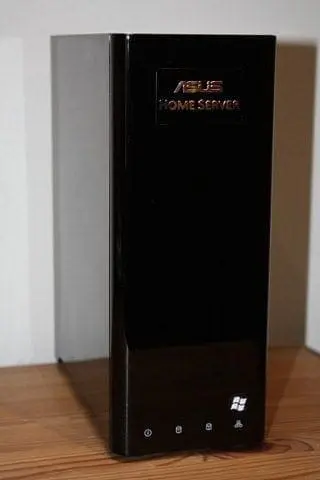
    Review of the ASUS TS Mini Windows Home Server

    Earlier in the week I received an ASUS TS Mini Windows Home Server. Well, several days on I figured it was time to post the review.

    This is the first Windows Home Server that ASUS have released, and it is slowly appearing for sale around the world. I have also been told by ASUS that they are looking at releasing more Home Server’s in the future.

    WHATS IN THE BOX?

    The box contains all the usual things you would expect to find….

  • TS Mini
  • Quick start guide
  • User manual
  • AC adapter
  • Power cord
  • RJ45 LAN cable
  • HDD screws package
  • Software installation CD
  • Recovery CD
  • Restore CD
  • Warranty card
  • ASUS TS MiniASUS TS Mini
  • ASUS TS MiniASUS TS MiniASUS TS MiniASUS TS MiniASUS TS MiniSPECIFICATIONS
  • CPU: Intel Atom Processor N280 1.66GHz
  • Memory: 1GB or 2GB DDR2-800
  • Hard Drive Storage: 500GB or 2TB @ 7200rpm (2x 1TB)
  • Cloud Storage: 500GB ASUS WebStorage
  • Networking: 1x 10/100/1000 (Gigabit) RJ45 LAN
  • Interfaces: 6x USB 2.0, 2x eSATA, 1x Kensington Lock
  • Buttons: Power on/off button, Recovery button
  • LED Indicators: System, HDD1, HDD2, Network status indicators
  • AC Power Adapter (Watt): Output: 19V, 90W, Input: 100-240V AC, 50/60Hz universal
  • Dimensions: 9.6 (H) x 3.8 (W) x 8 (D) inches
  • Approximate Weight: 8.58 lbs.
  • Operation Noise: 28 dBa (near silent)
  • Operating System: Powered by Microsoft Windows Home Server
  • Color: Piano Black
  • ASUS TS Mini FrontASUS TS Mini BackASUS TS Mini Back
  • ASUS TS Mini portsThe front panel also contains 4 icons and lights which make it easy to see activity (certainly much easier than having those lights at the back of the server!)ASUS TS Mini front panelHere is information on the CPU:ASUS TS Mini CPU results