Apple Updates MacBook Air and Current Generation MacBook Pro with Latest Processors and New Graphics

0

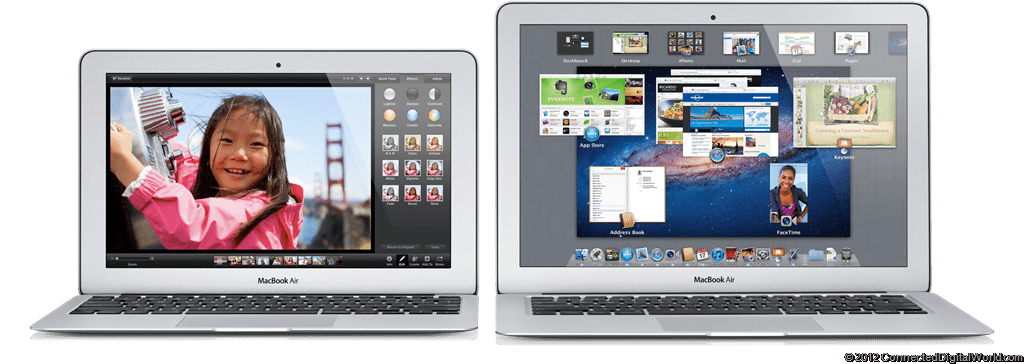
Apple today announced updated to both it’s MacBook Air range and MacBook Pro range, adding the latest processors, faster graphics and flash storage that is up to twice as fast as the previous generation. Oh, and they also get USB 3.0 finally!
features_processor_main

MacBook Air is the ultimate everyday notebook, and with new lower prices it is more affordable than ever. The current generation 13-inch and 15-inch MacBook Pro have also been updated with the latest Intel Core processors and powerful discrete graphics from NVIDIA. Apple’s popular AirPort Express has been redesigned to include features previously available only in AirPort Extreme.

“Today we’ve updated the entire MacBook line with faster processors, graphics, memory, flash storage and USB 3 connectivity,” said Philip Schiller, Apple’s senior vice president of Worldwide Marketing. “We’ve made the world’s best portable family even better and we think users are going to love the performance advances in both the MacBook Air and MacBook Pro.”

Available in 11-inch and 13-inch designs, the new MacBook Air features the latest Core i5 and Core i7 dual-core processors and is perfect for browsing the web, making movies and managing photos. The new integrated Intel HD Graphics 4000 is up to 60 percent faster and gives the MacBook Air plenty of power to tackle games and videos. MacBook Air features flash storage up to four times faster than traditional hard drives for instant-on performance and fast access to your apps and data. Now with 4GB of faster memory, configurable up to 8GB, you can run memory-intensive apps with ease. MacBook Air also features a new FaceTime HD camera that delivers high-definition 720p.

The 13-inch MacBook Pro features the latest Intel Core i5 or Core i7 dual-core processors up to 2.9 GHz with Turbo Boost speeds up to 3.6 GHz. The 15-inch MacBook Pro features the latest Intel Core i7 quad-core processors up to 2.7 GHz with Turbo Boost speeds up to 3.7 GHz and NVIDIA GeForce GT 650M discrete graphics. Both the 13-inch and 15-inch MacBook Pro can be configured with a 1TB hard drive or SSDs up to 512GB that are up to twice as fast as the previous generation.

MacBook Air and MacBook Pro both feature a high-speed Thunderbolt port and two USB 3.0 ports to easily connect to external displays and a wide variety of high performance peripherals. The 13-inch MacBook Air, and 13-inch and 15-inch MacBook Pro deliver up to 7 hours of wireless battery life, and the 11-inch MacBook Air delivers up to 5 hours. Mac® notebook batteries use advanced chemistry and Adaptive Charging technology to provide up to 1,000 recharges.

The MacBook Air and MacBook Pro ship with OS X Lion. Starting today, customers who purchase a Mac are eligible for a free copy of OS X Mountain Lion when it becomes available. Mountain Lion introduces innovative features including the all new Messages app, Notification Center, system-wide Sharing, AirPlay Mirroring, Game Center and the enhanced security of Gatekeeper. With iCloud built into the foundation of OS X, Mountain Lion makes it easier than ever to keep your content up to date across all your devices.

Priced at just $99, the new AirPort Express features a completely redesigned compact enclosure and new wireless and connectivity capabilities. Simultaneous dual-band 802.11n Wi-Fi allows users to easily create a network that delivers optimal performance and range. The AirPort Express also features an audio-out port to connect external powered speakers or an A/V receiver and use AirPlay to wirelessly stream from iTunes® on your Mac or iOS device. A USB 2.0 port allows you to share a printer wirelessly over your network, and an additional ethernet port lets you connect to other computers and network devices. Setup is built right into OS X and iOS and can be done in just a few simple steps, and with AirPort Utility 6.0 for OS X Lion and iOS you can access a visual map of your network for viewing and reconfiguring devices.

Pricing & Availability
The 11-inch MacBook Air comes with a 1.7 GHz processor, 4GB of memory and is available with 64GB of flash storage starting at $999 (US), and 128GB of flash storage starting at $1,099 (US). The 13-inch MacBook Air comes with a 1.8 GHz processor, 4GB of memory and is available with 128GB of flash storage starting at $1199 (US), and 256GB of flash storage starting at $1,499 (US). Configure-to-order options include a 2.0 GHz Intel Core i7 processor, up to 8GB of 1600 MHz DDR3 onboard memory and up to 512GB flash storage.

The 13-inch MacBook Pro is available with a 2.5 GHz dual-core Intel Core i5 processor, 4GB of memory and 500GB hard drive starting at $1,199 (US), and with a 2.9 GHz dual-core Intel Core i7 processor, 8GB of memory and 750GB hard drive starting at $1,499 (US). The 15-inch MacBook Pro is available with a 2.3 GHz quad-core Intel Core i7 processor, 4GB of memory, Intel HD Graphics 4000 and NVIDIA GeForce GT 650M, and 500GB hard drive starting at $1,799 (US); and with a 2.6 GHz quad-core Intel Core i7 processor, 8GB of memory, Intel HD Graphics 4000 and NVIDIA GeForce GT 650M, and 750GB hard drive starting at $2,199 (US). Configure-to-order options include faster quad-core processors up to 2.7 GHz, additional hard drive capacity up to 1TB, up to 8GB of memory and solid state storage up to 512GB.

Additional technical specifications, configure-to-order options and accessories are available online at apple.com/macbookair or apple.com/macbook-pro.

Apple announces the all new 15-inch MacBook Pro with Retina display

0

Apple today unveiled an all new 15-inch MacBook Pro featuring a stunning Retina display, all flash storage and quad-core processors in a radically thin and light design.

i7

Measuring a mere 0.71 inches and weighing only 4.46 pounds, the completely redesigned MacBook Pro sets a new standard in performance and portability for pro users.

“The MacBook Pro with Retina display pushes the limits of performance and portability like no other notebook,” said Tim Cook, Apple’s CEO. “With a gorgeous Retina display, all flash architecture and a radically thin and light design, the new MacBook Pro is the most advanced Mac we have ever built.”

The new MacBook Pro Retina display is the world’s highest resolution notebook display with over 5 million pixels, 3 million more than an HD television. At 220 pixels-per-inch, the Retina display’s pixel density is so high the human eye cannot distinguish individual pixels from a normal viewing distance, so text and graphics look incredibly sharp. The Retina display uses IPS technology for a 178-degree wide viewing angle, and has 75 percent less reflection and 29 percent higher contrast than the previous generation.

Featuring a precision engineered aluminum unibody design and an all flash storage architecture, the all new MacBook Pro is the lightest MacBook Pro ever and nearly as thin as a MacBook Air. Flash storage that is up to four times faster than traditional notebook hard drives enables the all new MacBook Pro to play four simultaneous streams of uncompressed 1080p HD video from internal storage. The flash storage architecture also delivers improved reliability, instant-on responsiveness and 30 days of standby time.

The MacBook Pro with Retina display features the latest Intel Core i7 quad-core processors up to 2.7 GHz with Turbo Boost speeds up to 3.7 GHz, NVIDIA GeForce GT 650M discrete graphics, up to 16GB of faster 1600 MHz RAM and flash storage up to 768GB. Two Thunderbolt and two USB 3.0 ports allow pro users to connect to multiple displays and high performance devices, and a new HDMI port offers quick connectivity to HDTVs.

The MacBook Pro battery delivers up to 7 hours of wireless productivity, and uses advanced chemistry and Adaptive Charging technology to provide up to 1,000 recharges. The MacBook Pro also features a FaceTime HD camera, glass Multi-Touch trackpad, full-size backlit keyboard, dual microphones, enhanced speakers, 3-stream 802.11n Wi-Fi and a thinner MagSafe 2 power port.

OS X Lion, iPhoto, iMovie, iTunes and other Apple apps including Aperture and Final Cut Pro X have been updated to take full advantage of the new MacBook Pro with Retina display. The updated Aperture 3.3 also includes revolutionary new image adjustment features and now supports a unified photo library so photographers can move seamlessly between iPhoto and Aperture.

The all new MacBook Pro ships with OS X Lion. Starting today, customers who purchase a Mac are eligible for a free copy of OS X Mountain Lion when it becomes available. Mountain Lion introduces innovative features including the all new Messages app, Notification Center, system-wide Sharing, AirPlay Mirroring, Game Center and the enhanced security of Gatekeeper. With iCloud built into the foundation of OS X, Mountain Lion makes it easier than ever to keep your content up to date across all your devices.

Pricing & Availability
The 15-inch MacBook Pro with Retina display is available through the Apple Online Store (www.apple.com), Apple’s retail stores and Apple Authorized Resellers. The 15-inch MacBook Pro is available with a 2.3 GHz quad-core Intel Core i7 processor with Turbo Boost speeds up to 3.3 GHz, 8GB of memory and 256GB of flash storage starting at $2,199 (US); and with a 2.6 GHz quad-core Intel Core i7 processor with Turbo Boost speeds up to 3.6 GHz, 8GB of memory and 512GB of flash storage starting at $2,799 (US). Configure-to-order options include faster quad-core processors up to 2.7 GHz, up to 16GB of memory and flash storage up to 768GB.

Additional technical specifications, configure-to-order options and accessories are available online at apple.com/macbook-pro.

Apple announce that OS X Mountain Lion coming in July

0

Apple today announced that OS X Mountain Lion, the ninth major release of the desktop operating system, will be available in July as a download from the Mac App Store.

OS X Moutain Lion

Mountain Lion introduces more than 200 innovative features including the all new Messages app, Notification Center, system-wide Sharing, Facebook integration, Dictation, Power Nap, AirPlay Mirroring, Game Center and the enhanced security of Gatekeeper. With iCloud built into the foundation of OS X, Mountain Lion makes it easier than ever to keep your content up to date across all your devices.

“The pace of innovation on the Mac is amazing, OS X Mountain Lion comes just a year after the incredibly successful launch of Lion,” said Philip Schiller, Apple’s senior vice president of Worldwide Marketing. “With iCloud built right in and the new Notification Center, Messages, Dictation, Facebook integration and more, this is the best OS X yet.”

Using your iCloud account, Mountain Lion makes it easier than ever to set up your Mail, Contacts, Calendar, Messages, Reminders and Notes. The new Reminders and Notes apps help you remember important tasks and jot down your thoughts quickly, while iCloud automatically keeps everything up to date. Documents in the Cloud works with iCloud-enabled apps including Apple’s iWork suite so you can always access and edit your documents on any device.

The new Messages app replaces iChat and brings iMessage to the Mac, so you can send messages to anyone with an iPhone, iPad, iPod touch or another Mac. You can include attachments, high quality photos and HD video, and your iMessages appear on all your devices so you can pick up a conversation right where you left off. iMessage includes group messaging, delivery and read receipts, typing indicators and secure end-to-end encryption. The Messages app also supports traditional instant messaging services, including AIM, Yahoo!, Google Talk and Jabber.

Mountain Lion streamlines the presentation of notifications, and with Notification Center you can see all your notifications from OS X and third party apps in one convenient place. You can customize which apps send you notifications, the type of notification you receive, and how many items are shown in Notification Center. When you want to focus on your work or watch a movie, you can choose to temporarily suspend all notifications.

New system-wide Sharing is built into Mountain Lion, making it easier than ever to share links, photos, videos and other files. Clicking the Share button allows you to share quickly without having to switch to another app, and you just need to sign in once to use third-party services like Facebook, Twitter, Flickr and Vimeo. Facebook and Twitter are integrated with Notification Center so you can receive notifications when someone sends you a message or mentions you in a post or Tweet.

With built-in support for Facebook, you can post photos, links and comments with locations right from your apps. Once you’ve signed in, your Facebook friends automatically appear in Contacts with their profile photos. Your Facebook notifications work with Notification Center in Mountain Lion, and you can even update your Facebook status from within Notification Center.

Dictation is built into Mountain Lion and allows you to dictate text anywhere you can type, whether you’re using an app from Apple or a third party developer. Mountain Lion also introduces Power Nap, an innovative new feature that keeps your MacBook Pro with Retina display and MacBook Air (second and third generation) up to date while it sleeps. Power Nap automatically refreshes Mail, Contacts, Calendar, Reminders, Notes, Photo Stream, Find My Mac and Documents in the Cloud, and when plugged in, downloads software updates and backs up your Mac using Time Machine.

The revolutionary new Gatekeeper feature makes downloading software from the Internet safer by giving you control over which apps can be installed on your Mac. You can choose to install apps from anywhere, just as you do today, or for maximum security you can set Gatekeeper to allow only apps from the Mac App Store. The default setting allows you to install apps from the Mac App Store and apps from developers that have a unique Developer ID from Apple. In addition to checking daily for security updates, Mountain Lion includes app sandboxing to keep misbehaving apps from compromising your system, and kernel ASLR for improved protection against buffer overflow attacks.

Additional new features in Mountain Lion include:

  • AirPlay Mirroring, an easy way to wirelessly send an up-to-1080p secure stream of what’s on your Mac to an HDTV using Apple TV, or send audio to a receiver or speakers that use AirPlay;
  • Game Center, which brings the popular social gaming network from iOS to the Mac so you can enjoy live, multiplayer games with friends whether they’re on a Mac, iPhone, iPad or iPod touch;
  • a faster Safari® with a unified Smart Search Field, iCloud Tabs that present your open tabs across your devices, and a new Tab View to quickly swipe through them;
  • new features for China, including significantly improved text input, a new Chinese Dictionary, easy setup with popular email providers, Baidu search in Safari, built-in sharing to Sina Weibo and popular video websites Youku and Tudou; and
  • over 1,700 new APIs that give developers access to the latest core OS and web technologies, as well as the newest features of OS X, including Documents in the Cloud, Notifications, Sharing and Game Center.

Pricing & Availability
OS X Mountain Lion will be available in July from the Mac App Store for $19.99 (US). Mountain Lion requires Lion or Snow Leopard (OS X v10.6.8 or later), 2GB of memory and 8GB of available space. For a complete list of system requirements and compatible systems, please visit: apple.com/osx/specs/. OS X Server requires Mountain Lion and will be available in July from the Mac App Store for $19.99 (US). The OS X Mountain Lion Up-to-Date upgrade is available at no additional charge via the Mac App Store to all customers who purchased a qualifying new Mac system from Apple or an Apple Authorized Reseller on or after June 11, 2012.

Apple announces iOS 6 coming this fall

0

Apple today previewed iOS 6, introducing over 200 new features to the world’s most advanced mobile operating system, and released a beta version to iOS Developer Program members.

ios 6

iOS 6 will be available to iPhone, iPad and iPod touch users this fall as a free software update. New iOS 6 features include: an all new Maps app with Apple-designed cartography, turn-by-turn navigation and an amazing new Flyover view; new Siri features, including support for more languages, easy access to sports scores, restaurant recommendations and movie listings; Facebook integration for Contacts and Calendar, with the ability to post directly from Notification Center, Siri and Facebook-enabled apps like Photos, Safari® and Maps; Shared Photo Streams via iCloud; and Passbook, the simplest way to get all your passes in one place.

“iOS 6 continues the rapid pace of innovation that is helping Apple reinvent the phone and create the iPad category, delivering the best mobile experience available on any device,” said Scott Forstall, Apple’s senior vice president of iOS Software. “We can’t wait for hundreds of millions of iOS users to experience the incredible new features in iOS 6 including the new Maps app, expanded Siri support, deep Facebook integration, Shared Photo Streams and the innovative new Passbook app.”

iOS 6 includes an all new Maps app with vector-based map elements that make graphics and text smooth, and panning, tilting and zooming incredibly fluid. New turn-by-turn navigation guides you to your destination with spoken directions, and the amazing Flyover feature has photo-realistic interactive 3D views. Real-time traffic information keeps you updated on how long it will take to get to your destination and offers alternate time-saving routes if traffic conditions change significantly. Additionally, local search includes information for over 100 million businesses with info cards that offer Yelp ratings, reviews, available deals and photos.

Siri, now available for the new iPad as well as iPhone 4S, includes language support for English, French, German and Japanese, and adds support for Spanish, Italian, Korean, Mandarin and Cantonese. Siri is optimized for use in 15 countries and helps you get even more done with just your voice, whether it’s finding the latest sports scores or making restaurant reservations. You also can ask Siri to update your status on Facebook, post to Twitter or launch an app. Additionally, Siri takes hands-free functionality even further with a new Eyes Free mode, enabling you to interact with your iPhone using nothing more than your voice.

Built-in Facebook integration is the best ever in a mobile device, allowing you to sign in once and post from Notification Center, Siri and Facebook-enabled apps, including Photos, Safari and Maps. Your Facebook friends’ information is kept up to date across all your iOS devices, automatically updating details in Contacts when they change, and scheduling events and birthdays in your Calendar. You can also “Like” content directly from the App Store and iTunes and see what your friends recommend.

With more than 125 million users already enjoying iCloud, iOS 6 introduces new ways to share photos with friends and family using Shared Photo Streams. Simply select the photos you want to share, pick which friends you want to receive the album, and the Shared Photo Stream album is instantly available on their iOS devices, iPhoto and Aperture on their Mac, via the web or even through Apple TV. You and your friends can leave comments on or “Like” any photo in a shared album.

The new Passbook app is the simplest way to get all your passes in one place, such as boarding passes and baseball tickets. Passbook lets you scan your iPhone or iPod touch to use a coupon, get into a concert or check into your hotel. Passbook automatically displays your passes on your Lock Screen based on a specific time or location, so when you walk into your favourite coffee shop your loyalty card appears and you can scan it to buy a coffee or check your balance. Passbook can even alert you to last minute gate changes or flight delays at the airport.

Building on Apple’s commitment to provide innovative solutions for education and accessibility, iOS 6 introduces Guided Access. This new feature allows a parent, teacher or administrator to disable hardware buttons to lock an iOS device into a single app, especially useful for test taking or helping someone with a disability stay focused on learning. Guided Access also includes the ability to confine touch input to certain parts of the screen.

Additional new iOS 6 features include:

  • enhancements to Safari, the world’s most popular mobile browser, such as iCloud tabs, offline reading lists, photo uploads and full screen view;
  • support for FaceTime calls over cellular networks;
  • the ability to set up a VIP Mailbox, making it easier to quickly view messages from important people you designate as VIPs;
  • the option to decline incoming calls with a quick message, set a callback reminder and enable a new Do Not Disturb option; and
  • a whole new set of improvements and services specifically for iOS users in China, such as improved text input and built-in support for popular Chinese services including Baidu, Sina Weibo, Youku and Tudou.

Availability
The iOS 6 beta software and SDK are available immediately for iOS Developer Program members at developer.apple.com. iOS 6 will be available as a free software update for iPhone 4S, iPhone 4, iPhone 3GS, the new iPad, iPad 2 and iPod touch (fourth generation) this fall. Some features may not be available on all products.

Microsoft talks about activating Windows 8 contracts in your app

In the next in their on-going Building Windows 8 series, Microsoft discussed activating Windows 8 contracts in your app.

contracts

This is how the new article starts:

When you start writing Metro style apps you’ll quickly come across contracts, a new and powerful concept in Windows 8. Metro style apps use contracts to declare interactions they support with other apps and with Windows. You’ve probably already heard about some of them: search, share, etc. Using contracts, apps become better by working with the system or with each other when users install more apps that implement contracts. In this post I’ll walk you through activation, one of the main concepts to think about as you add contracts to your apps.

The Windows activation platform is used to launch Metro Style apps and to notify them of the reason why a user launched them. The reasons vary from a user starting the app using its tile on the start screen to the app being launched for a specific task such as showing a user search results for a query. Windows provides your app with the reason it was launched and if applicable any additional info needed to complete its task. Before our Windows 8 activation platform, you passed this info to apps via command-line parameters. With our new model, we also support passing live objects such as a StorageFile, ShareOperation, etc to provide the app with context. You’ll see that this makes contracts all the more powerful. Let’s jump into the details of what you need to know to support being launched for a contract.

To continue reading, click here.

D-Link Introduces MovieNite Plus Streaming Media Player Offering Compelling Entertainment Options in 1080p HD

Transforming any living room into the ultimate entertainment center, D-Link today announced the MovieNite Plus (DSM-312), offering consumers more entertainment options straight to the TV and turning any night into a MovieNite.

DSM-312_front

The robust MovieNite Plus allows users to stream an endless amount of the latest movies and TV shows at up to 1080p HD video quality, as well as music right to their TV, including content from VUDU, Netflix, YouTube, Facebook, and coming soon, Hulu Plus. MovieNite Plus also transforms the TV into a digital photo album with Picasa, allowing users to share memories in stunning HD quality. In addition, it offers over 130 channels and apps for endless entertainment choices, providing something for virtually everyone in the family.

“Whether you are looking to stream the latest flicks from VUDU, catch up on your favorite TV shows available on Netflix, or just want to listen to some music from Pandora, our new MovieNite Plus offers a simple to use solution that delivers the biggest names in entertainment straight to your TV,” said Ken Loyd, director, consumer products, D-Link. “D-Link continues to deliver user-friendly entertainment solutions offering an unlimited amount of content at the best HD resolution for a great value.”

Featuring a simple three-step setup, the easy-to-use MovieNite Plus works with almost any TV and is an ideal media player for any user. MovieNite Plus is equipped with built-in wireless and Ethernet connectivity for quick and easy connection to a home network, HDMI output to stream HD movies up to 1080p, and composite audio/video connection to turn any analog TV into a Smart TV. Simply plug the MovieNite Plus into a TV and power outlet and set up MovieNite Plus using the onscreen menu.

MovieNite Plus features user-friendly one-button navigation from the remote control for instant access to VUDU, Netflix, Pandora, and YouTube, and an easy onscreen menu to access a limitless amount of entertainment options. Users can also conveniently access live video from mydlink-enabled Cloud Cameras on a TV via the mydlink app to monitor their home or keep an eye on kids or pets.

Availability and Pricing

The MovieNite Plus (DSM-312) streaming media player is available for pre-order now for $79.99 at Amazon.com. MovieNite Plus will be available at retail and e-tail outlets in the U.S. beginning in July. More information about MovieNite Plus is available online at www.dlink.com/dsm-312.

Halo 4 extended trailer to air during England football match tonight

0

Last week we told you that Microsoft had released more information about Halo 4 at E3. Well tonight the extended trailer we saw at E3 will be shown during the England football match on ITV.

e32012_halo4_chiefhero2

This is what Microsoft told us today:

It’s an important evening for England tonight. Not only does it mark the beginning of their Euro 2012 group campaign vs France, but will also play home to the worldwide TV premier of the extended “Halo 4” E3 trailer, debuted at the Microsoft E3 keynote in Los Angeles last week. The stunning live-action trailer, which will air at half-time on ITV (5.45pm approx), gives a tantalising glimpse into the “Halo 4” storyline and shows the Master Chief on the planet Requiem,  about to face an unknown and terrifying threat that sits at the heart of the “Halo 4” campaign.

Showcased at last week’s Electronic Entertainment Expo in Los Angeles, “Halo 4” marks the return of Master Chief and the beginning of a new saga in the blockbuster franchise that has shaped entertainment history, selling more than 40 million games worldwide. Developed by 343 Industries, “Halo 4” launches on 6 Nov. 2012, delivering the most epic and explorative Halo campaign yet, together with groundbreaking multiplayer and episodic co-op action.

So what do you think of Halo 4? Personally I can’t wait!

StableBit Scanner 2.0 for Windows Home Server 2011 Beta Updated to 2.0.0.2245

StableBit Scanner 2.0 for Windows Home Server 2011 is now available in beta and has been updated to version 2.0.0.2245.

An advanced hard disk surface scanner, monitor and more.

Monitors all your hard drives and ensures that every bit holding your precious data is readable.

2.0.0.2245

* Rewrote raising / hiding WSS notifications.

* Fixed columns not being saved.

* Added new ‘Age’ column to main screen.

* Fixed UI issues, including removed disks lingering after they were removed.

* Enabled SMART health links on main summary panel.

* BitFlock <-> Scanner integration is now via. Azure.

* A new type of SMART warning based on advisory attributes. This includes a new type of ignore rule for such warnings. The ignore rule will be generated automatically when you choose to ignore this new type of warnings.

* Revamped the SMART window to show all the new BitFlock detail.

* Each attribute is now monitored in more than one way, and you can visually inspect how by clicking on it.

* BitFlock attribute descriptions are now shown.

* Added new BitFlock group identifier.

* Added new BitFlock attribute types.

* Added new BitFlock interpretation formats.

* BitFlock has been massively updated with new data and new health rules.


Download the latest beta version from here

Connect and drive with the first MirrorLink compatible in-car AV Centre head unit from Sony

Sony have released the first MirrorLink compatible AV Center head unit enabling you to enjoy smartphone content, apps and calls in safety.XAV-601BT_EUR_1

Now you can control and enjoy music, navigation and other smartphone apps safely while on the move. With the first MirrorLink compatible in-car AV centre head unit from Sony, you’re always in touch with your digital world while you’re behind the wheel.

Just connect your MirrorLink certified smartphone to the XAV-601BT and you’re ready for the road. As well as making and receiving calls safely, it’s easy to interact with your phone’s media collection and compatible apps while your smartphone’s battery charges via USB. You can even get directions and interact via the large 15.5cm (6.1”) touchpanel with your phone’s built-in navigation app (NB: supported functions depend on capabilities of connected smartphone).

From launch, the XAV-601BT offers guaranteed MirrorLink compatibility with these Symbian smartphones: Nokia 701, 700, 603, N8, E7, C7, X7, C6-01. The head unit is future-proofed with simple firmware updates to add compatibility with more apps and a growing range of smartphones from other manufacturers.

You don’t even have to be a driver to enjoy all the fun. Passenger App Control lets your passenger view videos and interact with apps from their connected iPhone and iPod Touch on the head unit’s touchscreen. (NB: iPod video playback requires additional cable).

Dual USB ports allow simultaneous connection of two portable devices so you can make calls and use your smartphone’s navigation app, while browsing album artwork and playlists onyour iPod/iPhone or Walkman or listening to tracks stored on USB flash memory.

Music searches, control of linked devices and other functions are a pleasure via the touchscreen’s speedy, responsive ‘3D-style’ interface. Choose your background wallpaper image, or select from a choice of six eye-catching visuals that bring music playback to life.

Audio/video quality of the XAV-601BT is everything you’d expect from Sony’s range-topping AV Centre head unit. You’ll enjoy detail-packed DVD video playback, plus a clear view of playlists and album artwork on the large 15.5cm (6.1”) WVGA touchscreen.

Pristine video is teamed with unmatched in-car sound. Immerse yourself in the emotion of a live concert with 4.1 multi-channel surround sound plus a virtual centre speaker. Sony’s unique Advanced Sound Engine lets you fine-tune each performance to suit your mood and your music collection. Unique to Sony, radio reception is enhanced by a Digital Clarity Tuner that improves stereo channel separation and sound quality if you’re driving in areas with weak FM signal coverage.

Naturally the XAV-601BT supports Bluetooth for safe hands-free calls from your phone, and wireless music streaming from your Walkman or Bluetooth-enabled MP3 player.

For additional peace of mind, the XAV-601BT features a removable front panel that detaches in an instant for improved anti-theft security while you’re away from the vehicle.

About MirrorLink

MirrorLink is a technology standard developed by the Car Connectivity Consortium (CCC) that unites many of the world’s major electronics, automotive and mobile communications companies.

With MirrorLink, drivers can safely access many of their smartphone’s capabilities from behind the wheel, without looking at or touching the phone itself.

MirrorLink seamlessly connects your phone with your vehicle’s information and entertainment system. Approved applications and content are ‘mirrored’ from the mobile device onto the display of your in-dash head unit. This connectivity allows you to interact safely with your smartphone via the car’s head unit display, steering wheel buttons and audio system.

The new XAV-601BT in-car AV Centre with MirrorLink compatibility by Sony is available in Europe from June 2012.

Nokia Lumia 900 on AT&T gets an update

Nokia have released an update for it’s Lumia 900 phone, but only if you are on AT&T in the US.

UWHS---Nokia-Lumia-900-at-CES-2012--[7]

According to the Conversations by Nokia blog:

This update brings the following enhancements:

▪ Removes purple hue which affected the screen of some devices in low light conditions

▪ Improved sensitivity for the proximity sensor

▪ Other minor adjustments and enhancements

Let us know if you are on AT&T and have installed the update.

BYOB Podcast Episode 88 Out Now

0

The guys over at the BYOB podcast, including our very own Tim Daleo have just released episode 88.

BYOB300_thumb_thumb_thumb

Here is what is included in this weeks show:

[box style=”rounded” border=”full”]XBOX E3 hardware/compatibility updates, more server Issues, Windows on a laptop Mike gives us his experience. Thunderbolt comes to PC hardware, Cheap butt kicking HTPC, Server 12 first impressions.[/box]

As usual you can listen to the show from here.

A closer look at the Toshiba Portege Z930 Ultrabook

0

Earlier in the week we told you that Toshiba had announced a new Ultrabook for business called the Portege Z930. We had some hands-on time with it so here are our thoughts.

CDW - A closer look at the Toshiba Portege Z930 - 2

Weighing just 1.12kg, the Portégé Z930 is the world’s lightest 33.8cm (13.3”) laptop. The unique combination of an incredibly durable magnesium alloy chassis and an internal honeycomb structure offers outstanding support throughout the working day. Combined with an eight hour all-day battery life, the Portégé Z930 is the perfect companion for long-haul business trips or daily commutes, and robust enough to withstand the physical strains of day-to-day use. At just 8.3mm at its thinnest point, it is also compact enough to easily fit in tight spaces or carry cases.

The anti-glare, LED backlit display ensures working on documents is comfortable for long periods of time, while using the laptop outdoors in bright sunlight is possible without distracting reflections. A full-size tiled keyboard features a backlight, illuminating each key for ease of use in low light conditions. Additionally, a spill-resistant membrane beneath the keyboard lets users save important documents and fully shut down the laptop, helping to prevent damage to the internal components in event of a spillage. Up to a 512GB SSD provides plenty of storage space and fast access to documents and programs, while remaining more robust, compact and energy efficient, as it features no moving parts.

With powerful 3rd generation Intel Core processors for Ultrabook and up to 12GB DDR3 memory, the Portégé Z930 is capable of effortlessly working through office applications, performing memory-intensive tasks or running multiple programs simultaneously. Intel Rapid Start Technology delivers an incredibly quick boot-up time, making the Portégé Z930 fully operational within seconds.

CDW - A closer look at the Toshiba Portege Z930 - 3 CDW - A closer look at the Toshiba Portege Z930 - 4CDW - A closer look at the Toshiba Portege Z930 - 5 CDW - A closer look at the Toshiba Portege Z930 - 6CDW - A closer look at the Toshiba Portege Z930 - 7 CDW - A closer look at the Toshiba Portege Z930 - 8CDW - A closer look at the Toshiba Portege Z930 - 9 CDW - A closer look at the Toshiba Portege Z930 - 10

As you can see this new business Ultrabook is very slim, and looks like a business machine.

What makes it a business machine you may ask? Well, Toshiba feel that businesses require additional security, and they would be correct. The Z930 has both a fingerprint reader and also a TPM chip, which helps with things like disk encryption using BitLocker.

The screen is non-glare and it was very clear and easy to read.

Could this be the first real Ultrabook to grace business meetings with the security enforcing functionality that modern businesses demand? Time will tell…

The Portege Z930 Ultrabook will be available during Q3 2012, and prices start from £899.

A closer look at the Toshiba U840 Ultrabook

0

Earlier in the week we told you that Toshiba had announced a new Ultrabook called the U840. We had some hands-on time with it so here are our thoughts.

CDW - A closer look at the Toshiba U840 Ultrabook - 19

At just 19.9mm thin and weighing 1.58kg, the Satellite U840 is an excellent choice for anyone looking for a highly portable laptop, such as frequent travellers or style-conscious users. A durable and lightweight brushed aluminium chassis ensures the Satellite U840 looks and feels as premium as it performs.

Each Satellite U840 is fitted with an integrated 32GB solid state drive (SSD), a fast and robust storage solution that also helps to further improve overall performance, boot-up times and extend battery life up to nine hours. An additional 500GB hard disk drive (HDD) also provides ample storage space for large video files, photo libraries, music collections and more.

The Satellite U840 features SRS Premium Sound 3D, tweaking audio content to ensure bass, mid and treble tones reach their maximum potential, while stereo speakers deliver rich, distortion-free audio from movies, music and games, without the need for an external speaker system.

CDW - A closer look at the Toshiba U840 Ultrabook - 1 CDW - A closer look at the Toshiba U840 Ultrabook - 5CDW - A closer look at the Toshiba U840 Ultrabook - 6 CDW - A closer look at the Toshiba U840 Ultrabook - 7CDW - A closer look at the Toshiba U840 Ultrabook - 8 CDW - A closer look at the Toshiba U840 Ultrabook - 9CDW - A closer look at the Toshiba U840 Ultrabook - 10 CDW - A closer look at the Toshiba U840 Ultrabook - 11CDW - A closer look at the Toshiba U840 Ultrabook - 12 CDW - A closer look at the Toshiba U840 Ultrabook - 16

This is Toshiba’s first 14” Ultrabook, and it looks very nice!

It has Intel’s Wireless Display making it easy to send the display to a supported device. It also has a backlit keyboard making it easy to use it darker locations.

It has an 8 hour battery life, which is really good, although we will wait to test it properly before making any judgements.

It has a number of ports, including USB 3.0, Ethernet and a card reader, plus HDMI which is always useful!

It weighs in at 1.59kg so it’s pretty portable.

It has a 3rd generation Intel Core processor and can hold up to 8GB RAM.

The U840W Ultrabook will be released during Q3 2012 with a starting price of £599.

Media Browser 2.6 (Atlas) Released

The latest version of Media Browser, version 2.6, codename Atlas has been released.

MediaBrowser_thumb1_thumb

Highlights:

      • True searching with an on-screen keyboard has been added at all levels. The search screen is produced with ctl-s or the yellow button on your remote or via a search button in the theme
      • Box sets are now a recognized type and can have their metadata downloaded by the internal internet providers. To designate a folder as a box set simply include “[BoxSet]” in the folder name.
      • Playback has been completely revamped for both the internal and external players. Media Browser now has built-in support for MPC-HC, TMT5 and VLC2 offering position tracking and resume support
      • External players can now be setup by both media type and video format (standard or 3D)
      • A “Play All From Here” context menu has been added for episodes
      • A number of defects with the internal player have been resolved
      • The internal metadata providers have been improved in both their ability and speed. You can now have them save a local copy of all metadata and images which can greatly reduce the amount of time required for subsequent refreshes.
      • If you use the internal tmdb provider, it can automatically download actor images
      • Problems starting the service and configurator when MB is not installed in the default location have been solved
      • Many, many more features and bug fixes.

To see the full list of changes and enhancements see here

Download the latest version of Media Browser here