Official Microsoft Announcement for Vail

Here is the official Microsoft announcement for the preview of Windows Home Server Vail.

There is even a 7 minute video you can watch:

Many of you may already know that Microsoft has been hard at work on the next version of Windows Home Server. We are excited to announce today that the beta of this next version (code name “Vail”) is now available. We invite everyone to check it out by downloading the software from the Microsoft Connect site. (English language builds are available now). We are releasing this Vail beta with one express goal: to solicit your feedback!

So what’s new and exciting in this next version? Although we’re still in the midst of development work (and things may change), we can say that Vail includes feature improvements in four key areas:

  • Extending media streaming outside the home or office
  • Multi-PC backup and restore
  • Simplified setup and user experience
  • Expanded development and customization tools for partners

Check out a short demo of some of the new features here.

Before we go too much further, however, we want to pass along a couple of very important hardware-related tips on installing the Vail Beta:

  1. In Vail, we’re moving to a new underlying server platform that will only run as a 64-bit OS. We do not recommend running Vail on a 32-bit PC or existing Windows Home Server systems (even 64-bit Home Server systems) because there may be compatibility issues with some OEM drivers.
  2. Since it is still in ‘beta,’ please install the Vail code on a secondary computer as opposed to existing Windows Home Server v1 OEM systems (not even 64-bit systems) If you do install the beta on an existing system, you may experience a number of problems, including the inability to run WHS v1 add-in applications (even those provided by OEMs). Installing on a secondary machine will help ensure the best possible user experience, and we would like your feedback on what this scenario is like.
  3. Installation of the Vail OS on a PC will also require users to wipe all data from that PC or device.
  4. The hardware requirements for Vail call for a 1.4 GHz x64 processor, 1 GB RAM, and at least one160 GB hard drive. Full details and additional requirements will be posted on the Microsoft Connect download site.

Also, if you are a developer, this beta includes a new software development kit (SDK) that gives developers and partners even more ways to customize the OS and add new functionality and services to Windows Home Servers. Download the SDK here.

So after you check out all of the great features in this public beta, you’ll probably want to know when the final version of Vail is going to ship. We’re not ready to discuss delivery dates yet. We want to ship the best possible product, and as that old commercial went (sort of), “we will ship no Windows Home Server before it’s time.”

Give Vail a test run today!

– Dave Berkowitz, Senior Communications Manager

Windows Home Server Vail Public Preview

Today Microsoft have released a public preview release of the next version of Windows Home Server, codenamed Vail.

24-04-2010 08-55-39

A few months ago an internal build of Vail, that was only available to a select few, including us WHS MVPs, got released into the wild. Well this is the “official” release. And even better for us that means we can now talk about it and we are not under that part of the NDA anymore!

Here are some of the key pointers for this release:

Windows Server “Vail” server software is a 64-bit only operating system.

System Requirements:

· 1.4 GHz x64 processor.

· 1 GB RAM

· At least one 160 GB hard drive.

Vail is based on Windows Server 2008 R2.

So, you probably want to know how to get it then, don’t you?

Well you will need to get it from Microsoft Connect, which you can do so from here: https://connect.microsoft.com/WindowsHomeServer

Note that it may take a little while for the download to show up on Connect so keep checking.

If you want to post your questions to the official Microsoft Vail forum, you can do so here:

http://social.microsoft.com/Forums/en-US/whsvailbeta/threads

It is important to note that this is not a Beta release, it is a Technical Preview release. The difference being is that technical preview releases are aimed at people with a certain level of IT knowledge and experience, and that the build is not complete, features may be missing, things may not work as expected, etc.

So, if you are in any doubt, do not use it! And whatever you do, do not use it as your production Windows Home Server box!

Also, and I cannot stress this enough, READ THE MANUAL! There are literally pages and pages of known issues that you should be aware of with this build. And remember, before you think that maybe Microsoft shouldn’t have released this as it looks like it is not fit for primetime, it is a technical preview and not a beta!

Let us know your thoughts on Vail, and watch this space for Vail articles Smile

Review of the Synology DiskStation DS409slim NAS

2

If you are looking for a small, quiet, NAS device that takes 2.5” hard drives, then take a look at the Synology DiskStation DS409slim.

Here is how Synology describe the DS409slim:

Synology Disk Station DS409slim is designed to provide users with a budget-friendly solution for easy file sharing and backup. The snap-in 2.5″ hard drive design brings low power consumption, quiet operation, reliability and easy disk replacement in a compact design. Its sophisticated software, Synology DiskStation Manager 2.3, delivers ease of use and variety of features.

Here is so more information on the capabilities of the DS409slim from the Synology website:

Green, Quiet, and Reliable

The DS409slim is designed to work with 2.5″ hard drives. The low power consumption characteristic of 2.5″ hard drives will lower your electricity bill, as well as reduce your carbon footprint.

The smart fan design keeps the DS409slim’s fan off under normal operations and spinning up at a very low speed only when needed, thus minimizing the noise level.

In addition, 2.5″ hard drives have reduced vibration, increased MTBF (mean time before failure), and shock tolerance. It not only extends hard drive’s lifespan, but also provides better reliability.

Multimedia & Entertainment

Synology Download Station 2 functions as a 24×7 BitTorrent, FTP, HTTP, eMule, and NZB download center. The newly-integrated eMule download engine allows search-n-download capability with a web-browser without installing additional desktop applications.

Synology Audio Station supports music, Internet radio stations, and iPod playback with connected USB speakers. An optional direction-free Synology Remote allows you to freely enjoy your music. Web-streaming mode allows your music to be shared with multiple users over the Internet.

UPnP support allows users to stream multimedia files with an UPnP Digital Media Adapter (DMA) on a stereo system or a TV-set. Sony PS3 and Microsoft Xbox360 are also supported.

iTunes Server is an easy way to share music to other iTunes clients over the network. Password protection prevents unauthorized sharing.

Easy Storage & Backup

USBCopy provides a plug-n-save solution to store data. With just one touch on the Copy button, it quickly backs up the data on an USB storage device to the pre-defined location on the Synology Disk Station.

Synology Data Replicator 3 allows Windows users to back up desktop data to the Synology Disk Station. Immediate, Sync, and Scheduled Backup are fully-supported.

The Network Recycle Bin ensures all deleted files are recoverable from the recycle bin.

Eco Friendly

Synology Disk Station is designed and developed perpetually with the concept of energy saving.

Compared with average PC counterparts, Synology Disk Station consumes a relatively low amount of power and has the HDDs hibernate when not in use. This not only helps to save energy but also extends the lifespan of the hard disk.

Synology Disk Station truly earns the title of “green product” because of the unique Scheduled Power On/Off feature, and the smart fan design effectively cools down the system with minimum power consumption, yet keeps the system quiet on operation.

Finally, all Synology products are produced with RoHS compliant parts and packed with recyclable packing materials. Synology recognizes its responsibility as a global citizen and is continually working to reduce the environmental impact of the products we create.

SPECIFICATIONS

The DS409slim is a very small device indeed. It has four removable drive bays at the rear, along with an Ethernet port, eSata port and USB port, plus the power connector.

Synology DiskStation DS409slimSynology DiskStation DS409slim

Synology DiskStation DS409slim

The front of the DS409slim also houses a USB port, plus status lights.

Synology DiskStation DS409slim

Here are the complete specifications:

Hardware


  • CPU Frequency: 1.2GHz
  • Hardware Encryption Engine
  • Memory Bus: 16bit@DDR800
  • Memory: 128MB
  • Internal HDD1: 2.5″ SATA(II)/SSD X4
  • Max Internal Capacity: 3TB (4x 750GB hard drives)*
    (See All Supported HDD)
  • Size (HxWxD): 120mm X 105mm X 142mm
  • External HDD Interface: USB 2.0 port X2, eSATA port X1
  • Weight: 0.66kg
  • LAN: Gigabit X1
  • Wireless Support
  • Noise Level (fan-only):2 24dB(A)
  • Power Recovery
  • AC Input Power Voltage: 100V to 240V
  • Power Frequency: 50Hz to 60Hz, Single Phase
  • Power Consumption:3 19W(Access); 12W(HDD Hibernation)
  • Operating Temperature: 5°C to 35°C (40°F to 95°F)
  • Storage Temperature: -10°C to 70°C (15°F to 155°F)
  • Relative Humidity: 5% to 95%RH
  • Maximum Operating Altitude: 10,000 feet
  • Certification: FCC Class B, CE Class B, BSMI Class B

Applications


File Station 3

FTP Server

  • Bandwidth Control
  • Custom FTP Passive Port Range
  • Anonymous FTP
  • Transfer Log

Web Station

  • Virtual Host (up to 30 websites)
  • PHP/MySQL
  • Alternative HTTP Error Page
  • 3rd-Party Applications Support

Surveillance Station 4

Photo Station 4

  • Supported Image Format: BMP, JPG (jpe, jpeg), GIF, RAW (arw, srf, sr2, dcr, k25, kdc, cr2, crw, nef, mrw, ptx, pef, raf, 3fr, erf, mef, mos, orf, rw2, dng, x3f)
  • Supported Video Format: 3G2, 3GP, ASF, AVI, DAT, DivX, FLV, M4V, MOV, MP4, MPEG, MPG, QT, WMV, XviD, RM5, RMVB5, VOB5, RV305, RV405, AC35, AMR5, WMA35

Download Station 2

  • Supported Download Protocols: BT/HTTP/FTP/NZB/eMule
  • Custom BitTorrent Port Range
  • BitTorrent / eMule Bandwidth Control

Audio Station 2

  • Supported Audio Format: (USB Mode) AAC, FLAC, M4A, MP3, Ogg Vorbis, WMA, WMA VBR; (Streaming Mode) MP3, M4A, M4B
  • Supported Playlist Format: M3U, WPL
  • Internet Radio: SHOUTcast, Radioio

DLNA/UPnP Media Server

  • PS3/Xbox 360 Support
  • Supported Audio Format: AAC, FLAC, M4A, MP3, Ogg Vorbis, PCM, WAV, WMA, WMA VBR, WMA PRO, WMA Lossless
  • Supported Video Format: 3GP, 3G2, ASF, AVI, DAT, DivX, DVR-MS, ISO, M2T, M2TS, M4V, MKV, MP4, MPEG1, MPEG2, MPEG4, MTS, MOV, QT, SWF, TP, TRP, TS, VOB, WMV, XviD
  • Supported Image Format: BMP, JPG (jpe, jpeg), GIF, ICO, PNG, PSD, TIF (tiff), UFO
  • Supported Subtitles Format: srt, psb, smi, ass, ssa, sub, idx, ifo

iTunes Server

  • Supported Audio Format: MP3, M4A, M4P, WAV6, AIF6
  • Supported Video Format: M4V, MOV, MP4
  • Supported Playlist Format: M3U, WPL

Printer Server7

  • Max Printer #: 2
  • Printing Protocols: LPR, CIFS, AppleTalk

Synology Packages

  • SqueezeCenter
  • Mail Station
  • Webalizer
  • phpMyAdmin

iPhone Applications

  • DS photo
  • DS audio
  • DS cam

Twonky Release TwonkyMedia Server 6.0 Beta

On Friday night, Twonky released a beta for their new TwonkyMedia Server 6.0 release, bringing with it a number of new features, including aggregation.

TwonkyMediaServer

Release notes for TMS 6.0
—————————————-
New in Version 6.0:

+ aggregation of TMS and WMC servers
+ auto update for PC versions
+ file system eventing support for MAC
+ time seek support for MPEG, WMA and WMV content
+ active connections info on status page
+ animated tray icon on Win32
+ wpl playlists can contain URLs to Internet content (radio, pictures, video)
+ can now handle albumart art that has the same file name as a music or video file, but file extension is jpg,
e.g. mymovie.mpg can have albumart file mymovie.jpg (make sure than the scanner filter is set to video only)

Changes:

o Improved URLs with fixed schema for scaling
o Improved playlist handling, enabled upload of wpl playlists

You can download the beta here: http://www.twonkyforum.com/downloads/6.0-Beta/

There is also a page you can visit to learn more here: http://www.twonkyforum.com/viewtopic.php?f=16&t=8016&start=0

Western Digital Photos Photo Viewer for iPhone Released

1

Western Digital have released a free app for the iPhone and iPod Touch that enables you to view your photos from either a My Book World Edition drive or from WD ShareSpace Network Drives.

The app, called WD Photos, is available now from the Apple App Store and only takes a few moments to install.

WD Photos app

WD 1WD 2

WD 3

Here is the full press release:

WD® UNVEILS WD PHOTOS PHOTO VIEWER APP FOR IPHONE® AND IPOD TOUCH®

Users Can Easily View Their Entire Photo Collection Stored on Their
My Book World Edition or WD ShareSpace Network Drives

clip_image002

WD® (NYSE: WDC), the world’s leader in external storage solutions, today introduced WD Photos photo viewer, an iPhone®/iPod Touch® app for use with its My Book® World Edition™[1] and WD ShareSpace network drives, that lets users access up to 250,000 of their favourite photos from anywhere in the world. The WD Photos photo viewer app allows users to easily log in to their drive from anywhere so they can view their entire photo library.

Users’ photos remain private, safe and secure in full high resolution format, on their network drive, eliminating the need for painstaking uploads to costly online photo services and the need to choose which pictures to sync to their iPhone – with WD Photos photo viewer, they’re all instantly and easily accessible. The app’s powerful search tools, thumbnail previews and viewing options make it easy to find that special picture to show a friend at a coffee shop or remember a special moment.

With more than 50 million iPhones sold as of Apr. 2010 (Apple®), the iPhone has become one of the fastest growing smart phones in the market and is used every day by consumers to access and share their photos.

According to research firm Parks Associates (Mar. 2010), the number of network storage drives worldwide is projected to increase from 2.6 million units sold in 2009 to more than 18 million units by year-end 2014 as consumers realize the value of having one central place to store and share all their media. In 2009, 56 percent of households rated remote access of their network storage an important feature. Combining the centralized storage and remote access benefits of the My Book World Edition network drive with the iPhone is a natural fit with this rapidly growing consumer behaviour.

Users can view up to 250,000 pictures on their iPhone or iPod touch by simply copying their pictures into the “Shared Pictures” folder on their My Book World Edition network drive. A unique application that runs directly on these WD network drives automatically creates optimised versions of users’ photos ahead of time, enabling fast viewing on an iPhone or iPod touch without having to wait for the photos to load.

Available now at the Apple iTunes App Store, the WD Photos photo viewer app is free. Registration with MioNet®, WD’s secure remote access service (included with My Book World Edition), is also free and required to use this app. WD Photos photo viewer also works with WD ShareSpace network storage systems.

“Home networks are becoming prevalent in many parts of the world, and WD’s My Book World Edition network drives are the easiest way to create one place for all your photos that is accessible to everyone from within the home, and securely from outside the home,” said Dale Pistilli, vice president of marketing for WD’s branded products group. “With the WD Photos photo viewer app and a WD My Book World Edition network drive, users can access all of the photos from their collection via their iPhone without syncing, without extra organizing and without paying a fee. Photos are available instantly making it easy to relive those great memories or share them with friends.”

WD Photos Photo Features & Compatibility

Features of the WD Photos photo viewer app for iPhone and iPod touch devices include:

– Access to all the photos in the “Shared Pictures” folder of users’ My Book World Edition network drives and WD ShareSpace network storage systems;

– Photos are automatically resized for perfect viewing on iPhone or iPod touch, leaving originals in full resolution;

– Smart filtering to find the photos you want — view photos by album, folder or all images and search by date, folder name or file name;

– Access previously viewed photos offline;

– E-mail a photo to a friend;

– Assign a photo to a contact;

– Add a photo to the Camera Roll;

– View a slideshow; and,

– Set slideshow duration.

WD Photos photo viewer app is compatible with iPhone and iPod touch OS 3.1 or later and works with WD’s My Book World Edition network drives and WD ShareSpace network storage systems. Users must register with WD’s free MioNet remote access service to use the app.

About WD

WD, one of the storage industry’s pioneers and long-time leaders, provides products and services for people and organisations that collect, manage and use digital information. The company designs and produces reliable, high-performance hard drives and solid state drives that keep users’ data accessible and secure from loss. Its advanced technologies are configured into applications for client and enterprise computing, embedded systems, and consumer electronics, as well as its own consumer storage and media products.

WD was founded in 1970. The company’s storage products are marketed to leading OEMs, systems manufacturers, selected resellers and retailers under the Western Digital® and WD brand names. Visit the Investor section of the company’s Web site (www.westerndigital.com) to access a variety of financial and investor information.


[1] My Book World Edition network drives second-generation with white light on the front

The Media Center Show 253 – Media Managers

Ian over at the Digital Lifestyle has released the Media Center Show 253 and its mainly about media managers this week, so if like me you have a lot of content on your Media Center, you will want to listen.

TDL logo

This week we are talking Media Manager apps for Windows Media Center with Bjorn Morris and Adam Thursby. There are some great apps for managing movies metadata and we discuss the pros and cons of the various addins and whether we really need extra software.

I have email and a look at the weeks news including Zune HD hacks, a new Media Center tennis app and a child friendly UI for Windows Media Center.

As usual you can listen to the show from here: http://thedigitallifestyle.com/cs/blogs/podcast/archive/2010/04/22/the-media-center-show-253-media-managers.aspx

And if you are waiting for news on the next UK user group meeting, Ian is hoping for it to be in June at Microsoft UK, so watch this space!

Home Server Show Podcast 86

Dave and the guys over at the Home Server Show have released show number 86.

home_server_show_small

Here’s what Dave has to say about this week’s show:

In today’s episode we discuss Cloud services and your Windows Home Server.  Whether you backup your files to the cloud, use it to collaborate, or share files, there is plenty out there for Windows Home Server users.

Links and News Items mentioned on the show

Installing OpenFire Instant Messaging on your Windows Home Server

Western Digital EARS Drives

Sempron 140 Review

Windows inTune

Windows FixItCenter

Hohm

Crashplan Forums for Windows Home Server

KeepVault for Windows Home Server (Add-In)

Asus Web Storage for Windows Home Server (Add-In)

Wuala

Cloudberry for Windows Home Server (Add-In)

Mozy

Carbonite

As usual you can listen to the show from here: http://homeservershow.com/the-home-server-show-86.html

Will there be a drinking game this week? Tim?

Office 2010 RTM Now Available to Download from TechNet and MSDN

2

Last week Tim posted that Office 2010 had RTM’d. Today you can download the RTM if you are a TechNet or MSDN subscriber.

Only a week ago Tim posted this: https://moviesgamesandtech.com/2010/04/16/microsoft-office-2010-rtm-today/

Now if you are a subscriber to either MSDN or TechNet you can download both the 32-bit and 64-bit versions of Office 2010, the full blown RTM version.

Office

RTM, in case you were wondering, stands for Released to Manufacturing, so this is the version you will buy in the shops or in the Microsoft Store.

Normally you get 10 keys/activations with your subscription, but until the 30th April, you only get 1. But you can quite happily use Office 2010 without activating it until after that date, so go on, get it now.

And if you want a good book on PowerPoint 2010, why not pre-order mine Smile

Seagate Adds Netflix and more to FreeAgent Theater+ HD Media Player

0

Yesterday Seagate announced that they were adding support for various popular Internet streaming providers to its FreeAgent Theater+ HD Media Player. These providers include Netflix and YouTube, amongst others.

fa_theaterplus_leftangle_remote_02_320x340

I have one of these devices and I have been meaning to post a review for some time, so expect it shortly, including this update!

Here is the complete release:

SEAGATE ADDS POPULAR STREAMING CAPABILITIES TO SEAGATE® FREEAGENT THEATER+™ HD MEDIA PLAYER

Addition of Internet-based Services and Enhanced Features Deliver Streaming of Licensed Content

London, UK — April 19, 2010Seagate (NASDAQ: STX), the worldwide leader in hard disk drives and storage solutions, today announced that its FreeAgent Theater+™ HD media player now delivers easy access to content from Netflix Inc. and other providers such as YouTube, vTuner and Mediafly. Customers of these services will have access to an even larger pool of both user-generated and licensed Internet-based media on their TV using the FreeAgent Theater+ HD media player. All new enhancements are being offered to existing FreeAgent Theater+ HD media player owners through a free, automated firmware update[1] that can also be downloaded from Seagate.com, and will be included as part of all future product shipments.

According to a recent report conducted by the University of California, San Diego and other sponsors[2], Americans consume information an average of 12 hours per day—41 percent of which is spent watching TV (including DVDs, recorded TV and real-time watching). Additionally, nearly 37 percent of broadband households in North America are extremely or very interested in viewing “Over-the-Top” video content on the home TV, according to market research firm, In-Stat[3].

A World of Content at the Click of a Button

Seagate’s media player is providing a gateway for people to consume digital media, whether it is stored locally or streamed through a network or the Internet. With the FreeAgent Theater+ HD media player, people can enjoy collections of photos, movies and music saved on a FreeAgent Go™ portable drive or any other USB-connected storage device. They can also choose to access and stream content using the included Ethernet port or optional wireless adapter, or connect directly to various video feeds including the Internet’s largest library of user-generated videos on YouTube.

“FreeAgent Theater+™ HD media player plays an important role in the evolution of how people are now enjoying digital media,” said Dave Mosley, executive vice president, Sales, Marketing and Product Line Management at Seagate. “We first envisioned this product as a way to move highly valued family photos and videos from the PC environment to the home entertainment center, but it has now become much more. The combination of access to local storage and streaming media playback with access to a wealth of online content makes the FreeAgent Theater+™ HD media player a valuable addition to modern home entertainment systems.”

People who own FreeAgent Theater+ HD media players can now also access more Internet content through services such as Mediafly, an aggregator of free and user generated content including podcasts, news, sports, comedy, pop-culture, technology and more. FreeAgent Theater+ HD media player can also serve up audio feed from vTuner, which provides access to more than 8,000 terrestrial and Internet only radio stations.

The media player is also now UPnP/DLNA compliant, enabling access and sharing of digital content using any DLNA compliant device on a network, including the Seagate® FreeAgent DockStar™ network adapter.

“People today have so much of their memories captured in a digital format —family photographs, home videos, and music libraries—locked away in PCs,” said Carl Howe, director, Anywhere Consumer Research, Yankee Group. “Devices that can present those digital memories in a comfortable living room environment as well as connect to burgeoning Internet content are those that will delight today’s ‘anywhere’ consumers.”

Improved User Interface, Additional Features and More File Formats: Easy Navigation and Usability

Following in its tradition of allowing consumers to sit back, relax, point, click and enjoy as digitally captured memories and favorite movies come to life, the FreeAgent Theater+ HD media player includes user interface and feature enhancements for video, photo and music navigation. The new capabilities include:

  • Improved MP3 cover art and tagging
  • Redesigned homepage view featuring better access to Internet and network applications
  • Redesigned thumbnail view for easier browsing of movies, pictures and music
  • Skip time option when watching movies to jump forward by 20 minute intervals
  • Ability to create screensavers using personal photos
  • Easy sorting of files when browsing network attached devices
  • UTF 16 character support
  • Ability to skip by 1000 items for faster browsing of files
  • WMA Pro audio support, enabling sound in the most of high definition of WMV files
  • Motion JPEG support commonly used by Digital Cameras and multi-compression PNG file support

[1] FreeAgent Theater+ HD media player owners will automatically receive the new feature enhancements and capabilities if the media player is connected to the Internet using the Ethernet port on the back of the device or the optional USB wireless adapter. If the device is not connected to the Internet, a copy of the new firmware encompassing the latest additions can downloaded by visiting the Home Entertainment Downloads section of Seagate.com.

[2] “How Much Information? 2009: Report on American Consumers,” Roger E. Bohn and James E. Short, Global Information Industry Center, University of California, San Diego.

[3] “Global Web-enabled Device Market Set to Explode,” Norm Bogen, January 2010.

Six Minute and Six Second Installation of a Sound Card and Media Card Reader on a Friday night – Video Edition

Another slow WHS week so I am doing a video of the final steps for my new budget HTPC. This week I will install a sound card and 3.5” media card reader in 6 minutes and six seconds.

Background

This is the last article on my cheapie HTPC build. The previous two articles are at:

https://moviesgamesandtech.com/2010/04/05/the-easy-250-outlet-htpc-on-a-friday-night/

https://moviesgamesandtech.com/2010/04/11/six-minute-and-six-second-installation-of-a-60-blu-ray-drive-on-a-friday-night-video-edition/

Equipment Needed

  • PCI Sound Card
  • 3.5” Media Card Reader
  • Six Minutes and Six Seconds
  • One Beer (optional as always)

I got these basic components cheap at Newegg. For those of you really into sound there are much better, and more expensive, sound options available. For most of us though, a sound card like this is fine.

image

image

Installation Video

This is a quick video of the installation. Although every computer model is different, the basic concepts are the same. If in doubt, check with the manufacturers website for service instructions and warranty information.

Here are a few quick links:

Dell

HP

Gateway

Sony

If you have a video camera why not do a video of your own?

Conclusion

After I started the PC, the drivers for the sound card and media card reader automatically installed. Sweet.

The HTPC was then moved into the house and placed behind the 50”. The wife accepted the location and we watched “The Hangover” in Blu-Ray stutter free. Super Sweet.

This project should be an easy sell to your family. For about $320 you not only get a Blu-Ray player and Windows Media Center but you also get other great features of Windows 7 such as Internet Explorer and Zune. In addition, you can also download applications like Google Earth, Skype and  iTunes. Netflix and Hulu also run great on a 50”.

100_4049

See you next Friday night,

Tim

Plextor Announces New PX-NAS2 Consumer NAS Drive

2

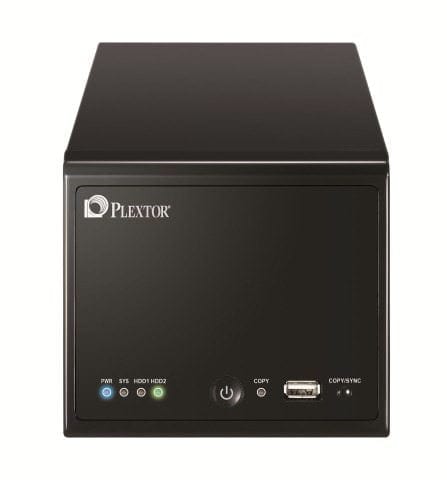
Plextor have this week announced the launch of a new consumer NAS drive, the PX-NAS2.

PX-NAS2 Front and Upper (High Resolution)PX-NAS2 Right Art (High Resolution)PX-NAS2-1T1 Retail Box (High Resolution)

The PX-NAS2 facilitates data back-up and storage as well as file sharing and streaming to other devices across a home or small office network. With security features, excellent cross platform
compatibility and the ability to effortlessly sync and share data – even without technical knowledge – the PXNAS2 is the ideal file management solution for the whole family.

PX-NAS2 Key Features:

Back-up, store and share data across a home or office network
Secure – user access control and data encryption to protect privacy
PX-NAS2 Utility enables easy detection and connection to device
Cross platform – compatible with PC or Mac system
DNLA 1.5 compliant – share data with media players, XBox, PS3
One-touch back-up from USB drives and cameras
Memeo software enables automatic backup to multiple locations
Auto resume feature following power outages
Three versions available – no HDD, 1TB or 2TB options
Pricing starting from £156 SRP
2 year collect and return warranty

The PX-NAS2 will be available from May 2010 in three versions:

PX-NAS2-BL1 – 2-Bay NAS without Hard Disk (SRP £156)
PX-NAS2-1T1 – 2-Bay NAS with 2 x 500GB (total 1TB) Hard Disk (SRP £248)
PX-NAS2-2T1 – 2-Bay NAS with 2 x 1TB (total 2 TB) Hard Disk (SRP £339)

More information can be found at: www.plextor.com

Review of the Icy Dock MB877IK Hard Drive Enclosure

If you want to swap out SATA or SAS drives on a regular basis from your desktop computer but you don’t want to continue to open the computer up, then you should take a look at the MB877IK Hard Drive Enclosure from Icy Dock.

Over the years I have collected a number of older SATA hard drives as I have replaced them. Some of these go in my Windows Home Server and some are just used to store older stuff on. Whenever I need to access those drives, I either have to open my main desktop computer and sway things out, or I use an external device that enables me to sit the drive in. However, both of these are not ideal, the external device often plays up and I don’t like leaving my drives “exposed”.

This is where the MB877IK comes into play. This enclosure sits in your desktop and enables you to just slide a drive in and use it. As with other Icy Dock equipment it also cools the drive as well.

One great addition to this enclosure over other drive enclosures I have seen and used is that this one enables you to use SAS drives. SAS stands for Serial Attached SCSI and these drives are a lot smaller and faster!

Icy Dock MB877IK

WHATS IN THE BOX?

The box is very small, in fact only slightly bigger that the drive enclosure itself. It contains the enclosure, a set of keys to lock the drive in place and a small user manual.

Icy Dock MB877IKIcy Dock MB877IK

Icy Dock MB877IKIcy Dock MB877IK

A CLOSER LOOK

As you would expect from a drive enclosure, it is very simple to use and fit. The rear of the enclosure has a power connector, a fan and two SATA ports.

Icy Dock MB877IKIcy Dock MB877IK

Icy Dock MB877IK

ADDING A DRIVE

Adding a drive to the enclosure is very simple. You just open the front of the enclosure and slide the hard drive in and as it slides in, the front closes up with a click. You can then choose to either lock the drive in place or not bother. For ease of showing this, the pictures below show the enclosure outside of a desktop computer, although you would do this with the enclosure already fitted in the desktop.

Icy Dock MB877IKIcy Dock MB877IK

Icy Dock MB877IK

CONCLUSIONS AND FINAL THOUGHTS

There isn’t really much else to say on using the enclosure. It is very easy to fit, easy to use, and works very well. Simple!

The enclosure remains powered up at all times when the computer is switched on. I suppose I would have preferred an on/off switch at the front perhaps, but this isn’t a huge problem. And in the past I have certainly used Icy Dock enclosures for all my drives, even those I had no intention of swapping out.

Make sure that you connect the SATA cable to the correct port on the back of the enclosure, because yes, the first one I connected it to was no the right one! Still, that only took a moment to correct.

Overall I can highly recommend this enclosure as it works and does what it says on the tin. Yet another product from Icy Dock worth having.

To learn more about this enclosure, and other products from Icy Dock, click here: http://www.icydock.com/product/mb877ik-b.html

The MB877IK Hard Drive enclosure retails for less than $35, so it certainly won’t break the bank.

Tranquil PC Harmony T7-S Windows Home Server

With the news that HP have stopped production and will no longer be selling their single drive LX195 Windows Home Server, Tranquil have released a special edition single drive WHS.

Tranquil PC Harmony T7 Series 2 WHS

Here’s how Tranquil describe the Harmony T7-S:

Fitted with a high performance dual core Intel D510 CPU and 1GB of high speed RAM this server will tear through its tasks with ease !

Yet, it consumes so little electrical power, you could leave it on 24/7 and it will only cost approx £17.00 per year !

With the near silent operation (you’ll only know it’s turned on as the power LED is blue) and tiny size, this is a Home Server for everyone, everywhere !

· Very low running costs

· Almost silent

· Tiny cabinet size

· Can be secured to walls / desks

· Excellent reliability

· Long term warranty

· Includes the AVA Media CD ripping engine

· UK designed and manufactured

· First Class technical support / knowledge

  • Harmony T7-S Home Server in Black cabinet
  • 1x 500GB HDD (2.5” fitted)
  • 64 bit ready Dual Core Intel Atom D510 (2 x 1.66GHz)
  • 1GB RAM
  • Media Kit and Server Restore kit
  • Universal Power Supply and country specific power cord
  • 24 months RTB warranty

    Order now – http://www.tranquilpc-shop.co.uk/acatalog/Home_Server_Specials.html

  •  

    Get one now, and save over £40.00 against the standard price and as a special UWHS offer, enter SUB300 at the checkout and get a further £25.00 off – bringing the price to Sub £300 incl VAT !!

    Microsoft Office 2010 RTM Today

    Microsoft Office 2010 has just been released. You can pre-order it directly from the Microsoft website.

    Microsoft Office 2010

    The link is at MICROSOFT OFFICE

    “Free ground shipping only available to the 50 United States and D.C. No APO/FPO addresses, PO Boxes or U.S. Territories. Offer is not valid on previous orders, and is non-transferable and not redeemable for cash.

    A credit card is required for pre-order, but your card will not be charged until your order is shipped or the product is made available for download.

    Pre-orders are covered by our Pre-Order Price Guarantee and can be reviewed, updated, or canceled at any time before pre-order items are released.

    Please see our Pre-Order Policy for more information.”

    Excerpt from: http://store.microsoft.com/Category.aspx?CatId=210

    Software acronyms you might want to know about…

    RTM = Release to Manufacturing

    RC = Release Candidate

    SR = Service Release (aka Service Pack)

    WR = Web Release (no DVDs or other media)

    EOL = End of Life

    Alpha = Software Testing

    Beta = Software Development

    Hope you get a chance to try it. I have been running the beta since last year and it has some nice features.

    Tim