Mail, Calendar, People and Messaging app for Windows 8/RT updated

Microsoft have released an update to their Mail, Calendar, People and Messaging app for Windows 8/RT.

mail

Release notes

Group email messages by conversation to keep your inbox organised.
Respond to meeting invitations directly from your inbox.
Get things done more quickly with faster performance in all apps.
Experience better reliability and usability based on feedback from customers like you.

Skype for Windows 8/RT updated again

Skype for Windows 8 has been updated again.

Skype

What’s new:

– Enhanced Snap view for smarter multi-tasking
– Performance improvements
– General bug fixes

Download Skype from the Windows Store

App Update: Adobe Reader for iOS updated to version 10.4.4

0

Adobe have today released an update to their Adobe Reader app for iOS.

mzl_jxwizlrx_320x480-75_thumb1

Adobe Reader is the free global standard for reliably viewing and sharing PDF documents across platforms and devices. Easily and efficiently access the widest range of PDF file types—including PDF Portfolios, password-protected PDF documents and Adobe LiveCycle rights-managed PDF files. Now available for iPad, iPhone and iPod touch, Adobe Reader offers fast, high-quality interaction with PDF.

View PDF files
• Quickly open PDF files from email , the Web or any application that supports “Open In…”
• View PDF Portfolios, PDF Packages, annotations and drawing markups
• Read text annotations such as Sticky Notes

Access encrypted PDF files
• Open and view password-protected PDF files
• Access files secured by Adobe LiveCycle Rights Management, which helps protect sensitive documents
• Supports the highest grade of PDF encryption, up to AES256

Interact with PDF files
• Search text to find specific information
• Use bookmarks to jump directly to a section in your PDF file
• Select single page or continuous scroll modes
• Easily zoom in on text or images for a closer view
• Quickly navigate through large files using thumbnails
• Select and copy text from a PDF file to the clipboard

Print and share files
• Print wirelessly with AirPrint
• Share PDF files with other applications using “Open In…”
• Email PDF documents as attachments

Available languages
English, Chinese Simplified, Chinese Traditional, French, German, Italian, Japanese, Korean, Spanish, Dutch, Danish, Portuguese, Swedish, Russian, Czech, Polish and Turkish

What’s New in Version 10.4.4

  • Fixed Bugs
Download from the Apple App Store

Review: Sony Google TV NSZ-GS7

A few weeks back, I picked up a Sony NSZ-GS7 Google TV unit.  Here is the review!

NSZGS7 1

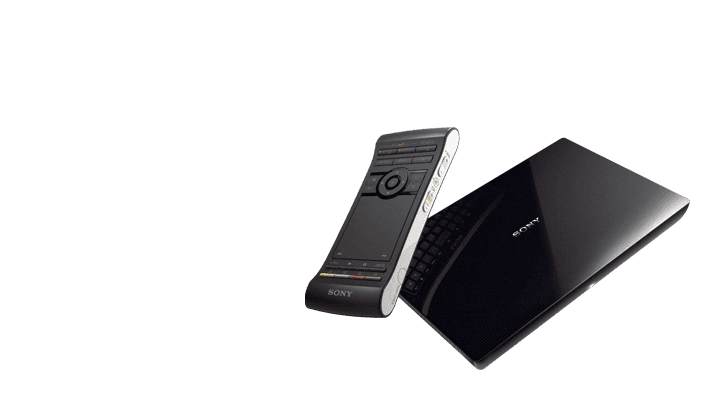
Sony’s entrant to the Google TV market is the NSZ-GS7 Internet Player with Google TV.  I recently had two first-generation Apple TV’s die on me (the power supply seems to have failed in both) and I wanted to try out Sony’s answer to the Google TV when replacing one of them.  The main draw to me was the prospect of integrating an improved channel guide and universal remote capabilities with my 6 year old Sony 60” TV and my DIRECTV receiver, as well as to open up some Android apps such as the IP camera viewer and Chrome.  Before we get into how this is working out in my home network, let’s see what Sony says about this product.

TV will never be the same.

What’s on TV? It’s completely up to you. Find what you’re craving with instant access to shows on live TV, streaming content, made-for-TV apps and Google Chrome™. Take control of your entertainment with an intuitive new remote that features a touchpad and backlit keyboard for easy operation. One box, unlimited entertainment.

Enjoy live TV, movies and more.

The TV & Movies app is the easiest way to find the best entertainment available. Choose what you want to watch exactly when you want to watch it—comedy or drama, live or streaming, right now or this Friday night. Devour the content you crave, from broadcast shows to cat videos and everything in between.

More apps, more choices.

A host of made-for-TV apps like Netflix®, Pandora® and Twitter® are pre-installed on your Google TV right out of the box. Want more? Download an endless variety of apps in the Google Play Store™. You’ll find video, music, games, social networking and news apps—just like the ones on your smartphone. Very convenient.

Remote control like no other.

You’ve never seen a remote quite like this. With a large touchpad on one side and a full keyboard on the other, it’s optimized for ease of use. The clickable touchpad works just like the one on your laptop, with one-handed operation plus pinch-and-pull for zoom control. Flip it over and you’ll find a backlit QWERTY keyboard. There’s also a 3-Axis motion sensor for gaming.

Find content quickly and easily.

Browse everything that’s playing right now—whether it’s on live TV, or available through an online service like Netflix. With Google search built right into your TV, you can cross-search results from your cable provider, the internet, apps and more to instantly find the content you crave.

Browse the web on the big screen.

Experience your favorite websites on a grand scale with the built-in Google Chrome™ browser designed for speed, simplicity and efficiency. And because it features a Flash Media Player, you can view Flash-based video sites for endless video content and engaging interactivity. Auto updates ensure added security.

And watch this video overview.

And now onto the review!

Hardware

The Sony Google TV is based on a Honeycomb build of Android, so this is running and ARM processor, similar to the Apple TV.  It is a small box that connects between your cable/satellite box and your TV or receiver.  This is nice as it does not take up an HDMI slot, and since it passes the receiver signal through the box, the receiver can operate with the Sony Google TV powered off.  There is a small power supply that hangs off of the back, and this unit supports Wi-Fi as well as ethernet connections.  I connected this device to my network via both Wi-Fi and ethernet, but left it connected to ethernet for general use as I had an extra port behind the TV.  It measures (W x H x D) : 8 x 1.3 x 5.1 in (204 x 35 x 130mm) and weighs about 1.3 pounds, very small.  It stacked on top of my DIRECTV receiver and looks right at home in my home entertainment center.

The remote is pretty confusing to use, and even though it is backlit, the buttons on the back side are hard to read in the dark.

ASUSTOR Updates Apps for NAS Units

ASUSTOR rolled out several new apps and updated some current ones for their NAS line of products.  Read on for details.

ASUStor Logo

ASUSTOR rolled out several new apps and updated some current ones for their NAS line of products.  Here is the press release:

ASUSTOR Unveils New Apps and Enhancements

Expands App lineup with Symantec Backup Exec’s RALUS, Dropbox and DVBLink TV Server while releasing updates and enhancements for Download Center and Surveillance Center

Taipei, Taiwan, December 17th, 2012 – ASUSTOR Inc., a leading innovator and provider of network storage solutions, today announced the release of three new NAS Apps for its well-received AS 6 Series NAS devices. These new Apps consist of Symantec Backup Exec’s RALUS, an acclaimed backup solution, Dropbox, a popular cloud storage and sync service and DVBLink TV Server, a digital television App. Additionally, two of ASUSTOR’s existing Apps are being upgraded with advanced features and enhancements. Download Center now features the new and convenient Smart Download Folder function. Its mobile App, AiDownload, has added a push notification function and is now available for both iOS and Android. Not to be outdone, the Surveillance Center App now boasts added Daylight Saving Time adjustments along with full compatibility with Panasonic’s BB and BL camera lines. Interested users may begin enjoying these new Apps and upgrades by downloading them through ASUSTOR’s App Central.

ASUSTOR NAS is the world’s first App-based NAS. In addition to its full featured pre-installed Apps, users can use ASUSTOR’s App Central to download a host of supplementary Apps. Whether a user’s interests lie in business, website construction or home entertainment, App Central is able to provide the large variety of applications required to satisfy users’ digital lifestyle needs. “App Central empowers users with the ability to create a customized NAS with endless possibilities,” said James Su, Product Manager at ASUSTOR. “Presently, App Central contains over 80 unique Apps for users to choose from. We are constantly working with third party developers and the open source communities to expand our App lineup in order to meet the demands of all kinds of different users.”

The newly released Apps are summarized as follows:

RALUS: RALUS is the remote agent used with Linux/Unix clients for Symantec’s Backup Exec. Backup Exec is an acclaimed backup and restoration software that provides users with easy to use data protection functions for business and personal use. After installing RALUS through App Central, users will be able to remotely backup and restore their NAS devices. RALUS effectively provides users with a complete disaster recovery solution.

Dropbox: Dropbox provides users with a cloud storage and file syncing service. After installing this App, users will be able to sync files between Dropbox, their ASUSTOR NAS and their PC, which provides for convenient file storage and sharing. The Dropbox App also supports multiple users which means that all user accounts on the NAS will be able to use the service simultaneously.

DVBLink TV Server: Once users install this App and a compatible TV tuner onto their NAS, they will be able to watch and record digital television programs. Digital TV content may be streamed to UPnP compatible devices and to mobile devices running iOS, Android and Windows Phone. Furthermore, with its complete electronic program guide listings, DVBLink TV Server will ensure that users never miss a moment of their favorite shows. DVBLink TV Server is compatible with DVB-T, DVB-T2 and DVB-S2 digital TV broadcast standards.

The newly updated Apps are summarized as follows:

Download Center: The latest version of Download Center features the new Smart Download function. Users can upload their torrent files to a specified folder and then automatically have their NAS add the torrent as a download task and begin downloading. In addition to the AiDownload mobile App for iOS, AiDownload for Android can now be downloaded from Google Play. Now both iOS and Android users can manage their download tasks from the convenience of their mobile devices.

Surveillance Center: The new version of Surveillance Center offers an optimized visual display along with complete Daylight Saving Time handling for recording and playback. The newly compatible Panasonic BB and BL series cameras offer users more options and flexibility for surveillance deployment.

If you are running a NAS from ASUSTOR, go ahead and get your updated and new apps now!  And check out my hands-on of the AS-602T 2-bay unit here.

AUStor AS-602T Hands-On

DARK SOULS II trailer released

Last week brought you information and screenshots for NAMCO BANDAI’s forthcoming game Dark Souls II. Now we bring you the trailer. Currently in development at FromSoftware in Tokyo, Japan, for PlayStation 3, Xbox 360 and PC. Dark Souls II will continue a legacy of presenting its passionate fans with the kind of unrelenting challenges that have become a hallmark of the series, while presenting devilish new obstacles for players to overcome.

_bmUploads_2012-12-07_758_DARKSOULS2[1]

Built upon the foundation established by Souls series creator and Dark Souls II Supervisor, Hidetaka Miyazaki, with development helmed by FromSoftware Director Tomohiro Shibuya, Dark Souls II will feature a new hero, a new storyline, and an unfamiliar world for players to survive in, while delivering the uncompromising challenge and ultimate sense of empowerment that players hunger for. Epic battles with gruesome enemies and blood-thirsty bosses await adventurers as they traverse and conquer a devastated world filled with death and despair. Players will also discover a revamped server based multiplayer experience that will put a distinct Dark Souls II twist on the concept of playing and sharing with others. For those with enough tenacity and sheer force of will, great rewards await.

Here is the trailer:

More details surrounding Dark Souls II will become available in the months leading to its release. Begin your Dark Souls II journey at www.DarkSoulsII.com or join the Dark Souls II conversation on Facebook at www.Facebook.com/DARKSOULS.

Are you interested in Dark Souls II? Let us know by leaving a comment below.

ASUSTOR AS-602T NAS Hands-On

ASUSTOR recently entered the NAS market, and they were nice enough to send one of their 2 bay units, the AS-602T, for a review.  Here is the initial installation and my first impressions!

2bay

ASUSTOR recently entered the NAS market, and they were nice enough to send one of their 2 bay units, the AS-602T, for a review.  First, a little background on ASUSTOR:

About ASUSTOR

Founded in 2011, ASUSTOR Inc. is a leading innovator and provider of private cloud storage (network attached storage) and video surveillance (network video recorder) solutions. We are devoted to providing the world with unparalleled user experiences and the most complete set of network storage solutions possible.

Based out of Tapei, Taiwan, ASUStor is a division of ASUS.  They are relatively new to the NAS scene and we told you about their new NAS firmware  and new 6 bay units here.

ASUSTOR was nice enough to send on a 2 bay unit for me to review, the AS-602T model.  Here is some information on that model:

AS-602T

The ultimate hub for your digital entertainment lifestyle

The AS-602T features dual gigabit Ethernet ports making it a reliable storage server and a must-have for your digital home entertainment

  • Superior personal cloud storage space
  • Diverse array of apps for multimedia and digital home entertainment
  • 24/7 round-the-clock download assistant
  • Your complete backup solution
  • Support for a multitude of mobile apps
  • Designed for energy efficiency and quiet operation


Here are some of the specifications:

Hardware & Packaging

Hardware Specifications

  • CPU: Intel® Atom™ 2.13 GHz Dual-Core Processor
  • Memory: 1GB SO-DIMM DDR3 (Expandable. Max. 3GB)
  • HDD: 2.5″ or 3.5″ SATA II/ III x 2¹
  • Expansion: USB 3.0 x 2, USB 2.0 x 4, eSATA x 2
  • Network: Gigabit Ethernet x 2
  • Output: HDMI x 1
  • System Fan: 70mm x 1
  • Input Power Voltage: 100V to 240V AC
  • Certification: FCC, CE, VCCI, BSMI, C-TICK

Operation

  • Power Consumption: 23.5W (Operation); 19W (Disk Hibernation); 1.4W (Sleep Mode)
  • Noise Level: 21.3 dB(A)
  • Operation Temperature: 5°C~35°C (40°F~95°F)
  • Humidity: 5% to 95% RH

Eco-Friendly Design

  • System Sleep Mode (S3)
  • Auto-Standby for Both Internal and External Disks
  • Auto Fan Control
  • LED Night Mode
  • Power Schedule: On, Off, Restart, and Sleep

Size and Weight

  • Size: 163.5(H) x 108(W) x 230(D) mm
  • Weight: 2.1 kg / 4.63 lb

And now onto the installation!

Installation

Insert the CD that came in the NAS box and click on Auto-Run. You’ll get the following screen, where you will want to click Start.

clip_image002

The program will ask for permission to install the software on the NAS. Click on OK.

clip_image004

Choose the language. The wizard starts; click Next. Then accept the license agreement.

clip_image006

Accept the location information for the Control Center on your PC. Click Next.

clip_image008

Determine if you want a desktop icon or not. Click Next.

clip_image010

Review your installation options; if OK, click on Install. If not, click Back and make changes. I clicked Install.

clip_image012

Setup completes; click Finish to close the installer and to open the Control Center.

clip_image014

Windows Phone 8 update for HTC 8X available now

Last week saw an over the air (OTA) update to the HTC 8X Windows Phone 8 handset.

wp_ss_20121218_0004

The update includes fixes for the annoying reboot bug (it’s been really annoying everyone who used the 8X) and also the bug that drops the Wi-Fi connection when the screen is off. It also includes SMS Call Reject, SMS Drafts and SMS Select features.

wp_ss_20121218_0005

The update took about 10 minutes and is available now.

Have you got the HTC 8X? Let us know what you think of it by leaving a comment below.

Angry Birds Rio Gets Updated With 24 New Levels and New Power-Ups

Rovio has updated Angry Birds Rio with 24 new levels and new power-ups.

Angry birds rio 1

In Angry Birds Rio, the original Angry Birds are kidnapped and taken to the magical city of Rio de Janeiro, where they eventually escape their captors and set out to save their friends, Blu and Jewel – two rare macaws and the stars of the hit motion picture, Rio. Angry Birds Rio pairs the physics-based gameplay of the original game with unique twists based on the film.

Features:
– Six fantastic episodes with 180 exciting levels, plus 24 new bonus levels!
– Completely new achievements!
– Special Hidden fruits – discover them all!
– Put your Angry Birds skills to the ultimate test in spectacular boss fights!

What’s New In This Version:
It’s samba time — with 24 new levels and new power-ups! Angry Birds Rio now has Sling Scope laser targeting and Super Seeds to supersize your birds, PLUS never-before-seen power-ups: Samba Burst and TNT Drop!


Angry birds rio 3
● Collect stars to unlock 18 special Star Levels!
● Earn feathers to unlock 6 Mighty Eagle levels!
● Get 20 free power-ups!
● Check back daily for your free power-up!
● Dance your way to destruction with Samba Burst!
● Send a “special delivery” with the TNT drop!

You can purchase Angry Birds Rio from the App Store for £0.69/$0.99.

Apple releases iOS 6.0.2 update fixing a Wi-Fi bug

0

Apple has just released iOS 6.0.2.

IMG_1304

The update fixes a bug that could impact Wi-Fi and is only available for iPhone 5 and iPad Mini owners.

Amazon Kindle App for Android Updated to version 3.8.1

1

The Amazon Kindle app for Android has been updated again, bringing it to version 3.8.1.

amazon-kindle-android_thumb_thumb_th

I use the Kindle app all the time on my iPad to read books and I know a number of people who use it on their Android devices, so it is really good to see that real page numbers are finally being used!

What’s New:

• Tuned line spacing options to be more compact.
• Bug fixes for Galaxy Note 10.1 and Japanese Nexus 7 customers.
• Customers in Hong Kong and Taiwan returned to an English experience.

Download the Kindle App from Google Play

App Update: CoPilot for iOS and Android updated to version 9.4, includes integrated Yelp content

The new version, available as a free update for existing users, adds Yelp data pulled from its API (application programming interface), improved ActiveTraffic service and a variety of app-wide refinements to provide the best possible in-car navigation experience on mobile devices.

IMG_1301[1]

CoPilot version 9.4 also brings a variety of additional improvements throughout the app, including:

· Traffic Incidents: CoPilot’s Live flow-based ActiveTraffic service has been enhanced to include detailed information about traffic incidents on-route

· Improved power consumption to maximize battery life when navigating on foot or without an in-car charger

· Universal app:  CoPilot single region iOS apps now run in full screen on iPads and iPad Minis for an incredible HD navigation experience

· Numerous refinements throughout the app based on customer feedback, including screen orientation lock, and support for additional coordinate formats

CoPilot version 9.4 is available now for iOS in the iTunes app store and for Android from Google Play. Existing customers can download the new version as a free update.

App Update: Google+ for iOS Gets Updated to Version 4.1

0

Google have just updated it’s Google+ app for iOS devices.

mza_418630021874718330_320x480-75_th[1]

What’s New in Version 4.1

– New feature: Google+ Communities
– Ability to subscribe to any circle for notifications
– Ability to indicate how many guests you’re bringing to an event
– Support for time zones in Events
– Basic profile editing
– New compose UI for easier sharing
– New visual stream design
– Discover people and topics more easily using ‘Find people’

Go get it now from the Apple App Store.

Apple releases Mac Wi-Fi Update 1.0

0

Apple have just released an update they are calling Mac Wi-Fi Update 1.0.

iMac-21-2012-165

This update is recommended for all late 2012 Mac systems. This update improves compatibility when using the 5GHz band in Wi-Fi.

It’s a small update so go get it now.