Combining compact design, powerful 100W RMS output, HDMI eARC connectivity and high-resolution sound, the M90 delivers immersive, versatile audio for desktops, TVs and modern home entertainment setups.
Edifier, a global leader in premium audio solutions, today announced the availability of the Edifier M90 in the US with other countries soon to follow. Unveiled at CES 2026, the Edifier M90 represents a defining milestone signalling the beginning of the brand’s next chapter in home-entertainment audio.
Designed to elevate everyday listening, the M90 features HDMI eARC for seamless, low-latency connectivity with desktop audio, TVs, and streaming platforms, delivering a richer, more immersive experience for movies, games and streaming. With 100W of bi-amplified power, larger 4-inch aluminium mid-low drivers for deeper bass and silk-dome tweeters for smooth, detailed highs, the M90 delivers powerful, high-fidelity sound. Enhanced connectivity and a flexible design allow it to transition easily from desktop to living-room setups, making the M90 a compact, all-purpose speaker solution.
Space-Efficient, Small Footprint, Room-Filling Sound
The Edifier M90 features a compact, space-saving design—measuring 133 mm (W) × 212 mm (H) × 225 mm (D) per speaker—allowing it to blend seamlessly into desktops, sit on bookshelves and feature in living-room setups. Despite its size, the M90 delivers an impressive 100W RMS total output, producing rich, room-filling sound. Certified for both Hi-Res Audio and Hi-Res Audio Wireless, it ensures exceptional clarity and detail across all listening scenarios. With versatile connectivity options – including HDMI eARC – the M90 integrates effortlessly with TVs, computers and modern entertainment systems.
Powerful Acoustic Performance
The M90’s acoustic architecture combines 4-inch long-throw aluminium mid-bass drivers with 1-inch silk-dome tweeters for accurate, balanced sound reproduction. Powered by dual high-efficiency Class-D amplifiers, the system delivers 100W RMS of clean, dynamic output—ensuring powerful bass, detailed mids and crisp highs across all listening levels.
High-Resolution Audio Processing
The M90 delivers superior audio quality with end-to-end 24-bit/96kHz digital signal processing. Its analog front end supports high-resolution analog-to-digital conversion, ensuring that whether you’re using analog inputs or digital streaming, every signal is accurately converted for faithful, detailed sound reproduction.
Versatile Connectivity Options
With multiple input options, including HDMI eARC, Optical, USB-C and AUX, the Edifier M90 allows for seamless integration with TVs, computers and other devices. Simply select the connection that best suits your setup for a flexible, high-quality listening experience.
Advanced Bluetooth Connectivity
The M90 features Bluetooth 6.0 with LDAC support for high-resolution audio streaming at rates up to 990 kbps, delivering near-lossless sound from compatible Android devices (Android 8.0 or later). It also supports Bluetooth multipoint connections, easily managed through the EDIFIER ConneX App, for seamless switching between devices.
Enhanced Bass, Intuitive Control, and Customizable Sound
Enhanced bass performance is available via the SUB OUT port, allowing connection to an external subwoofer for deeper, more impactful low-end. User-friendly controls include a 2.4 GHz omni-directional remote control and an onboard control knob, while HDMI eARC with HDMI CEC enables power, volume and mute control directly from your TV remote control. Customizable sound effects let you choose from three presets or create your own using the EDIFIER ConneX App, providing a flexible, personalized listening experience with easy switching between modes.
Price & Availability:
The Edifier M90 is available from March 25 on us.edifier and Amazon, with an MSRP of $369.99. The M90 will be available in the UK from April priced at £299.99
About Edifier:
Edifier specializes in the design and manufacture of premium audio solutions that showcase technological innovation and design excellence. Founded in 1996 and headquartered in Beijing, China, Edifier delivers outstanding sound experience through a wide range of audio systems for personal entertainment and professional use. Renowned for its award-winning design philosophy, expertise and innovation in acoustic technology, and superior manufacturing standards, Edifier is one of today’s leading innovators of audio electronics.
Developers Ryu Ga Gotoku Studios have been on a roll in recent years with brilliant new titles, along with beautifully remastered action classics. Can they strike gold again with Yakuza Kiwami 3 & Dark Ties? Or should this game have stayed in the past?
The Black Sheep
Yakuza 3 is a sensitive subject for fans of the series. Long regarded as the black sheep of the titles, the third game left fans with mixed feelings and is often claimed to be the biggest misstep made by the developers. Now with the release of this Kiwami version, packaged with a brand new prequel expansion, Dark Ties, RGG had a chance to rectify their past mistakes. Unfortunately, this remaster is just not up to the high standard the studio has set itself. Ultimately, despite there being some real positives here, I’m left feeling like this remake is just not needed.
Yakuza 3 Kiwami stars Kazuma Kiryu once again, trying to carve out a peaceful life in Okinawa. Attempting to leave his troubled past behind him, he is again pulled into a life of crime and mystery. Kiryu has decided to dedicate his life to raising orphans and in doing so, he becomes entangled in government interference on his land. There are government plans to either use the orphanage land for a military base, or to transform it into a luxury resort. Thus Kiryu is forced to take action to thwart these plans. It’s a convoluted mystery story; it gets significantly more bizarre the further you play, like all Yakuza games. All in all, it is a rather wacky, crime action thriller with a lot of heart, along with some questionable aspects.
Troubling Developments
The story of Yakuza Kiwami 3 is a tightly woven experience that the developers have decided not to alter drastically. However, there are some significant issues affecting the enjoyment of the narrative. First of these is the developers’ choices when it comes to the cast. The minor characters of Yakuza are what makes these games so great. So I applaud the decision to recast and redesign the Yakuza captain, Rikiyanow; he now seems so much more complex and layered. But I am aghast at the fact the team decided not to recast antagonist Goh Hamazaki. The voice actor for this character has a checkered past; he has been accused of some terrible things. Therefore, for him to still be performing in the game is a great disappointment.
Furthermore, the new animations and cutscenes in Yakuza Kiwami 3 really hinder the impact of the storytelling; they feel too stiff and subdued. The charm in the Yakuza series is the characters’ larger than life personas. However, this remake has made characters seem more wooden and restrained; this is hugely disappointing. Without spoiling things, the new story additions to the main narrative are also so minimal; they add virtually nothing and are downright bizarre. That being said, if you have never played the original game, this is still a worthy action story to unravel and discover.
A Brief Affair
The game launches with the Dark Ties expansion. It it is the biggest addition to this package but it’s also the most forgettable. You step into the shoes of antagonist Yoshitaka Mine, a member of the Tojo Clan family. Essentially a tale of his rise up the ranks of the clan, the story just feels rushed and far too formulaic. It’s a very brief tale as it only took around five hours for the credits to roll. It tries to humanise these villains and fails, it’s a real snooze fest.
Action Reimagined
Thankfully, I am more pleased with the additions and changes to the game’s combat system and minigames. Yakuza 3 Kiwami & Dark Ties is a third person action game which focuses on brawling combat. It’s the series iconic formula of brawling along the streets of Japan and this game is no different. Combat is fast and fluid. It’s a tried and tested system that RGG Studios have mastered. Now, with all their experience, Yakuza 3 feels so much smoother and responsive. Kiryu can pick up items to use and attack enemies with; this makes the environments feel important and reactive. There is also a new fighting style, named Ryukyu, which allows you to engage with different weapons for greater effect. This really helped keep the action feeling fresh.
Along with gameplay updates, this remake launches with a plethora of new minigames and side quests, a huge component of what makes Yakuza so beloved. The Morning Glory Orphanage has been vastly expanded, allowing more tasks to be completed. This results in a much more engaging and dynamic experience. Both the base game and the DLC content come with hilarious mini games; they really add great replayability to the overall package. My personal favourite is the “Baddies Battles” in which you manage an all female gang in huge battles across the city. Dark Ties adds a fight club mode which does exactly what you think it does. Minigames really enhance these titles and I’m pleased at the effort the developers have made, polishing old ones and adding new ones into the fray! Gameplay remains king in Yakuza.
Head Scratching
When it comes to visual presentation, this game is a real mixed bag. On the one hand, some areas look fantastic, as everything has been rebuilt in RGG Studios modern engine. But in other areas, oh boy! Textures seem to be the main culprit of the issues as some environments look downright terrible. Lighting is wildly inconsistent and drastically affects these textures; in some of the more open ended areas it can look very very poor on the eye. It just feels off. Add in the poor facial animations and animations in general and it feels vastly disappointing for a remake.
Thankfully, sound design and musical score remain solid from the original game, with an updated soundtrack in particular the highlight of the package. Sound design is bombastic and cartoonish during fights – just the way I like it! It captures the wacky and bizarre nature of these games, perfectly encapsulating the mood of the over the top action.
Verdict
To sum up, Yakuza Kiwami 3 & Dark Ties is a real mixed bag. An interesting story, with great combat will entice new players to try this classic game. Sadly, muddled visuals, not enough new content and terrible animations drag the overall package down. Remakes are meant to be a vast improvement on the original and this has failed to deliver. Still there is a great game to be found if you can see past the problems. Check out the page here- Yakuza Kiwami 3 & Dark Ties PS4 & PS5
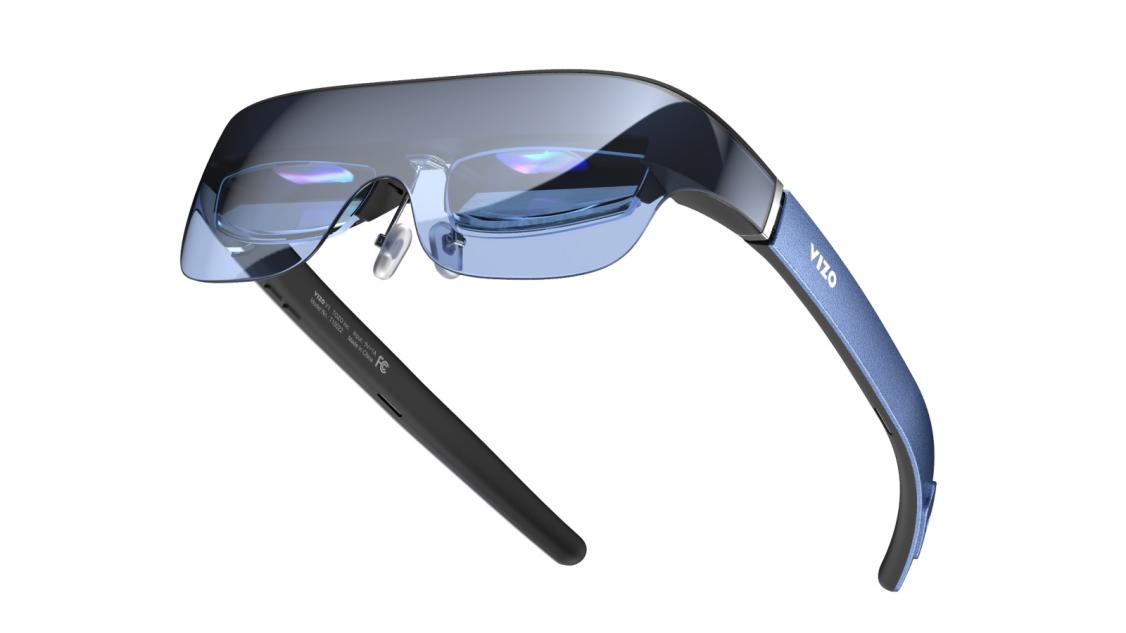
Guided by its “Tech Around You” philosophy, VIZO is committed to making advanced wearable technology feel intuitive, practical, and seamlessly integrated into everyday life. As the debut product from TOZO-backed XR brand VIZO, the V1 AR Glasses mark a confident entry into the augmented reality wearables market.
Engineered for immersive, cinema-scale viewing on the go, the TOZO VIZO V1 delivers stunning visuals wherever life takes you. Its ultra-bright 1800-nit display produces crisp, vibrant imagery—even in direct sunlight—cutting through glare to reveal sharp detail and rich contrast. Whether streaming in the park, commuting, or relaxing by a sunlit window, users can enjoy vivid colours and exceptional clarity without compromise, bringing movies, games, and everyday content to life in any lighting condition.
Immersive Visual Experience
The VIZO V1 features a 118-inch virtual mega screen, delivering a cinematic viewing experience in a compact, wearable form. Combining 1080p Full HD resolution with a 41° field of view and an impressive 100,000:1 contrast ratio, it produces crisp visuals, vivid colours, and remarkable depth across movies, games, and streaming content.
Its 1800-nit ultra-bright display has also proven a standout in real-world use, maintaining consistent clarity even in brighter environments—an essential advantage for everyday AR applications and on-the-go viewing.
Comfort, Customization, and Everyday Practicality
The V1’s ergonomic design has been carefully refined through extensive real-world fit testing, resulting in a lightweight, well-balanced form that supports comfortable extended wear—ideal for longer viewing sessions without strain.
Its built-in adjustable myopia correction (0–500°) has also been widely praised, enabling users to achieve clear vision without the need for additional prescription lenses, and making everyday use simpler and more convenient.
Audio and Immersion Beyond the Screen
Integrated stereo speakers enhance the immersive experience by delivering rich, balanced sound for video playback, gaming, and casual entertainment. Paired with 2D/3D mode switching, the VIZO V1 offers a versatile viewing experience that adapts to different content formats and user preferences.
Seamless Connectivity Across Devices
With direct USB-C (DP compatible) connectivity and broad adapter support, the VIZO V1 is easy to integrate with smartphones, laptops, and gaming consoles. Users appreciate the plug-and-play simplicity, allowing immersive experiences to begin instantly without complex setup.
A Promising Start for the VIZO XR Ecosystem
As consumer interest continues to grow, the VIZO V1 demonstrates VIZO’s commitment to delivering AR technology that balances innovation with real-world usability. Backed by TOZO’s engineering expertise, VIZO is positioning itself as a forward-thinking brand in the evolving XR landscape. With the VIZO V1 gaining positive momentum, VIZO looks ahead to expanding its XR product portfolio – continuing its mission to bring immersive technology closer to everyday life.
Outpath is the type of relaxing game that will not blow you away. However, if you like Minecraft and you want something with less depth, this will scratch that itch. It is a button-bashing/semi-automated experience that dumps you into an ever-expanding voxel world. Furthermore, the core mechanics are easy to master, and this makes it the perfect game for younger gamers.
This short but fun experience was developed by David Moralejo Sanchez and published by Silver Lining Interactive. It is a single-player, first-person title that is remarkably safe to play. There is no swearing or gore. Additionally, there is limited violence. Accordingly, parents will not worry if their children play it for hours.
Outpath tells no story.
I’m a huge fan of story-based games, but I was willing to drop this necessity when playing Outpath. Like the early days of Minecraft, this offers a refined plot, and that wasn’t a problem. Instead, you focus your energy on collecting resources, creating a rudimentary base, and expanding your world.
Each of these core elements was poorly explained, but luckily, working out what you need to do was a walk in the park. Gathering resources was as simple as tapping a button. Additionally, slaughtering animals, building refined structures, and setting up your automated resource gathering machines were easy.
Pick up resources and expand your world and mind.
Gathering resources is a key element of Outpath. As you hit nodes, trees, and animals, you’ll collect stone, copper, wood, and meat. Furthermore, you’ll gain in-game currency that can be invested in research or world expansion. This simple system takes a little time to get used to, but once you know what you’re doing, you’ll expand your world and your mind.
Alongside this, there are basic survival elements such as food and fatigue. Every hit of your axe and slice of your pick uses energy. Therefore, you must manage your meat and fruit gathering alongside other key resources.
As the game evolves, you’ll unlock tools to assist automation. This changes the game from a button-bashing affair to a bit of an idle miner. This may not appeal to everyone, but I liked the change of pace and the relaxing gameplay.
Outpath is wonderfully blocky.
If you hate voxel graphics, Outpath will not appeal. However, I can look past the dated visuals and enjoy the trouble-free action and the basic level design. Moreover, each key element has a unique style to make gathering the correct items an easy task. Although it is not the most beautiful game ever, it does enough to keep you interested.
The audio reacts to every action you take. This responsive design generates a layer of energy that is hard to ignore. Additionally, the music is reasonably varied, which helps distract you from the hours of rock-bashing and wood-cutting.
Simple controls.
Unlocking the automated element of the game takes a few hours of grinding. However, if that doesn’t sound like fun, you can switch it on from the beginning. I’d avoid doing this unless you hate button-bashing experiences. If you go with the normal layout, you’ll master things in seconds. With a couple of buttons to press and little else to do, Outpath is one of the easiest games available.
Replay value and longevity are sadly lacking. Once you expand the world and you’ve unlocked everything, there is no reason to return. Thankfully, the short playtime and interesting yet relaxing gameplay make this a worthy purchase.
Outpath is niche but fun.
Outpath is a niche experience that will appeal to a large audience. Despite its shortcomings, it is enjoyable, relaxing, and perfectly safe. Therefore, parents, children, and people who want a break from the norm can have fun. Accordingly, I like it and recommend buying it here! Can you survive this strange and expanding world? Gather resources, unlock new equipment, and enjoy a relaxing time.
The TH80 V2 Pro Keyboard from Epomaker is one of their latest designs. This short-form peripheral focuses on exceptional battery life, impressively low latency inputs, and a stylish data screen to keep on top of your PC stats. Alternatively, you may just use it for a custom GIF or the time and date. Either way, it is a fun thing to have.
This is a versatile, lightweight, and easy-to-use device that offers customisation options if that is your thing. With free-to-download software, hot-swappable 3/5-pin switches, and a media knob, this keyboard is a pleasure to use.
What’s in the box of the TH80 V2 Pro Keyboard?
The packaging is refined and compact. Moreover, it is durable and recyclable.
The TH80 V2 Pro Keyboard comes in 3 colourways. I have the black version with unusual-looking keycaps. The case is clean, and there are limited switches and ports.
Spare switches and keycaps are provided.
Swap the switches with the tool.
Charge the keyboard with the USB-C to A cable.
Learn the basics with the user manual.
Technical aspects.
I prefer a wired option whenever I invest in a keyboard, but I know I’m in a niche circle. Most people love a clean desktop, and wireless is the only way they’ll go. Thankfully, the TH80 V2 Pro Keyboard is a tri-mode device for ultimate versatility. A supplied USB dongle or Bluetooth functionality lets you connect to your PC or console with ease.
If you are playing wirelessly, you may worry about latency issues and polling rates. Luckily, the USB dongle offers impressively low-latency inputs and 1000 Hz polling. The same applies to the wired-only approach. However, if you pick Bluetooth as your go-to option, this reduces to 125 Hz polling. This isn’t a problem, but it may impact elite gamers.
If you opt for Bluetooth, there are three Bluetooth profiles to select. This makes it a seamless transition between devices for the ultimate user experience. Finally, if you opt for a wireless approach, you’ll be concerned about battery life. The TH80 V2 Pro Keyboard offers over 200 hours of usable battery power because of the 10,000 mAh battery capacity. This is much higher than many of its peers, and this blew me away.
Usability.
I’m not one for customising my device. Part of it is my lazy attitude, and the other part is my lack of technical expertise. However, the TH80 V2 Pro Keyboard ensures that you can play around with your switches and settings with no technical know-how. I love the provided switches, but if you have a favourite, you can use the supplied pulling tool and swap them over in no time.
The free-to-download software allows anyone to customise the data screen, macros, RGB, and much more. This handy tool can reset your keyboard to factory settings if you don’t like what you’ve done. Therefore, you can experiment without fear of damaging your new keyboard.
Despite the small form factor, this keyboard offers full keyboard functionality. The macro-FN system ensures that you get the best of both worlds. Moreover, your battery status can be observed by using the handy RGB indicators hidden under the middle row of keycaps.
Build quality.
The TH80 V2 Pro Keyboard combines metal, ABS plastics, and PBT keycaps for a durable and hard-wearing peripheral. Alongside this, the keycaps are supported using gasket mounts for the most comfortable and accurate typing experience.
The PBT keycaps are designed to resist unsightly marks and fading. Furthermore, they have a special eye-catching design that highlights your RGB profile. This makes this keyboard particularly attractive, and it will be a conversation starter.
The hardened plastic case is designed to withstand some rough and tumble. If you need to commute or take your keyboard with you, this will resist unwanted marks and damage. Additionally, pulling your keycaps to customise or clean the switches will not lead to damage or scratching.
Is the TH80 V2 Pro Keyboard worth it?
The TH80 V2 Pro Keyboard is another fine keyboard from Epomaker. It ticks many boxes, and gamers, office workers, and those who commute will appreciate the stylish and compact design. I love the tri-mode connectivity and durable build quality. Moreover, the customisation options were up there with the best available. Accordingly, I love it, and I recommend buying it here!
The RT100 Pro Keyboard from Epomaker is an addition to a much-loved series. I’ve tested every RT series keyboard, and I have the RT100 as my everyday device. However, I think I may have found a new tool to usurp my well-used workhorse.
This exceptional keyboard combines retro aesthetics with next-level and modern thinking. Consequently, it delivers impressive and much-needed technological advancements that other keyboards cannot match. Its durable style, interesting data screen, and hot-swappable switches are amazing.
Alongside this, its unique design is a head turner. There is a side-positioned media knob, and the off-white reminds me of a bygone era. As such, it is a pleasant juxtaposition that is designed to bring joy to your life.
What’s in the box of the RT100 Pro Keyboard?
The packaging highlights every key selling point. Furthermore, it is durable and recyclable.
The RT100 Pro Keyboard is a great-looking device. It is available in one colourway, and it has a streamlined appearance.
Spare switches and keycaps are provided.
Customise the device with the pulling tool.
Keep things charged with the USB-C to A cable.
Learn the basics with the user manual.
Technical aspects.
The RT100 Pro Keyboard offers an impressive 5000 mAh battery capacity. This delivers around a week’s worth of usage between charges. The results vary considerably if you turn up the RGB and use the data screen. However, I wasn’t disappointed with the results, and the fast charging meant that I was rarely without juice.
The excellent battery life is essential if you love to game with a wireless peripheral. This keyboard offers tri-mode connectivity and 3 Bluetooth profiles. These profiles can be switched between for seamless connectivity to multiple compatible devices. Alternatively, you can use the provided USB dongle to connect to your PC or gaming console.
If you connect wirelessly, you’ll enjoy 125 Hz polling via Bluetooth or 1000 HZ polling via USB or the wired connection. This is teamed up with impressive low latency, no matter your connection of choice. This makes this the ideal device for workers or gamers who love to compete.
Usability.
The RT100 Pro Keyboard is an exceptionally easy device to use. If you wish to customise the RGB or macros, you can do so with the free-to-download software. Alternatively, you can play with the RGB profiles from the small data screen.
The data screen offers key information regarding your PC performance and the time and date. If this doesn’t take your fancy, you can install a fun animation or GIF to keep you entertained. Although this isn’t essential, it is a nice touch that is a conversation starter.
The data screen can be removed and replaced by 4 usable keys if you don’t appreciate the interesting and futuristic edge. The 4 keys require minor technical know-how, and replacing them can be done in a matter of minutes.
Build quality.
This gaming keyboard has 103 keys, and it combines ABS plastic, metal, and PBT keycaps to great effect. Alongside this, it delivers a creamy typing soundscape as 5 layers of audio-damping material remove the harsh nature of the mechanical switches. Although it may not be as aggressive as other mechanical devices, it offers a familiar clacky sound.
The typing profile is accurate and comfortable because of the excellent switches and the gasket mounts. The actuation distance is smooth, responsive, and pleasant to type with. Additionally, the stable mounts generate a clean typing profile that reduces unwanted errors.
Durability is a key factor whenever buying a gaming peripheral. Luckily, the RT100 Pro Keyboard is extremely hard-wearing. The keycaps use double-shot PBT material to withstand staining and fading. Furthermore, the plastic ABS case can cope with the occasional roughhousing. Subsequently, this is ideal if you must commute and you need your keyboard by your side.
Is the RT100 Pro Keyboard worth it?
It is hard to pick a favourite when Epomaker designs so many incredible gaming peripherals. However, I adore the RT100 Pro Keyboard and everything it offers. Versatility, durable build quality, vibrant RGB, and an impressive data screen. Additionally, the retro style is fantastic. Accordingly, I love it, and I recommend buying it here!
If you’ve ever looked up at a bank of fluffy cumulus clouds and imagined what it would be like to actually live up there, navigating a wooden ship through the mist and hopping from one floating island to the next. Then Merchant of the Skies is going to feel like a dream come true. This cozy, economic strategy title is finally drifting onto Android, and it’s a perfect fit for anyone who just wants to leave the ground behind for a while.
A World of Whimsy and Wind
The first thing that hits you, before you even trade your first crate of apples is the audio-visual charm. The graphics are a masterclass in “pixel-art elegance.” It’s not just retro for the sake of being retro; there’s a hand-crafted, storybook quality to the floating islands and the way your airship chugs through the mist. The colors, the intricate details in the pixel design, and the beautiful scenes all work together to pull you into a soothing, calm state, like you’re drifting effortlessly on a ship passing through the clouds.
The soundscape is equally delightful. The music is light and airy, perfectly mirroring the “chill” vibe. Whether you’re listening to the gentle hum of your engine or the satisfying clink of gold coins hitting your purse, the game sounds like a relaxing Sunday afternoon. It’s the kind of game you play with headphones on just to disappear into the atmosphere. However, if you’re like me, it’s just a wonderful room-filling sound that brings you into a full meditative state, something that just makes you feel less stressed and even better after every time playing.
Gameplay: Buy Low, Fly High
At its heart, Merchant of the Skies is a pure economic sandbox. You start with a tiny, fragile tugboat of a ship and a dream of a trade empire. The basic flow of the game is straightforward: visit an island, check the prices, buy what’s cheap (like sand or grain), and trek across the sky to find a port where those same goods are “Very Expensive.”
As you progress, the game evolves from a simple delivery simulator into a base-building tycoon. You can eventually buy your own islands, set up production lines (turning wheat into flour, then bread), and even automate your trade routes. There is a genuine sense of accomplishment when you finally stop manual hauling and watch your fleet of AI ships do the heavy lifting for you.
Turbulence in the Clouds
However, the flight isn’t always smooth. The early-game fuel management can feel a bit restrictive. You’ll often find yourself making frequent pit stops just to recharge your ship’s electricity, which can break the rhythm of exploration.
Additionally, while the UI has been overhauled for touchscreens, it still betrays its PC origins. Some of the menus are a bit dense, and tracking which of your fifteen islands is producing what can become a headache without a “quick-glance” dashboard. Lastly, once you’ve reached “infinite wealth” status, the challenge drops off significantly. It’s a game meant for the journey, not necessarily a high-stakes destination.
Final Feelings
Merchant of the Skies is an absolute gem for anyone who loves a “no-pressure” simulation. Instead of fighting and stress, the game gives you quirky characters like carrots in top hats, giant fish gods, and the simple satisfaction of managing a profitable trade route. And with the combination of playing this game through its campaigns and sandbox features, there is so much fun to replay the game over and over and enjoy it without playing it the same way each time. It’s quirky, beautiful, and deeply addictive in short bursts. If you can forgive a little bit of late-game repetition, this is easily one of the most unique titles landing on the Play Store this year.
ITER-8 is a roguelite, mining/tower defense game. Developed by fluckyMachine and published by Fireshine Games, ITER-8 was released on March 9th, 2026. Employed by ITER Corporation, players will need to mine upwards in the Pillar in search for essential resources. Various skills and the ever trusty laser help you mine. It is a relatively easy job if it wasn’t for the horrors down below on the surface. Every few minutes, players will need to race down the Pillar to defend the base. Various creatures attack the protective dome surrounding the base and eventually the base itself.
Although mining and tower defense are the main two core features of ITER-8, there’s more gameplay elements to be aware of. There are buildings that can be placed to help defend the base. There’s tech trees that upgrade various aspects. Small light puzzles can be solved, taking the game in a different perspective. And of course, there’s tidbits of story through satellites. Many reviews I’ve seen compare ITER-8 to a game released back in 2022, Dome Keeper. Though I can certainly see the similarities, I don’t think ITER-8 should be passed off as some cheap copy. I had a pretty good time playing this one and could definitely see myself continuing to play. The overall content is a bit limited, but the basics are in place for something quite fun. So, get ready to mine a whole lot of voxels, because its time to discuss ITER-8!
The Pillar & Resources
Before we get into the scary stuff down on the surface, let’s focus on the main job duty— mining the Pillar. The Pillars are large, seemingly floating towers that exist in this universe. ITER Corporation hires you to mine the Pillar for valuable resources, but the game keeps the true nature of those materials deliberately vague. No matter, as a good little worker, players mine upwards into the Pillar breaking a plethora of blocks called voxels which will earn you credits. Credit isn’t too important initially and will come more into play with the roguelite elements that I will discuss later.
Another resource—the orange material scattered around—is uranite. Uranite offers far more value to players. Unlike credits, which the game collects automatically, you must haul uranite back to your base using the drillship’s magnetic field. You’ll spend this resource on upgrades in the tech tree, which I’ll cover a bit later.
As you travel up the Pillar, blue lights can be found. When uncovered, they will shoot a powerful laser down towards the previous light. These are path nodes, and the drill ship can actually travel along them to help speed up the process. When you pass over one, you can even further speed up the process by giving the ship a small boost. This can be done three times before it starts to cooldown. You can carry resources as you fast travel as well. However, make sure to keep a close hold of your resources. They can wedge themselves against walls when too many try to squeeze through a narrow passage. Sometimes they snap back into place after a moment, but other times they fall behind and force you to make a second trip.
Another resource that will need transported back to base are relics, the black cubes with gold lines. Every so often, players can come across gold lights connected by a dotted line on the surface of the Pillar. Players need to uncover all the lights and then are rewarded with a relic. Once delivered back to base, it will reward the player with a selection of a new defensive building to place. Again, this is something I will discuss later.
The last resource to discover are actually in the Pillar’s exterior. As you travel upwards, hallways of light appear leading to the outside. Once outside, the camera shifts to a closer perspective. The little miner gets out of the ship and can mine bricks with a hand-drill. A light blinks on their heads when they’re close to a data cube. You use these to unlock stronger upgrades in the tech trees. You can also solve a small light‑based puzzle on this platform. By guiding the beam of light towards a small structure, players can light it up, shooting a beam of light towards the sky. Players are then rewarded with a selection of a new upgrade. These include drill ship skills, extra resources or passive effects. Players will need to solve two of these puzzles in order to proceed to the next area of the Pillar.
The light puzzles are never insanely difficult, but they can get trickier. Different blocks can be rotated, moved, or hit in order to reveal a new path. The last thing to discover on some platforms are the surveillance dishes. These pick up the texts of other, or previous, employees. These help give a bit more to the lore of the game, though in my experience so far, nothing said is all that ground-breaking or mystery solving. I’d like to think that’s there’s a deeper a story, but I’m not sure if it’s fully fleshed out yet. What I do love is how this looks visually. You can really get a sense of the sheer monstrosity the size of the Pillar is, and seeing ones in the back really makes me wonder about the lore.
Though I love the idea of these outside platforms, I do think they feel somewhat like an after-thought. There’s a tech tree just for this section, but I’m not too sure why. In my first run, I made it to the final boss without buying a single upgrade in this tech tree. This might change with increased difficulty levels, but even then, it’s probably the last thing I would upgrade. I do like that players need to solve two of the light puzzles once they reach the height of an area in the Pillar, but this also makes it feel more like a chore rather than a fun little thing I’d want to do for a reward. In fact, I probably wouldn’t do them at all if it wasn’t for the rewards, as they are pretty beneficial during runs. I suppose, in the end, that’s the point.
Heading back inside the Pillar, after you solve the two light puzzles, the next area will unlock. Shortly after unlocking this area however, a boss battle will take place down on the surface. I’ll also discuss these in the next section, but for now, assuming you made it out alive, players can then freely explore the new biome. The Pillar can have a few different biomes, such as an ice-maze or a magma ‘explosive blocks’ type. Though the biomes change, the overall goals stay the same. It is important to note that the Pillar does not stretch to infinity and there is indeed a final boss.
Overall, besides the outside platform areas, I don’t really have much to critique when it comes to mining the Pillar. I think it’s a pretty easy to understand concept that works well. It’s a rinse and repeat idea of travelling up and down the Pillar, delivering uranite to the base and mining upwards. Admittedly, I’d probably even like this alone without the tower defense as a sort of tycoon game, but I do think the two work well together. Speaking of which, when the path nodes start flashing orange, that’s your signal that enemies are approaching the base. At this point, its probably a good idea to start heading back soon to defend.
Defending the Base
In the base, there are three main areas—tech trees, main weapon, and defense building. Arming the main weapon gives a wide view of outside the Pillar. Once the wave of enemies start, a dome barrier covers the base for protection and a thin red line can be seen. The main weapon is almost like a rifle or a rattling gun. It doesn’t need reloaded, but you have decreased accuracy the longer you fire. Short bursts are recommended to make all of your shots count, and they will probably need to initially as the weapon isn’t the most powerful. Different creatures come toward the base on the left or right side. They’re all black shadows with red eyes or appendages, but how they look isn’t all that important. What’s important is of course defending the base from their various attacks.
Some enemies walk towards you and shoot, some stay in the back and launch underground missiles. Some even fly and drop bombs or land directly on the dome. The white line on the ground indicates the dome’s health, with the same being true for the green line on the base (and I believe the red circle in the corner but honestly it was easier to use the green). I do wish the game offered a guidebook that explained what each enemy type does—and maybe fleshed out the lore—because there’s a surprising amount of variety. After you clear a wave, the red lights fade back to blue, and a sense of calm settles over the Pillar again.
To help you defend the base are various types of buildings. Again, these are mainly gained by finding relics in the Pillar. Defense buildings have various functions. Different turrets can target either ground or flying enemies, lasers can heat targets to make other attacks hit harder, and barriers can block incoming projectiles. You can upgrade all of these structures with uranite to boost their strength and effectiveness.
Another important aspect to consider for buildings and base defense is the weather. With a new biome, a new weather effect will occur. Players can see what this effect is before the weather actually occurs, so it will be useful to plan ahead. In the image above, a blizzard was occurring. This meant that any building that had movement (the turrets) froze and were inoperable. This also slows the enemies down, which makes it easier for me to shoot them myself. This idea of a negative for defense buildings and positive for hindering enemies seems to be pretty consistent across the weather types. I also really loved how the weathers looked in this game visually.
The last thing to help defend your base are the various upgrades to purchase in the tech trees. The tech trees can upgrade your main weapon’s fire power, speed and accuracy, while the shield tech tree improves the dome barrier’s strength. The drill ship tech tree improves the drill ship’s speed, laser power, and magnetic field size. Last but least (intentionally ‘not least’), the Operator tech tree improves the outside mining capabilities, such as higher sensor for data or stronger drill. These are the four tech trees that players start with. They require more uranite than they do data, but I was still able to max out a decent bit of upgrades in a playthrough. More tech trees are added with the roguelite purchases made between runs.
The last thing to discuss with defending the base are the boss battles. After unlocking a new area, the next wave you face will be a boss battle. On the initial difficulty, they’re pretty easy to take down. However, as the difficulty ramps up, they prove to be a tougher challenge. It is helpful to remember which attacks they will throw at you so that you can be prepared.
Overall, I thought that the tower defense aspects were fine. It’s perhaps not the most varied or stimulating of combats, as its mostly just moving your gun around and shooting, but the roguelite purchases help make things more interesting, whether this be with new base weapons or increased difficulties. I think strategic planning takes more of a focus with placing down defensive structures rather than all-out combat. Since enemies can’t destroy them, they stay reliable in most encounters outside of weather events. I still prefer the mining over the tower‑defense sections, but the defensive side isn’t poorly executed. If the game focused solely on tower defense, I probably wouldn’t stick with it; thankfully, the two systems complement each other well.
New Employee Roguelite
If you do perish while defending the base, ITER Corporation readily replaces you with a new employee at a new Pillar. As the new employee, your onboarding bonus is in the form of the previous employee’s credits. The credits are where the actual roguelite elements come into play. Players can spend credits to purchase upgrades across four different classes of operators—explorer, miner, technician, and trooper. Starting as an explorer, players will need to purchase up to a certain point on the other classes in order to unlock them. This will also unlock a new difficulty setting which increases the health of enemies.
Players can change their loadout as well. In this section, players are able to change their operator class, change the difficulty, and also change their secondary weapon and base device. I haven’t mentioned it yet, but during gameplay you’ll see two objectives listed in the top‑left corner. Completing them rewards you with a secondary weapon or a new base device. You can fire the secondary weapon alongside your main one, and each comes with its own unique effects. Base devices give powerful passive effects to your runs. You can only equip one secondary weapon and two base devices and will need to complete objectives in order to unlock more.
The last thing you can purchase here are simple decorations to style out your base and lobby area. These will require you to complete a certain number of runs first before you can purchase them. After you’ve made all your purchases, its time to head back out there and repeat the process once more.
Personally, I prefer a roguelite over a roguelike so I am glad that they went with this route. My second playthrough felt different than the first thanks to the things I’ve purchased in the lobby. I like that each new class introduces a new difficulty setting, and I appreciate that the game never forces you to change either one. You can play however you prefer, but it does leave me wondering what the larger purpose is. After you’ve made a few purchases, cleared some objectives, and completed a handful of successful runs, does an overarching goal finally reveal itself? I don’t want to harp on the game’s lore again, but if a bigger narrative exists, I imagine it has to tie into that larger goal somehow. One negative Steam review claims that the game ends in 6 hours but I’m still not sure what this “end” looks like.
Conclusion
Overall, I liked it. I had a fun time and can definitely see myself coming back to this one every so often. One full run took me around 2 hours to complete. For me, I probably won’t ever spend all day playing, but a run or two here and there certainly. Gameplay elements are simple and easy to understand, and therefore easy to pick-up and play any time. ITER-8 isn’t without flaws and could use with some more polishing and content, but I think what is here is pretty good. I’d happily recommend it to fans of the genre, especially to those who have played Dome Keeper before.
Speaking of Dome Keeper, as mentioned, a lot of the Steam reviews claim that this is basically the same game with small additions. I haven’t played Dome Keeper myself, but even if the two games share similarities, that shouldn’t push players away or count as a negative—and thankfully, not all the reviews that mention it treat it that way. I would encourage you to not just pass this off as a copy and instead try to view the game on its own. Watch a gameplay video to see how things are. Read more reviews like this beyond what’s on Steam. At the very least, maybe add this one to the Wishlist and watch out for content updates. I’m hoping that fluckyMachine continues to make improvements and builds on what already is a pretty decent game.
Thank you for reading my ITER Corporation announcement!
The Civilian 20L Backpack from UAG mixes stunning style with incredible usability. Moreover, this spacious backpack is remarkably versatile. With mountains of pockets and a durable design, it is built to be functional, rugged, and great to look at.
Everything about this backpack is fantastic. The stitching and zips feel strong and built to last. Furthermore, the zips are incredibly easy to handle. Forget those cheap, flimsy things that catch the internal material. Instead, this backpack opens and closes with ease.
Alongside this, if you pack for an apocalyptic event, this bag will suffice. It has so many compartments, you’ll not know what to do with them all. In short, this packs a huge punch for a 20L capacity bag.
Technical aspects of the Civilian 20L Backpack.
I’m based in the UK, so many of our low-cost airlines are extremely strict about hand luggage sizing. However, if you have more generous providers, this would be an exceptional option as a carry-on. The quick access pockets and hidden compartments are ideal for commuting and aviation. Furthermore, the ability to safely transport an up to 16″ laptop reduces luggage.
I’m a little forgetful, and I’ve been known to misplace my bag many times. This is an unfortunate security risk, and losing my belongings is somewhat jarring. Thankfully, the Civilian 20L Backpack is AirTag ready. This makes this the perfect option for wayward individuals or parents who wish to track their children’s belongings.
If you want a lightweight bag for your daily commute, this stylish backpack is the ideal option. It weighs under 1kg. Additionally, it is only 18.9″ long. Consequently, you won’t look like a turtle with a huge shell on your back.
Build quality.
Commuters and outdoors types will adore the build quality. The Civilian 20L Backpack comes in 3 colours. I’m reviewing the midnight camo, but there is a black with burnt orange accent, and a green alternative. The midnight camo blends deep blacks with greys for an authentic camouflage finish. This isn’t too in your face, so it’ll appeal to those who love to be discreet.
This bag is extremely comfortable to wear and handle. The padded straps cushion the bag whilst carrying it. Furthermore, the lightweight mesh helps to keep sweat away from your back. This reduces moisture from impacting your clothing and the backpack.
The YKK zippers are a trusted and exceptional product. Every zip uses one of these zippers, and it makes the pockets a joy to use. Even when I packed the bag full, the zipper worked with ease. This was unbelievably reassuring, and I felt confident that the bag wouldn’t fail me.
Is the Civilian 20L Backpack worth it?
Buying the right backpack is a very personal experience. It has to be the right weight, size, and look. Moreover, it has to be right for the job at hand. The Civilian 20L Backpack is extremely versatile. It isn’t heavy, and the choice of pockets was impressive. Alongside this, every aspect is built to last. Therefore, I think it’s an incredible product, and I recommend buying it here!
It’s rare when you can combine eye-catching build quality with reliable and useful tech. UAG delivers this approach every day. Their incredible products are designed to keep your high-end tech safe. Whether it’s a VR headset, a laptop, a tablet, or your work gear, their products are some of the best available. Today, I’m looking at the Civilian Shock Laptop Sleeve. It is durable, comfortable to use, and spacious.
This fantastic laptop sleeve is designed for up to 16″ laptops. There is an internal pocket to store cables or a notepad. Furthermore, there is a rugged handle to help you carry your device safely. In short, this stunning case is exactly what your laptop deserves.
Technical aspects of the Civilian Shock Laptop Sleeve.
Are you a little clumsy and inadvertently drop your tech all day, every day? If the answer is yes, you’ll be fed up with damaging your expensive products when you are at work or commuting between places. Thankfully, the Civilian Shock Laptop Sleeve is designed to withstand some huge impacts.
This laptop sleeve uses wear-resistant materials that meet military-grade protection! This is mind-blowing for the everyday person. Military-grade protection for those who work in an office or in the transport industry. This is a game-changer, as you know, your tech will bounce when it is in the case.
I didn’t want to push my luck, but I tested the strength with an old laptop. I got to around 3.5 metres, and the laptop remained unscathed. Yes, the case had a few scratch marks, but it held up remarkably well.
Build quality.
This up to 16″ laptop sleeve is deceptively spacious. I placed my 16″ laptop inside, and there was still ample room. You may be concerned about your device moving. However, you shouldn’t. The sleeve holds your laptop in place to reduce unwanted movement.
There is an internal pocket to store your charging cable and any other slim items. If you have a dated charging cable, you may need to store it separately. I found the internal pocket to be durable and extremely useful. Moreover, as long as you don’t overload it, the Civilian Shock Laptop Sleeve comfortably retains its shape.
The zip and handle are chunky, strong, and easy to use. Whether you hold it by the body or the handle, you won’t be disappointed. The padded handle feels comfortable, and it will not rub your hands. Furthermore, the heat-moulded EVA material is durable and pleasant to hold.
Is the Civilian Shock Laptop Sleeve worth it?
Anything that keeps your tech safe is a valuable investment. The Civilian Shock Laptop Sleeve takes things to the next level! The rugged design is perfect if you are clumsy. Moreover, the grey colourway and defined style are perfect if you want a headturner. Accordingly, I love it and recommend buying it here!