Google Announces Nexus 7 Tablet, Starting at $199

Google announced their reference Jelly Bean tablet today, starting at $199 for an 8GB version.  Read on for details!

nexus_7_banner_002

Google announced their new Jelly Bean (Android 4.1) equipped 7” tablet today.  Sporting a quad core Tegra 3 processor, a 1280×800 IPS display, a 1.2 megapixel front-facing camera and 8 or 16GB of storage, this is an interesting tablet.  Here is what Google is saying about their new tablet:

Thin, light and portable

Nexus 7 is a no compromise Android tablet that’s designed to go where you go. With a stunning 7” display, powerful quad-core processor and up to 8 hours of battery life during active use, Nexus 7 was built to bring you the best of Google in a slim, portable package that fits perfectly in your hand.

Made for Google Play

Nexus 7 was built for Google Play. With Google Play, all the entertainment you love is right in your hand: more than 600,000 apps and games, millions of eBooks and songs, thousands of movies, and a growing selection of TV shows and magazines. Sign in to your Google Play account and we’ll give you $25 of credit to spend in the Play store, as well as some great free content.

The best of Google

Nexus 7 comes with all your favorite Google Apps – like Gmail, Chrome, Google+ and YouTube – putting the best of Google in the palm of your hand. Easy to use apps stay in sync automatically across your tablet, phone and PC. With tons of free cloud storage and features you’ll find nowhere else, Nexus 7 brings the best of Google together in one simple, beautiful device.
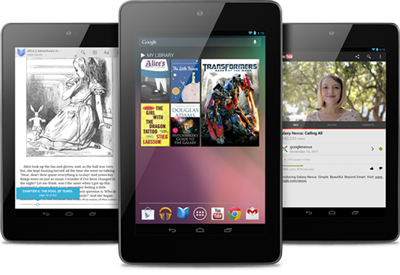
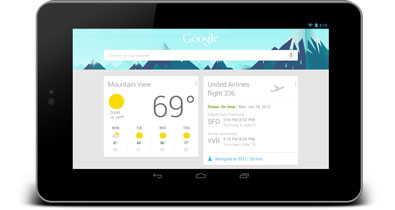
I really like this tablet.  The only thing missing here is an SD card slot to allow you to load more than 8 or 16GB of content onto the device.  At $199 for the 8GB version and $249 for the 16GB version, 8 hours of battery life, quad core processor, the latest stock Android release and a really nice screen, this is one interesting Android tablet.  Hmmmm….

The Nexus 7 lines up nicely against the Kindle Fire tablet.  The Nexus is more powerful and can be expanded to 16GB.  I’m not sure if I’d prefer the Samsung Galaxy Tab 2 7 with SD card support or this non-expandable model.  The Nexus is likely the higher-performing version, so it might be worth it to deal with less storage.

LogMeIn App for iPhone and iPad Updated to Version 3.1.1100

0

The guys and girls over at LogMeIn have just released an update to the LogMeIn app for the iPhone and iPad so you can access your PC or Mac from your iOS devices.

mzl_stspvxrj_320x480-75_thumb_thumb

From your couch, on the train or in the air – get anytime, anywhere access to your PC or Mac.

Remotely control your PCs and Macs over WiFi/3G with the free LogMeIn app on your iPad or iPhone. It works with LogMeIn’s free award-winning software installed on as many computers as you like. You can remotely access your files, run your applications and control your desktops from anywhere. With everything at your fingertips, you’re finally free to go.

Access your information and get stuff done.

• Access your home and work computers on the go.
• Control your Mac or PC as if you’re sitting right in front of it.
• Get to your computer files and edit them from your iPad or iPhone.
• Remotely run any application on your computer from your iPad or iPhone.
• Fix computer problems remotely for business or personal IT.
Upgrade in-app to experience these LogMeIn Pro features, and more:
• HD video and sound streaming for seamless remote control from any device or Pro enabled computer (available for Windows, Mac coming soon)
• My Cloud Bank integration that links your LogMeIn app with popular cloud services
• File Manager for transferring files and folders between computers and saving them to your device
• Remote printing to any AirPrint compatible printer
• Photo App Management for accessing and transferring photos from/to your iPad or iPhone photo library

Remote control features include:

• Intuitive and flexible control modes
• Multi-monitor support
• Supports use of special key combinations
• Start a sleeping computer with Wake-On-LAN

How does the in-app subscription upgrade to LogMeIn Pro work?

• Downloading the app is free, and includes FREE remote control of all your computers
• If you choose to upgrade to a LogMeIn Pro subscription, simply select yearly ($39.99)

What’s New in Version 3.1.1100

Bluetooth keyboard functionality is here! Now you’ll have full screen visibility while typing away. Additional updates include enhancements to My Cloud Bank and resolution improvements.
• Bluetooth keyboard support
• Host resolution sets to iPad resolution for Windows
• My Cloud Bank enhancements include support for Skydrive and Box

Download LogMeIn from the App Store now

CloudBerry Labs releases CloudBerry Backup Version 2.9

CloudBerry Labs has today releases CloudBerry Backup for WHS (v1, 2011 and SBS 2011) version 2.9.

Cloudbery_thumb

The new release comes with few important enhancements.

1. Cost Estimates

You can set up cost estimates per the storage account on the account configuration dialog. You can also setup the limit in GB and in $ that when reached will stop the backup.  The software will automatically calculate the costs based on the current storage price offered by the storage provider. Currently Amazon S3 charge 0.125/GB per month.  The software will also send an alert to the users when the storage is about to reach the limit.

http://blog.cloudberrylab.com/2012/06/controlling-storage-costs-with.html

2. Pre/post actions

With the latest release you can configure Pre- and Post actions that will run before and after the actual backup is running. This feature will make it easier to back up applications such as SQL Server and Exchange. You can set up a Pre-action to back up SQL Server and then you can set up a POST action to clean up the SQL Server backup directory from the older backup files.

http://blog.cloudberrylab.com/2012/06/how-to-set-up-pre-post-actions-with.html

3. Windows Event Log support

The latest version of CloudBerrry Backup comes with an option to write Events on backup completion (success and failure ) to the Windows Event log.  This feature makes it easier to deploy CloudBerry Backup along with the popular monitoring and management systems such as Microsoft System Center Operations Manager (SCOM), HP OpenView, BMC Patrol, Quest Foglight and a few others that come with a capability to process Windows Event Log and apply certain common rules.

http://blog.cloudberrylab.com/2012/06/how-to-report-on-backup-status-to.html

4. Run missed backups

In the latest release we are introducing the option to restart the backups having missed their schedule. Typically this happens when the computer was turned off.  The new option allows to start missed backups as soon as computer starts or backup service starts.

http://blog.cloudberrylab.com/2012/06/how-to-restart-missed-backups-with.html

5. Prevent sleep mode if backup is running?

Apple releases Podcasts app for iPhone, iPod and iPad

0

Yesterday Apple release a standalone app for listening to and subscribing to podcasts and they called it Podcasts!

Features:

• Enjoy all of your audio and video podcasts in a single app
• Explore hundreds of thousands of podcasts including shows in over 40 languages
• Try the innovative new Top Stations feature to find new podcast series in a variety of topics, including arts, business, comedy, music, news, sports, and more.
• Browse by Audio or Video podcasts, or see what’s most popular in Top Charts
• Tap subscribe for your favorites and automatically receive new episodes for free as they become available
• Stream episodes or download to listen while offline
• Skip forward and back using simple playback controls
• Turn on Sleep Timer to automatically stop playing a podcast while listening in bed
• Share your favorite episodes with friends using Twitter, Messages and Mail
• Optionally sync your favorite episodes from iTunes on your Mac or PC
• Sync your episode playback for seamless transition between devices

Requirements:

• Requires a device with iOS 5.1 or later
• Optionally syncing episodes requires iTunes 10.6.3 or later
• Streaming or downloading episodes requires internet access over a Wi-Fi or cellular data connection

The Podcasts app is free and is compatible with the iPhone, iPod touch (3rd and 4th generation) and iPad.

I have tested the app and it’s very simple to use and now means I don’t have to sync podcasts through iTunes before syncing them to my device.

Have your tried it yet? Let us know what you think of it.


How Ford is using biometrics to help with driver wellness

0

Here at the 2012 Go Further with Ford conference in Detroit, Ford are demonstrating how biometrics can be used to help with driver wellness.

“In addition to using existing vehicle data to estimate demand on the driver, we’re researching ways to get an even better understanding of the stress level of the driver,” says Gary Strumolo, manager of vehicle design and infotronics, Ford Research and Innovation. “Biometric or health information of the driver can help us better tailor the experience when behind the wheel.”

Turning new biometric sensors toward the driver will help to create a more complete picture of the driver workload. The research team has built a biometric seating buck to test a number of different sensors and gather data on how drivers respond to a variety of inputs for a driver behavior model.


The experimental system adds several sensors to the steering wheel rim and spokes to get more detailed driver information. Anyone who has used modern exercise equipment like treadmills and stair climbers will be familiar with the metal pads on the rim that can be used to measure the driver’s heart rate.


Infrared sensors on the steering wheel monitor the palms of a driver’s hands as well as his or her face looking for changes in temperature. A downward-looking infrared sensor under the steering column measures the cabin temperature to provide a baseline for comparing changes in the driver’s temperature. The final sensor is embedded in the seat belt to assess the driver’s breathing rate.


With a more complete picture of the driver’s health and wellness blended with knowledge of what is happening outside the vehicle, the car will have the intelligence to dynamically adjust the alerts provided to the driver and filter interruptions. With the driver occupied in heavy traffic, the vehicle control system could increase the warning times for forward collision alerts and automatically filter out phone calls and messages, allowing the driver more time to respond. On the other hand, an alert driver on an open highway could receive incoming calls.


“While these features are still in research, they show significant opportunity for us to leverage data already being captured by the vehicle and apply an intelligent decision-making system to simplify the driving experience,” adds Strumolo.


Microsoft to Acquire Yammer

Microsoft announced a definitive agreement to acquire Yammer yesterday.  We have details!

product-yam-hero3

Yammer, known for providing enterprise social networking services, reached a definitive agreement to be acquired by Microsoft for $1.2 billion in cash.  Here is the announcement:

Microsoft to Acquire Yammer

June 25, 2012

Microsoft extends cloud services with best-in-class enterprise social networking.

REDMOND, Wash., and SAN FRANCISCO — June 25, 2012 — Microsoft Corp. and Yammer Inc. today announced that they have entered into a definitive agreement under which Microsoft will acquire Yammer, a leading provider of enterprise social networks, for $1.2 billion in cash. Yammer will join the Microsoft Office Division, led by division President Kurt DelBene, and the team will continue to report to current CEO David Sacks.

“The acquisition of Yammer underscores our commitment to deliver technology that businesses need and people love,” said Steve Ballmer, CEO, Microsoft. “Yammer adds a best-in-class enterprise social networking service to Microsoft’s growing portfolio of complementary cloud services.”

Launched in 2008, Yammer now has more than 5 million corporate users, including employees at 85 percent of the Fortune 500. The service allows employees to join a secure, private social network for free and then makes it easy for companies to convert a grassroots movement into companywide strategic initiative.

Yammer will continue to develop its standalone service and maintain its commitment to simplicity, innovation and cross-platform experiences. Moving forward, Microsoft plans to accelerate Yammer’s adoption alongside complementary offerings from Microsoft SharePoint, Office 365, Microsoft Dynamics and Skype.

“When we started Yammer four years ago, we set out to do something big,” Sacks said. “We had a vision for how social networking could change the way we work. Joining Microsoft will accelerate that vision and give us access to the technologies, expertise and resources we’ll need to scale and innovate.”

Yammer extends Microsoft’s reach in business-facing cloud services.  It will be interesting to see how they integrate this technology with Skype and Office 365.

Yammer Press Release

Microsoft talks about the new Photos app in Windows 8

In the next in their series of Building Windows 8 articles, Microsoft talks about the new Photos app. You can see by the article that Microsoft are integrating SkyDrive even more, and as a current user of SkyDrive I am very impressed with it and use it rather a lot!

1524.Summer-Vacation-2_thumb_7DF2BED0

This is how the article begins:

We take a lot of photos that end up in a lot of different places. Some are on our PCs, others end up on a photo sharing service like Flickr or Facebook, and even more are on our phones—sometimes indefinitely. How and where we store and share photos has changed and will continue to change as we take more photos, buy more devices, and share to more places with more people. What we need is one place where we can see, relive, enjoy, share, and immerse ourselves in all of them, all in one place.

For the Windows 8 Consumer Preview we released an App Preview of the Photos app that introduced a new way to enjoy more of your photos. We realize the myriad places you have to go to see all of your photos, so we decided to bring them all to you in one place. Because you can connect your Microsoft account to services like Facebook and Flickr, you can get to all of your photos and all of those memories just by signing in to Windows 8 with your Microsoft account. Of course, the Photos app works best with our SkyDrive service, and with Windows Phone, you can automatically send all the pictures from your Phone to SkyDrive. This makes the Photos app in Windows 8 a great way to show off your photos without having to huddle around a phone. Even though you took your photos on your phone, you can easily enjoy them on your PC, just about as fast as you can take them.

To continue reading it, click here.

Seagate and DensBits Announce Partnership

0

Seagate and Haifa, Israel-based DensBit announced a strategic agreement for development of SSD’s.  Read on for details.

Seagate logo

Seagate and DensBits announced a strategic agreement to join forces in the SSD business, with Seagate making an undisclosed equity investment in DensBits.  Here is the annoucement:

Seagate Makes Equity Investment in DensBits

Cupertino, CA and Haifa, Israel, — Seagate Technology plc (NASDAQ: STX) the worldwide leader in hard disk drives and storage solutions, and DensBits Technologies Ltd (“DensBits”) the inventor of the world’s first Memory ModemTM have announced today a strategic agreement for the development of low-cost, high-performance Solid State Drives (“SSD”) for the consumer and enterprise markets. In conjunction with the agreement, Seagate has made an undisclosed equity investment in DensBits.

Seagate and DensBits are joining forces, to develop future products that are intended to provide customers with significant cost savings, extremely high reliability, and unparalleled performance. Under the agreement, DensBits’ Memory ModemTM controller technology will be integrated with Seagate’s various storage technologies to power a wide range of consumer and enterprise applications including 3 bits/cell (“TLC”) 1Xnm Flash-based consumer-grade SSD, and 2 bits/cell (“MLC”) 1Xnm Flash-based enterprise-grade SSD.

“For the last 30 years, Seagate has delivered technology and product innovation to become the global leader in storage solutions, from high-end enterprise drives to solid-state hybrid drives,” said Rocky Pimentel, Seagate chief sales and marketing officer. “Seagate is excited to be working with the talented DensBits team and believes we have a significant opportunity with our new strategic relationship to extend our leadership into the SSD market.”

“We are very excited at the opportunity of collaborating with Seagate,” said Ilan Hen, DensBits’ Chairman and CEO. “This is yet another testament to our technology leadership, and we strongly believe that the coupling between DensBits’ unique Memory ModemTM controller technology and Seagate’s exceptional storage capabilities across the board could truly disrupt the industry.”

Seagate closed the day at $24.12, up $0.85, or 3.65% today.

STX Quote Seagate News Release

StableBit Scanner 2.0 for Windows Home Server 2011 Beta Updated to 2.0.0.2427

StableBit Scanner 2.0 for Windows Home Server 2011 is now available in beta and has been updated to version 2.0.0.2427.

An advanced hard disk surface scanner, monitor and more.

Monitors all your hard drives and ensures that every bit holding your precious data is readable.

2.0.0.2427

* Extracted the Direct I/O scan settings from the UI into the .config and disabled by default. Needs more testing regarding throttling.
Some busses behave badly when using this method. They tend to halt or severely slow down I/O targeted at other disks.
* New Starting and Stopping state for disk scans.
* Stopping a scan is now asynchronous and done in parallel for all disks.
* Some drives incorrectly report 0 degrees C as the SCT temperature. If this is the case, correct it to a “not available” value.
* Added SSD life meter to SMART window for supported disks, as determined by BitFlock.
* Fixed disk signature verification on GPT formatted disks.
* Added option for the Scanner to create a file on a disk when it’s actively scanning one or more disks.
Can be used for 3rd party integration. (See .config – Scanner_RunningFile)

Download the latest beta version from here

HTC Announces HTC Connect Streaming Solution

0

HTC today announced a new streaming audio and video solution called HTC Connect.  Read on for details.

htc logo

HTC announced a new audio and streaming solution.  HTC Connect will allow an HTC smartphone owner to stream audio and video content from their phone directly to electronic devices like receivers and in-dash audio receivers in automobiles.  Here is what they announced:

HTC ANNOUNCES HTC CONNECT PROGRAM TO FOSTER GREATER A/V CONNECTIVITY

Pioneer Electronics is the first partner to feature HTC Connect compatibility in its 2012 line of products

Taipei, Taiwan — 26 June 2012 — HTC Corporation, a global leader in mobile innovation and design, today announced its HTC Connect™ certification program designed to offer consumer electronics manufacturers the opportunity to create an improved sound and visual standard for seamless connectivity between HTC® devices and consumer electronics. For consumers, HTC Connect will mean high-quality, wireless audio and video sent through their HTC smartphones to their compatible in-home and in-car electronics.

Smartphones are changing the way individuals listen to music and watch video, making it easier than ever before to enjoy rich multimedia content almost anywhere. HTC is working to bring the benefits and ease-of-use of mobile connected devices into the home through the HTC Connect initiative. HTC Connect certification introduces new connectivity standards for partners, and gives consumers using an HTC Connect certified device a new level of convenience through seamless integration with their other compatible consumer electronics. The HTC One™ series of smartphones is slated to receive HTC Connect certification through a software update in the coming months.

“The vision for HTC Connect is to allow our customers to easily stream their favorite high-quality video and audio from their smartphone into their home or car. This new initiative will build upon HTC’s innovation in smartphones with leading consumer electronics brands,” said Kouji Kodera, chief product officer, HTC Corporation. “We’re also excited to announce Pioneer Electronics, a leader in the audio and video industry, as our first partner to demonstrate the initial HTC Connect certified audio experience for consumers.”

Pioneer Electronics – First HTC Connect Partner
Pioneer Electronics is the first and leading partner to bring HTC Connect certified devices to market. HTC Connect will be featured as part of Pioneer’s 2012 lineup of DLNA capable audio/video receivers and wireless speakers delivering a seamless and consistent audio streaming and control experience.

“We’re very pleased to be working with HTC on this important evolution of audio technology, which fits very well with Pioneer’s strong commitment to embracing the smartphone movement in our home entertainment products,” said Russ Johnston, executive vice president, Home Electronics Division, Pioneer Electronics. “The use of smartphones as primary content sources in the home is a trend that’s developing very quickly, and HTC is helping to provide a much-needed solution for a very significant and growing part of the market.”

The HTC Connect certification will also be extended to future Pioneer products.

This looks like another proprietary implementation, similar to Apple’s AirPlay.  I’m not sure how excited I am about another closed ecosystem coming onto the market.  I’d prefer that HTC continue to support DLNA solutions, and that Pioneer continue to build in DLNA compatibility, to ensure the broadest and most convenient solution for streaming audio and video.

HTC Connect Press Release